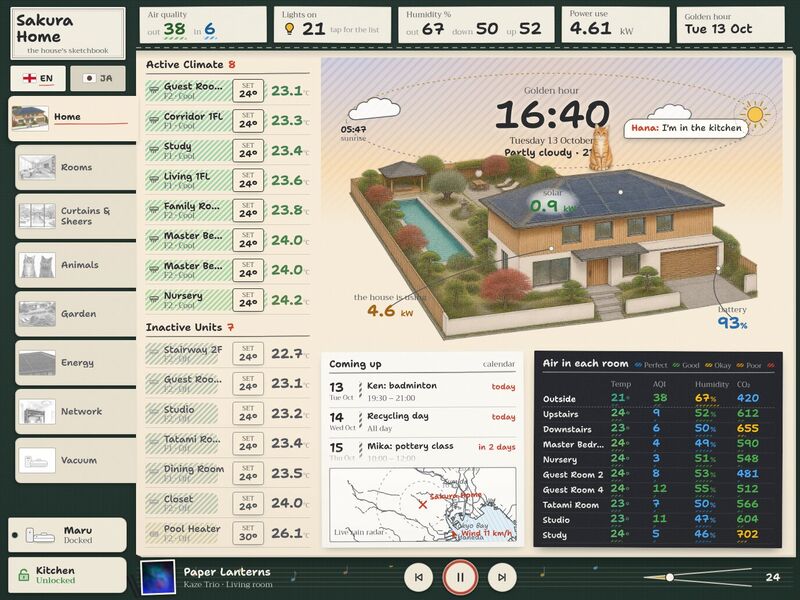
You are setting up Sketchbook, a wall-tablet dashboard for Home Assistant, in another person's home. This file is written for you, the agent. Work through it top to bottom; every step says what to change, where, and how to check it. You will not need to ask the authors anything.
What you're building
Sketchbook draws the home like a page from an architect's sketchbook: graphite pencil drawings that colour in when something is on. The Home page is a three-quarter aerial drawing of the house under a sky that follows the real sun (drag the sun or moon along its loop to preview any hour), with lit windows, a heated-pool glow, garden lamps, solar / battery / power notes and the cats popping up in the room they're in. Rooms shows 18 pencil sketches that bloom into colour when the room's light is on (dimmer, A/C ±, curtain and lock status). Curtains & Sheers puts real 3D curtains in front of each window's view and reacts to the weather. Then Animals (where each cat is and has been), Garden (a plan with 20 light pins), Energy (the day's solar, grid and battery chart), Network and Vacuum. English ⇄ 日本語.
Out of the box it runs as a demo of a made-up home ("Sakura Home" in Tokyo, a fictional family and six fictional cats). Nothing in it is a real home. Your job: run the demo, connect it to the person's Home Assistant, map their entities, optionally redraw the pictures of their own home, and put it on their tablet.
Sketchbook — the Home page at golden hour
What the person needs
- Home Assistant 2024.1 or newer (uses the WebSocket API,
weather.get_forecasts, and the REST history, calendar and template endpoints). No HACS cards, no custom frontend. - A wall tablet or any modern browser. The design is made for 1376 × 1032 CSS px, landscape (a 13" tablet); it also works at 1180 × 820 (11" tablets). Phones are not a target.
- A computer with Node.js 18+ to build it (the tablet only runs the result).
Time: demo 10 min · mapping entities 1–3 h (depends on how many rooms and devices) · going live 30 min · pictures of their own home 2–6 h (optional — the made-up pictures work as placeholders).
What's in this package
HANDOFF.md              this guide            README.md   3-line pointer            LICENSE   MIT (code) + notes
package.json            exact versions it was built and tested with
vite.config.ts          dev server (+ live-mode proxy) and builds; BASE = where a build will be hosted
tsconfig.json  index.html  .gitignore
.env.example            copy to .env.live for live mode (Home Assistant address, token for the dev server, BASE)
panel-loader.js         mode B: makes the dashboard a page in Home Assistant's sidebar
live/README.md          the go-live kit in detail (modes A, B, C, troubleshooting)
docs/still.jpg          what it looks like
tools/
  sketchbook_art.py     picture pipeline (Python + Pillow): rooms, window plates, house, garden, cats, thumbnails,
                        background cut-out, measuring grid
  measure.html          click-to-measure helper for window polygons and anchor points (open in a browser, offline)
  prompts.json          the exact prompts used to draw the made-up home, each with the command that processes it
src/
  main.tsx              start-up switch: demo (default) · live (VITE_HA_MODE=live) · sidebar panel (?panel=1)
  main.demo.tsx         demo entry: mock backend + demo time/weather bridge
  main.live.tsx         live entry for modes A and C          main.panel.tsx   live entry for mode B
  App.tsx, app/views.tsx   the menu: which pages exist, their order and labels
  ha/                   types.ts (the HaBackend interface) · HaProvider.tsx (hooks) · wsBackend.ts (live) ·
                        hassBackend.ts (sidebar) · authFetch.ts (token on REST calls) · mockBackend.ts (demo)
  config/               ← EVERY entity id and per-house setting lives here (Step 2)
  views/, components/   the pages and their parts
  lib/                  sun & sky maths (sky.ts), forecasts, history, music, network data, formatting
  i18n/                 i18n.tsx + ja.ts (English → Japanese dictionary) + ja-fonts.ts
  styles/               theme.css (colour and font tokens), app.css, fonts.css
  demo/                 the made-up home: states snapshot, synthetic day, calendar, music, bridge — never in a live build
  assets/               pictures bundled by Vite (house, garden, rooms, plates, cats, thumbs) + fonts (+ OFL licences)
static/                 served as-is at /local/… and /fonts/…: robot and lamp icons, app icon, network gear,
camera "spotting" photos, demo music covers and camera stills, Manrope fontRun the demo first
npm install
npm run dev            # serves http://localhost:5173/ (and on the LAN: the dev server listens on all interfaces)
Open it in a desktop browser window of roughly 1376 × 1032 (or devtools' device mode). The made-up home runs entirely
in the browser: no Home Assistant, and the demo layer (src/demo/sandbox.ts) blocks every network request except
Google Fonts (only when 日本語 is switched on) and the RainViewer radar tiles on the Home page. If you see the drawn
house with a sky, the toolchain works — do this before touching their house.
Things to try: drag the sun on Home into the night (it springs back when you let go); tap a room sketch on Rooms (it colours in); open a curtain; switch to 日本語; Garden → "All lights on".
The demo clock starts at 16:30 and keeps running. Start-up URL parameters: ?t=21:15 (time; also ?demoTime=),
?wx=rainy (weather — sunny, partlycloudy, cloudy, rainy, pouring, lightning-rainy, fog, snowy),
?lang=ja. A page that shows the demo in an iframe can change time and weather live with postMessage
(src/demo/bridge.ts documents the messages). As time moves, the demo switches its lights the way an automation would
(evening scene after sunset, night lights after 23:00), so the drawings colour in at dusk.
Other scripts: npm run build → the same demo as static files in dist/ (any web host; BASE=/sub/path/ npm run build
for a sub-folder) · npm run typecheck (tsc --noEmit, 0 errors) · npm run preview (serve dist/).
How it works
Home Assistant ──► HaBackend  (src/ha/types.ts — one small interface)
                     ├─ wsBackend    live, over HA's WebSocket API (subscribe_entities, call_service)
                     ├─ hassBackend  inside HA's sidebar (HA hands the app its `hass` object)
                     └─ mockBackend  demo: an in-memory made-up home
                ──► HaProvider hooks (src/ha/HaProvider.tsx)
                     useEntity(id) · useEntities([ids])      → state + attributes, live
                     useCallService()(domain, service, data, { entity_id })
                     useCallServiceResponse()                → services that return data (weather.get_forecasts)
                ──► views/ and components/
   + REST  fetch("/api/…"): history for the charts (/api/history/period), calendars (/api/calendars/<id>),
the "lights on" list (/api/states + /api/template). In live mode authFetch adds the user's token.- Views never know which backend is behind the hooks. Each view subscribes only to its own entities (it stays
light on big installations). Keep that when you add cards:
useEntities([...ids]), never "all states". - Demo vs live:
src/main.tsxpicksmain.demo.tsxunless the build/dev mode islive(see Step 3). A live build contains no demo code at all (src/demo/, the mock backend and the demo bridge are tree-shaken out). - Config:
src/config/*.tsholds every entity id and every per-house setting (rooms, curtains, garden lights, where the windows are on the drawing, cats …). Changing the house = changing these files + the pictures. - i18n: visible text goes through
t("English text")(useT()fromsrc/i18n/i18n.tsx);src/i18n/ja.tsmaps English → Japanese, and room/cat names shown on screen are looked up the same way. The flag toggle switchesen/ja; Japanese fonts are loaded only then. To add their language: copyja.tsto e.g.de.tsand translate the values; add the code toLangand the lookup ini18n.tsx; add a button tocomponents/shell/LangToggle.tsx; change the"ja-JP"locale picks (searchja-JP) to their locale; or replace Japanese entirely by editingja.tsin place. Strings missing from the dictionary simply show in English. - Theming: CSS custom properties in
src/styles/theme.css— paper--paper*, graphite--lead*, lamp yellow--lamp, coloured-pencil inks--cerulean --sap --vermilion --violet, energy--solar --grid --batt, the dark "cloth" sidebar--cloth*, fonts--f-hand(Shantell Sans) and--f-print. The sky tints the paper live:src/lib/sky.tssets--paper,--paper-shadeand--clothfrom the sun's height. - Pictures and how they are layered and anchored (specs in Step 4):
- Home (
components/home/HouseStage.tsx): the sky is CSS, coloured from the real sun position (lib/sky.ts), with stars, clouds, rain, fog, snow and lightning from the weather entity. Over it the house:house-day-cut.webp(transparent background) cross-fades tohouse-night-body.webp(indigo body) as the sun sets, withhouse-night-lines.webp(white-pencil lines) on top at night. Between those layers an SVG in the drawing's own pixels (1800 × 791) draws the lit windows —WINDOWSinconfig/houseArt.ts: a polygon per window and the light(s) that light it, hatched yellow + glow, brighter after sunset — the heated pool (POOL_PTS), lamp halos (PAVILION,GARAGE,ENTRANCE_LAMP), the solar/battery/house energy notes (ENERGY_AT= the point on the house,ENERGY_LABEL= where the note sits) and cat perches (CAT_PERCH, one per cat-room key, where a cat pops up). - Rooms (
components/rooms/RoomCard.tsx): two pixel-aligned layers per room,<key>-sk.webp(pencil) under<key>-col.webp(colour). Turning the light on reveals the colour with a round "bloom" from where you tapped; the colour layer's opacity follows brightness (42 % + 58 % × brightness). - Curtains & Sheers (
views/CurtainsSheersView.tsx,components/curtains3d/engine.ts, three.js): a flat plate — the view out of that window,plates/<key>-day.webp/-night.webp— behind 3D curtains and sheers that open and close at motor speed. The weather entity picks the lighting (day / overcast / wet / storm and their night variants, rain and lightning on the glass). Per room inconfig/curtains3d.ts: the plate key, the entities, fabric colour, and the glass rectangle (glass: [0, 0, 1, 1]= the plate fills the window). - Garden (
views/GardenView.tsx):garden-day.webpcross-fades togarden-night.webp; 20 light pins sit at fractions of the picture (config/garden.ts, x and y from 0 to 1); glows are SVG. - Animals: transparent cat sketches (
assets/cats/<cat>.webp) in the donuts and pop-ups; two "spotted by the cameras" photos instatic/local/snapshots/animals/. - Menu thumbnails:
assets/thumbs/*.webp(168 × 112), cut from the pictures above.
- Home (
Step 1 — Inventory their Home Assistant
Get the Home Assistant address (e.g. http://homeassistant.local:8123) and, for development only, a long-lived access
token (their profile → Security → Long-lived access tokens). List every entity:
export HA=http://homeassistant.local:8123 TOKEN=…            # keep the token out of git; .env.live is ignored
curl -s -H "Authorization: Bearer $TOKEN" "$HA/api/states" \
 | python3 -c 'import json,sys; [print(e["entity_id"], "|", e["state"], "|", e["attributes"].get("friendly_name", "")) for e in json.load(sys.stdin)]' \
 | sort > ha-entities.txt
curl -s -H "Authorization: Bearer $TOKEN" -H "Content-Type: application/json" "$HA/api/template" \
 -d '{"template":"{% for a in areas() %}{{ area_name(a) }}: {{ area_entities(a) | join(\", \") }}\n{% endfor %}"}' > ha-areas.txt
(Or Developer Tools → States in Home Assistant.) Domains this dashboard reads or controls: light, switch,
climate, sensor, weather, calendar, media_player, vacuum, lock, script, input_number, input_select,
input_boolean, button, select, input_text, input_datetime. Use ha-areas.txt to match their rooms to the
dashboard's rooms. Ask the person which rooms, floors and features they want: the dashboard never needs every entity.
Anything they don't have, you hide — each row below says how. Never put the token in a build or a committed file.
Step 2 — Map entities
Replace the made-up ids (*.sk_*) with theirs. "State/attributes used" is what the code reads; "services" is what it
calls. Names you can change freely (room titles, cat names, labels) are in the same files. Rows marked (demo only)
need nothing. Example ids are the made-up home's.
Rooms page and room cards — src/config/rooms.ts
| Key | What | Domain | Reads | Calls | Example ids | If they don't have it |
|---|---|---|---|---|---|---|
ROOMS[].name / floor | room card title (upper case is fine) and floor tab "1st"/"2nd" | — | — | — | TATAMI ROOM, 1st | delete the room's object to drop the card; the sketch key comes from KEY in components/rooms/RoomCard.tsx (add theirs there) |
ROOMS[].light | the room's light (a light group is ideal) | light | state, brightness | light.toggle, light.turn_on {brightness_pct} | light.sk_1f_tatami, light.sk_1f_living, light.sk_1f_kitchen, light.sk_1f_dining, light.sk_1f_atrium, light.sk_1f_corridor, light.sk_1f_salon, light.sk_1f_study, light.sk_1f_stairs, light.sk_2f_master, light.sk_2f_bath, light.sk_2f_closet, light.sk_2f_family, light.sk_2f_catroom, light.sk_2f_pinkroom, light.sk_2f_nursery, light.sk_2f_guest2, light.sk_2f_guest4 | light: null — the card shows the sketch without a switch |
ROOMS[].climate | the room's A/C: its on/off look on the card, and the temperature if there is no sensor | climate | state, current_temperature | — | climate.sk_ac_tatami … (see CLIMATE below) | null |
ROOMS[].temp, humidity | room temperature / humidity | sensor | state (°C, %) | — | sensor.sk_living_temperature, sensor.sk_atrium_temperature, sensor.sk_study_temperature, sensor.sk_master_temperature, sensor.sk_family_temperature, sensor.sk_cat_room_temperature, sensor.sk_studio_temperature, sensor.sk_nursery_temperature, sensor.sk_guest4_temperature · sensor.sk_living_humidity, sensor.sk_hall_1f_humidity, sensor.sk_atrium_humidity, sensor.sk_study_humidity_2, sensor.sk_hall_2f_humidity, sensor.sk_bedroom_hall_humidity | null / leave out — hidden |
ROOMS[].sheer, blackout | "sheers open" / "curtains open" text on the card | any entity whose state is on when open (a template switch or binary sensor over their cover — see helpers) | state | — | switch.sk_tatami_sheers_open_led, switch.sk_tatami_curtains_open_led (same pattern for living, dining, atrium, salon, pinkroom, nursery, guest2, guest4) | null — the card says "no curtains" |
ROOMS[].lock | lock status on the card | lock | locked/unlocked | — | lock.sk_kitchen_door, lock.sk_study_door, lock.sk_master_door, lock.sk_pinkroom_door | leave out |
ROOMS[].featureLight | a feature lamp with its own on/off icon (onSvg/offSvg in static/local/) | light | state | light.turn_on / light.turn_off | light.sk_1f_dining_halo, light.sk_1f_salon_halo, light.sk_1f_stairs_halo | leave out |
ROOM_AC[room][] | A/C control on a card: helper = target temperature, script = on/off, optional climate + color for rooms with two units | input_number, script, climate | helper state, min/max/step; climate state | input_number.increment/decrement, script.turn_on | input_number.sk_tatami_ac_target + script.sk_tatami_ac_toggle (same pattern for living, salon, study, stairs, closet, family, pinkroom, nursery, guest2, guest4; master has master_ac1/master_ac2 with climate.sk_ac_master1/2) | delete the room's entry (no A/C row on the card), or create the helper + script below |
FLOOR_VIEW in this file is unused.
Home page — src/config/entities.ts, src/config/houseArt.ts, src/components/home/HouseStage.tsx
| Key | What | Domain | Reads | Calls | Example ids | If they don't have it |
|---|---|---|---|---|---|---|
WEATHER | weather for the sky, label, temperature, radar wind | weather | state (HA condition), temperature, wind_speed, wind_bearing; hourly forecast for dragging the sun ahead | weather.get_forecasts {type: hourly} (response) | weather.sk_tokyo | use the weather entity of HA's default Met.no integration — every install has one |
CLIMATE[] | A/C list on the left ("Active / Inactive climate"); pin keeps a unit at the top/bottom | climate | state, current_temperature, temperature | climate.set_hvac_mode (off / cool), climate.set_temperature | climate.sk_ac_dining, climate.sk_ac_corridor, climate.sk_ac_study, climate.sk_ac_living, climate.sk_ac_tatami, climate.sk_ac_stairway, climate.sk_ac_guest2, climate.sk_ac_nursery, climate.sk_ac_guest4, climate.sk_ac_studio, climate.sk_ac_family, climate.sk_ac_master1, climate.sk_ac_master2, climate.sk_ac_closet, climate.sk_pool_heater | delete rows; an empty list leaves the column empty |
(ClimateList.tsx) | pool water temperature shown on the pool-heater row | sensor | state °C | — | sensor.sk_pool_temperature | edit or remove in components/home/ClimateList.tsx |
AREAS[] | "Air in each room" table | sensor | state of temp (°C), hum (%), aqi, co2 (ppm, optional) | — | sensor.sk_<area>_temperature / _humidity / _aqi / _co2 for outside, upstairs, downstairs, master, nursery, guest2, guest4, tatami, studio, study | delete rows; omit co2 |
CALENDARS[] | "Coming up" list, with a colour per calendar | calendar | REST /api/calendars/<id>?start&end | — | calendar.sk_family, calendar.sk_japan_holidays, calendar.sk_birthdays, calendar.sk_school, calendar.sk_cats | delete rows; none → "No upcoming events" |
WINDOWS[].ids (houseArt.ts) | which light lights which drawn window (re-measure if you redraw the house) | light | state | — | light.sk_1f_tatami, light.sk_1f_corridor, light.sk_1f_salon, light.sk_2f_guest2, light.sk_2f_guest4, light.sk_2f_catroom, light.sk_2f_pinkroom | delete a window entry |
LIVE_IDS (HouseStage.tsx) | pool glow when the pool heater is not off; halos for pool steps, pavilion, garage-side lamp, entrance sconce; the three energy notes | climate, switch, light, sensor | state | — | climate.sk_pool_heater, switch.sk_garden_pool_steps, switch.sk_garden_pavilion, switch.sk_garden_side_gate, light.sk_garden_house_sconce, sensor.sk_solar_power (kW), sensor.sk_battery_level (%), sensor.sk_house_power (kW) | replace with theirs or any id they lack: missing entities simply draw nothing ("—" on a note) |
TOPSTRIP | top strip: air quality out/in, humidity out/down/up, power use | sensor | state | — | sensor.sk_outside_aqi, sensor.sk_downstairs_aqi, sensor.sk_outside_humidity, sensor.sk_downstairs_humidity, sensor.sk_upstairs_humidity, sensor.sk_house_power (lightsOn: sensor.sk_lights_on is subscribed but not shown) | edit the labels in components/shell/TopStrip.tsx |
| (TopStrip "Lights on") | count + list of lights that are on | — | REST /api/states; switches of the integration named in DIMMERS_INTEGRATION (lib/useRealLights.ts, via /api/template integration_entities(...)) also count | — | dimmers | set DIMMERS_INTEGRATION to an integration whose switches are lights, or leave it (no extra switches) |
SHELL | now-playing bar, vacuum status and the door-lock button in the sidebar | media_player, sensor, lock | state, media attributes | lock.lock/unlock, media services | media_player.sk_living_speaker, sensor.sk_maru_state, lock.sk_kitchen_door (vacuum = vacuum.sk_maru) | point at theirs; remove the lock button in components/shell/Sidebar.tsx if none |
The radar map (components/home/RadarMap.tsx) is not an entity: see "Make it theirs" for its location.
Curtains & Sheers — src/config/curtains3d.ts (ROOMS3D)
Each room has types[] — one per curtain, sheer or blind — of two kinds:
| Kind | Fields | Reads | Calls | Example ids |
|---|---|---|---|---|
scripted | open (state on = open), dir (state opening / closing / anything else = idle), script (state on while moving) | state of all three | script.turn_on on script | switch.sk_dining_curtains_open_led, input_select.sk_dining_curtains_direction, script.sk_dining_curtains_toggle — likewise for each of: dining, salon, living, atrium, study (blind), tatami, family, masterken, masterbath (venetian), catroom (venetian), nursery, guest2, guest4, pinkroom, familytv, mastermika; atrium uses input_boolean.sk_atrium_curtains_open / _sheers_open as open |
buttons | openBtn / closeBtn (buttons), openLed / closeLed (state on shows which way it is) | state of the two LEDs | button.press | button.sk_atriumback_curtains_open / _close, switch.sk_atriumback_curtains_open_led / _close_led (and the same for _sheers) |
Most homes have cover.* entities instead: use the cover helpers below (no code change), or change the code — add a
kind: "cover" with one cover id, and in views/CurtainsSheersView.tsx read open = state === "open",
moving = state === "opening" || state === "closing" and call cover.open_cover / cover.close_cover. Each room also
has curtainS / sheerS (motor seconds, used for the animation), baseHex (fabric colour), outdoor (true = the
weather shows through), floor, name and the plate key. Delete a room object to drop it; an empty floor hides its
tab content. src/config/curtains.ts is (demo only) — the mock backend reads motor times from it.
Garden — src/config/garden.ts
| Key | What | Domain | Reads | Calls | Example ids | If they don't have it |
|---|---|---|---|---|---|---|
GARDEN_LIGHTS[] (id, name, x, y) | the numbered pins and the list; x/y = position as a fraction of the garden picture | light or switch | state | <domain>.turn_on/turn_off; "All lights on/off" = homeassistant.turn_on/turn_off with all ids | switch.sk_garden_pavilion, switch.sk_garden_olive, switch.sk_garden_pool_wall, switch.sk_garden_pool_steps, switch.sk_garden_table, light.sk_garden_patio, switch.sk_garden_red_maple, switch.sk_garden_front_pine, switch.sk_garden_stepping_stones, switch.sk_garden_green_maple, switch.sk_garden_spouts, light.sk_garden_house_sconce, switch.sk_garden_fence, light.sk_garden_veranda, switch.sk_garden_sunbeds, switch.sk_garden_pavilion_steps, switch.sk_garden_side_gate, switch.sk_garden_side_path, switch.sk_garden_back_pine, switch.sk_garden_ferns | delete pins; no garden → remove the garden entry from src/app/views.tsx |
Energy — src/views/EnergyView.tsx (E)
| What | Domain | Reads | Example ids | If they don't have it |
|---|---|---|---|---|
| power now (kW): grid (+ import, − export), solar, house; battery level (%) | sensor | state; the day's history of grid, solar and battery for the chart (REST /api/history/period) | sensor.sk_grid_power, sensor.sk_solar_power, sensor.sk_house_power, sensor.sk_battery_level | values must be kW: if theirs are W, make a Template helper {{ states('sensor.x') | float(0) / 1000 }} |
| energy totals (kWh) today / week / month | sensor | state | sensor.sk_grid_import_daily / _weekly / _monthly, sensor.sk_solar_energy_daily / _weekly / _monthly, sensor.sk_battery_export_daily / _weekly / _monthly | Utility Meter helpers (below) |
| savings (in their currency) today, yesterday, last week, last month, year to date | sensor | state | sensor.sk_savings_today, sensor.sk_savings_yesterday, sensor.sk_savings_last_week, sensor.sk_savings_last_month, sensor.sk_savings_ytd | Template helpers (below), or delete the savings block in EnergyView.tsx |
No solar or battery at all → remove the energy entry from src/app/views.tsx and the three energy notes on Home
(EnergyNote lines in HouseStage.tsx). The ¥ sign is in EnergyView.tsx.
Animals — src/config/animals.ts
| Key | What | Domain | Reads | Example ids | If they don't have it |
|---|---|---|---|---|---|
CATS[] (id, name) | the cats; id also names the picture assets/cats/<id>.webp | — | — | mochi, yuki, sora, kuro, hana, ren | no pets → remove animals from src/app/views.tsx and the cat pop-ups (pop block in HouseStage.tsx) |
roomSensor(id) = sensor.<id>_room | the room each cat is in now; state = a room key from ROOM_RATIO (or away) | sensor | state, last_changed; history for the timeline | sensor.mochi_room | from a BLE room-presence integration (e.g. Bermuda) with a collar tag, or a camera person/animal detector + a Template helper that maps area → room key |
ratioSensor(id, period, room) = sensor.<id>_room_ratio_<today|7d>_<room> | % of time per room, for the donuts | sensor | state (%) | sensor.mochi_room_ratio_today_kitchen_1 | History stats helpers, type ratio (below) — 2 per cat per room; rooms they never use can be left out |
ROOM_RATIO[] | room keys, labels and donut colours | — | — | kitchen_1, 1fl_living_room, living_west, dining_2, dining_room, genkan, office_1, tatami_1, master_bedroom, cat_room, 2fl_living_room, stairway_2, hall_east_2 | rename to their room keys (keep them identical to the presence sensor's states) |
ROOM_SAY / CAT_PERCH (houseArt.ts) | what a cat "says" and where it pops up on the house drawing, per room key | — | — | genkan: at(1090, 520) | keep keys in sync with ROOM_RATIO |
SPOTTINGS[] | "Spotted by the cameras": a picture file + cam (input_text: camera name) + time (input_datetime) | input_text, input_datetime | state | input_text.sk_spotting_1_camera, input_datetime.sk_spotting_1_time (and _2) | an automation that saves camera.snapshot to www/snapshots/animals/spotting-1.jpg and sets the two helpers when an animal is detected; or delete the block in views/AnimalsView.tsx |
LITTER_BOXES[] | litter box status (state: clear/occupied/cleaning) | sensor | state | sensor.sk_litter_cat_room_state / _occupied, sensor.sk_litter_downstairs_state / _occupied, sensor.sk_litter_tatami_state / _occupied, sensor.sk_litter_master_state / _occupied | delete rows / the LitterBoxes component |
CAT_ACTIVITY_VIEW is unused.
Vacuum — src/components/vacuum/vacuumModel.ts, plan in src/config/groundPlan.ts
| Key | Domain | Reads | Calls | Example ids | If they don't have it |
|---|---|---|---|---|---|
VAC | vacuum | state, battery_level, supported_features | vacuum.start, pause, stop, return_to_base, locate | vacuum.sk_maru | no robot → remove vacuum from src/app/views.tsx and the vacuum status from Sidebar.tsx |
MODE | select | state, options | select.select_option | select.sk_maru_clean_mode | without it the picker falls back to Vacuum / Mop / Vacuum+Mop buttons that do nothing — remove the mode row in views/VacuumView.tsx |
OP_STATE, OP_ERROR, IDENTIFY | sensor, sensor, button | state | (IDENTIFY: button.press) | sensor.sk_maru_state, sensor.sk_maru_error, button.sk_maru_identify | optional |
AREA_SHAPES (groundPlan.ts) | the floor plan drawn on the Vacuum page, in metres | — | — | "Tatami Room": [[0,-12],[5,-12],[5,-8.5],[0,-8.5]] | redraw from their floor plan (rectangles are fine) |
Music — src/components/music/useMusicData.ts, src/lib/music.ts, src/components/shell/MediaBar.tsx
| What | Domain | Reads | Calls | Example ids |
|---|---|---|---|---|
speakers per room (SPEAKERS: name + spk) and the now-playing bar | media_player | state, media_title, media_artist, entity_picture, media_position(_updated_at), media_duration, volume_level, group_members, shuffle, source | media_player.media_play_pause, media_next_track, media_previous_track, media_seek, volume_set, shuffle_set, play_media, join, unjoin, select_source | media_player.sk_living_speaker, media_player.sk_family_speaker, media_player.sk_master_speaker, media_player.sk_study_speaker, media_player.sk_pinkroom_speaker |
music-service account player (SP_PLAYER) + search and favourites | media_player + a custom musicplus integration | service responses | musicplus.search_tracks/_albums/_artists/_playlists, get_track_favorites, get_playlist_favorites, get_player_recent_tracks, save_track_favorites, remove_track_favorites | media_player.sk_music_account |
Playback works with any media_player. The search/favourites tabs need a music integration that offers those
response services; most homes don't have musicplus — then those tabs stay empty: hide them in
components/music/MusicPlayer.tsx, or rewire them to media_player.browse_media / media_player.search_media.
Internet radio uses media_player.browse_media with the Radio Browser integration.
Network — src/lib/networkData.ts (makeNet())
A drawn rack of network gear (gateway, switches, recorder, power strip, access points, servers, the internet line,
cameras) where each device's ent map names sensors for cpu, mem, temp, clients, uptime, latency and power
(63 made-up ids such as sensor.sk_net_wan1_latency, sensor.sk_net_lan_clients, sensor.sk_net_pdu_power). Match them to
their network integration's sensors (router/switch/AP integrations expose most of these), drop devices they don't have
(the pictures are generic, in static/local/network/assets/gear/), or remove network from src/app/views.tsx.
Helpers they may need to create
Create helpers in Home Assistant's UI (Settings → Devices & services → Helpers → Create helper), and scripts and
automations in Settings → Automations & scenes (switch the editor to Edit in YAML and paste). With a token you can
also create them through the config API (POST /api/config/script/config/<id>, POST /api/config/automation/config/<id>)
— don't hand-edit configuration.yaml. The YAML below is the definition to paste; it uses the 2024.10+ syntax
(triggers: / actions:; older versions: trigger: with platform: and service:). Replace living / ids with theirs.
A/C on a room card — a Number helper input_number.living_ac_target (16–30, step 1, °C), then:
# Script "Living A/C on/off" (script id: living_ac_toggle) — the card's fan button calls script.turn_on
sequence:
  - if:
      - condition: state
        entity_id: climate.living_ac
        state: "off"
    then:
      - action: climate.set_temperature
        target:
          entity_id: climate.living_ac
        data:
          hvac_mode: cool
          temperature: "{{ states('input_number.living_ac_target') | float(24) }}"
    else:
      - action: climate.turn_off
        target:
          entity_id: climate.living_ac
mode: single# Automation "Living A/C follows its target" — the card's − / + change the helper
triggers:
- trigger: state
entity_id: input_number.living_ac_target
conditions:
- condition: not
conditions:
- condition: state
entity_id: climate.living_ac
state: "off"
actions:
- action: climate.set_temperature
target:
entity_id: climate.living_ac
data:
temperature: "{{ trigger.to_state.state | float }}"
mode: restartCurtains from a cover (no code change) — for each curtain, two Template helpers and a script:
- Template helper → Switch "Living curtains open": state template
{{ is_state('cover.living_curtains', 'open') }}, turn on:cover.open_cover, turn off:cover.close_cover(targetcover.living_curtains) → use asopen/ROOMS[].blackout. - Template helper → Sensor "Living curtains direction": state template
{{ states('cover.living_curtains') if states('cover.living_curtains') in ['opening', 'closing'] else 'idle' }}→ use asdir. - Script
living_curtains_toggle:sequence: [{action: cover.toggle, target: {entity_id: cover.living_curtains}}],mode: single→ use asscript.
Energy totals — if they only have power sensors, first an Integral helper per power sensor (method Left, metric
prefix k, time unit hours) to get kWh. Then Utility Meter helpers on each kWh sensor with cycles daily, weekly,
monthly (sensor.grid_import_daily …). Savings = Template helper (Sensor), e.g. today:
{{ ((states('sensor.solar_energy_daily') | float(0) - states('sensor.grid_export_daily') | float(0)) * 0.31 + states('sensor.grid_export_daily') | float(0) * 0.16) | round(2) }}
with their tariff and feed-in rate; yesterday/week/month/year come from Utility Meters on that savings sensor
(Utility Meter tracks the last period in its last_period attribute — a Template helper can expose it).
Cat room time — History stats helper per cat per room (Settings → Helpers on recent versions; on older ones the history_stats sensor platform): entity sensor.mochi_room, state kitchen_1, type
ratio, start {{ today_at() }}, end {{ now() }} (for _today_) or start {{ now() - timedelta(days=7) }}
(for _7d_). Name it so the entity id becomes sensor.mochi_room_ratio_today_kitchen_1.
Step 3 — Go live
The kit is already wired into this package (src/main.tsx switch, src/main.live.tsx, src/main.panel.tsx,
src/ha/wsBackend.ts, hassBackend.ts, authFetch.ts, vite.config.ts, .env.example, panel-loader.js).
Read live/README.md — it has the full steps and troubleshooting. In short:
cp .env.example .env.live.- Mode C first (development against their Home Assistant): set
VITE_HA_TARGETandVITE_HA_TOKEN, runnpm run dev:live, open the printed address. The dev server proxies/api(REST + WebSocket) to Home Assistant and adds the token. Walk every page while you map entities (Step 2). Keep it on their network. - Mode A (recommended for the wall): keep
BASE=/local/dashboard/,npm run build:live, copy everything indist/to<config>/www/dashboard/on the Home Assistant machine (Samba / File editor / Studio Code Server app, orscp), openhttp(s)://<their-ha>:8123/local/dashboard/index.htmlon the tablet and log in once with Home Assistant's own login page. No token is ever baked into a build (the config refuses). - Mode B (a page in the sidebar): mode A's build +
panel-loader.jsin the same folder + thepanel_custom:block from the top ofpanel-loader.jsinconfiguration.yaml(the one YAML edit; restart Home Assistant).
Before the first live build, also do these app-specific changes:
- Location and clock —
src/lib/sky.ts: setLAT,LONto their home; the sun and sky read the tablet's wall clock as the home's local time throughTYO(a fixed +9 h for the demo's Tokyo). Replaceconst TYO = 9 * 3600000;with their offset — best, make it follow the tablet (correct through daylight saving):const TYO = -new Date().getTimezoneOffset() * 60000;and move it intowallMs(),tyoParts(),skyNowMs()andcrossings()as a call (tzMs()) so it is re-read after a DST change. - Radar —
src/components/home/RadarMap.tsx:LAT,LON, and the three map labels (pointsAIRPORT,SUMIDA,BAYand their<text>lines: move/rename or delete), plus the outline file (see "Make it theirs"). - Delete the demo when you are done (optional — a live build already leaves it out):
src/demo/,src/ha/mockBackend.ts,src/lib/mockApi.ts,src/main.demo.tsx, and theelse { import("./main.demo") }branch insrc/main.tsx.src/config/curtains.tsis then unused too.
Step 4 — Pictures
Every picture the app uses. keep = generic, fine in any home; replace = shows the made-up home (it still works as a placeholder, but it isn't their house).
| Path | Size | Role | Keep / replace |
|---|---|---|---|
src/assets/house/house-day-cut.webp | 1800 × 791, transparent | Home: the house and plot, three-quarter aerial, day | replace |
src/assets/house/house-night-body.webp, house-night-lines.webp | 1800 × 791, transparent | night body + white-pencil lines | replace (made by house) |
src/assets/garden/garden-day.webp, garden-night.webp | 2000 × 886 | Garden: bird's-eye of the garden, house along the top | replace (night made by garden) |
src/assets/rooms/<key>-col.webp, <key>-sk.webp — 18 rooms: tatami, living, kitchen, dining, atrium, corridor, salon, office, stairs, master, bath, closet, family, catroom, pink, nursery, bed2, bed4 | 800 × 447 | Rooms: colour drawing + its pencil version | replace (sk made by room) |
src/assets/plates/<key>-day.webp, -night.webp — 17 windows: dining, salon, living, atrium, atriumback, study, family, masterken, masterbath (1200 × 896, 4:3); tatami, catroom, nursery, guest2, guest4, familytv (896 × 1200, 3:4); pinkroom, mastermika (1264 × 848, 3:2) | as listed | Curtains: the view out of each window | replace (night made by plate) |
src/assets/plates/thumb/<key>.webp | 280 × 210 | the window chips under the curtain | replace (made by plate) |
src/assets/cats/<cat>.webp — mochi, yuki, sora, kuro, hana, ren | ≈ 200 × 420, transparent | Animals + pop-ups: each cat sitting, facing you | replace (their pets) |
src/assets/thumbs/*.webp — home, rooms, curtains, animals, garden, energy, network, translate | 168 × 112 | sidebar menu pictures | replace (made by thumbs) |
src/assets/translate/two-people.webp | 1100 × 504 | only for the optional Translate page | keep |
static/local/snapshots/animals/spotting-1.jpg, -2.jpg | 1273 × 720 | "Spotted by the cameras" photos | replace (their automation writes them) |
static/local/network/assets/gear/*.png (11) | ≈ 330 px wide | drawn network gear | keep |
static/local/robot/*.svg, lights-on2/off2.svg, diningon/off.svg, litter-*.svg, icon.png | icons | vacuum states, feature lamps, litter, app icon | keep (swap icon.png for their own if they like) |
static/demo/music/cover-01…12.jpg, static/demo/camera/*.jpg | 320 × 320, 1273 × 720 | (demo only) | delete with the demo |
fonts: src/assets/fonts/*.woff2, static/fonts/manrope.woff2 | — | Shantell Sans, Trirong, Manrope (OFL) | keep |
The style (every picture of a series must share it): a page from an architect's sketchbook on white drawing paper
— confident graphite pencil line work with light hatching and faint construction lines, coloured in with soft coloured
pencils, loose strokes, some paper left white; lamps glowing honey-gold; no people, no animals, no text. The exact
prompts used for the made-up home are in tools/prompts.json — keep each "Style" tail, change only the subject.
Prompt templates (adapt the subject; keep the tail word for word):
- Room (16:9, ~2k): "A wide landscape illustration of {their room: the main furniture, the lamps, the window treatment, materials and colours}. Style: a page from an architect's sketchbook on white drawing paper - confident graphite pencil line work with light hatching and faint construction lines, then coloured in with coloured pencils in soft natural colours, every lamp switched on and glowing honey-gold with warm light pooling around it. Loose pencil strokes, some paper left white. The main furniture sits across the middle band of the picture. No people, no animals, no text or lettering anywhere, no border, no frame." (Draw rooms lit: the colour layer is the "on" look.)
- Window plate (4:3, 3:4 or 3:2 to match the window): "The view out through a floor-to-ceiling window of {their house type} seen from inside the room: slim dark charcoal window frames divide the glass into {N} tall panes, and the frames run edge to edge so the window fills the whole picture; beyond the glass, {what that window looks out on}, on a bright clear day. Style: an architect's sketchbook drawing on white paper - confident graphite pencil line work with light hatching, coloured in with soft coloured pencils (fresh greens, clear sky blue, warm timber, pale stone), loose strokes, some paper left white. No curtains, no blinds, no people, no animals, no text, no border."
- House (21:9, ~4k, transparent background): "An elevated three-quarter bird's-eye drawing of one whole plot, drawn as a single isolated vignette on a transparent background (no sky, nothing outside the plot). {Their house: storeys, cladding, roof (solar panels?), windows per floor, front door, garage, front garden; the back garden wrapping behind it}. Style: …same tail… Daylight, every window unlit. No people, no animals, no cars, no text." Windows must be drawn unlit — the app lights them.
- Garden (21:9, ~4k): "A high bird's-eye three-quarter view looking down into the back garden of {their house}, drawn edge to edge in a wide landscape format. Along the top of the picture runs the back of the house … {every feature that has a light: pool, trees, paths, lanterns}. Style: …"
- Cat (2:3, ~1k, transparent): "{Their cat's coat, eye colour and build}, sitting upright and facing the viewer, the whole body from the tips of the ears to the paws, the tail curled round the paws, drawn as a single isolated sketch on a transparent background: confident graphite pencil outlines and light hatching, coloured in with soft coloured pencils, loose strokes, a faint pencil shadow under the paws. A gentle, sweet expression. Nothing else in the picture: no background, no text, no border."
Processing — tools/sketchbook_art.py (Python 3.8+ and Pillow: pip install Pillow; run from the package root;
writes into src/assets/…; --out DIR to write elsewhere first). Usage is printed with no arguments.
python3 tools/sketchbook_art.py room   living.png living          # → rooms/living-col.webp + rooms/living-sk.webp
python3 tools/sketchbook_art.py plate  dining-view.png dining 4:3 # → plates/dining-day/-night.webp + plates/thumb/dining.webp
python3 tools/sketchbook_art.py cutout house.png house-cut.png    # only if the generator can't do transparency
python3 tools/sketchbook_art.py house  house-cut.png              # → house/house-day-cut + night-body + night-lines
python3 tools/sketchbook_art.py garden garden.png                 # → garden/garden-day + garden-night
python3 tools/sketchbook_art.py cat    cat-mochi.png mochi        # → cats/mochi.webp
python3 tools/sketchbook_art.py thumbs network-corner.png         # → thumbs/*.webp (after the others exist)
python3 tools/sketchbook_art.py grid   src/assets/house/house-day-cut.webp grid.png 50   # a measuring grid
The pencil (sk) and night layers are derived from the same drawing, so they always line up with it. Pictures
are cropped to fill (cover), centred — frame the subject in the middle band.
Anchors to re-measure after a new house or garden drawing (open tools/measure.html in a browser, load the
picture, click): config/houseArt.ts — WINDOWS (4+ points per window, polygon mode → pts: P([...]), plus the
light ids), POOL_PTS, GARAGE, PAVILION, ENTRANCE_LAMP, ENERGY_AT (solar panels, battery, middle of the house),
ENERGY_LABEL (free space for each note), CAT_PERCH (one per cat-room key: a window sill or roof edge in that room).
config/garden.ts — each light's x/y (fraction mode). Room cards, plates, cats and thumbnails need no anchors.
Unused anchors can stay; the house art size is fixed by ART_W/ART_H (1800 × 791, set by the tool).
Generators (the made-up home was drawn with a paid AI image service — GPT Image, text prompts only; most people don't have one, and any of these work):
- Best match for this look, free: ChatGPT's free image tier or Microsoft Designer / Bing Image Creator (both follow long style prompts well and keep pencil hatching); Google Gemini (good at "keep the same style as this picture"); Ideogram, Leonardo, Adobe Firefly, Krea (free daily credits).
- Local, free, unlimited: FLUX.1 [schnell] or SDXL in ComfyUI or Forge (add a pencil-sketch LoRA,
fix the seed per series), Draw Things on a Mac/iPad. Transparent backgrounds: render on white, then
cutout. - Without AI: their own photos of each room through a "pencil sketch + watercolour" filter (the
roomcommand then makes the graphite layer — keep camera height and angle similar across rooms); a free 3D model of the house in Sweet Home 3D or Blender rendered from the three-quarter angle and run through the same filter (also great for the garden); or an illustrator. - Keep a series consistent: one style tail for everything; generate the house first and use it as the style reference for the rest ("same style as this drawing"); same seed / same model / same quality for a series; similar eye height and lens for rooms; let the subject sit in the middle band. Their own photos of the house, rooms and pets are fine as image-to-image references — it's their home.
Step 5 — Build & run
npm run build:live(mode A/B) →dist/;npm run build= the demo. Host: Home Assistant'swww/(mode A/B, recommended — same origin, HA's login), or any static host for the demo.- Wall tablet: Android → Fully Kiosk Browser (start URL = the dashboard, keep screen on, motion detection to wake, auto-reload on error); iPad → Safari → Share → Add to Home Screen (runs full-screen, no browser bars), then Settings → Accessibility → Guided Access to lock it; Display → Auto-Lock: Never while charging. Keep the tablet on power.
- Screen size: designed at 1376 × 1032 CSS px landscape (13" class); fine at 1180 × 820 (11"). Layout is fluid, not scaled; on smaller screens trim columns rather than shrink. Portrait is not supported.
Step 6 — Verify
Tick every line on the real tablet (or mode C on a computer):
- Every page opens: Home, Rooms (both floors), Curtains & Sheers (every window chip), Animals, Garden, Energy, Network, Vacuum (minus the ones you removed) — no blank areas, no "—" where a value should be.
- Home: the sky matches the real time of day at their home; sunrise/sunset times on the loop match their weather app; dragging the sun previews another hour and springs back.
- Turning a light on in Home Assistant colours in its room card within a second; the right window glows on the house drawing after dusk; tapping a card toggles the right light, the slider dims it.
- A/C − / + change the right target; the fan button switches the right unit; the climate list shows real states.
- Each curtain button moves the right curtain; open/closed text on the room card matches.
- Garden pins toggle the right lights; "All lights on/off" works.
- Energy: the chart shows today's real curve; totals and savings are plausible numbers in their units/currency.
- Weather label, temperature and rain/fog/snow effects match
weather.*; calendar shows their events. - Music: play/pause/next/volume on the right speakers.
- Browser console: no errors (devtools, or Safari's Web Inspector over USB for an iPad).
- Performance on the tablet: page turns smooth; leave it running an hour — memory steady, clock still ticking.
Make it theirs
- Names: room titles (
config/rooms.tsname,TITLE/KEYmaps incomponents/rooms/RoomCard.tsx), cat names (config/animals.ts), labels inconfig/entities.ts, the house name inindex.html(<title>, app title meta) and the sidebar logo (components/shell/Sidebar.tsx); add Japanese/their language for new names ini18n/ja.ts. - Rooms: add or remove room objects; each needs a
KEY(picture name) and its two pictures. Floors are the"1st"/"2nd"tabs (views/RoomsView.tsx). - Pages:
src/app/views.tsxis the menu — delete entries they don't want, reorder, rename. Optional extra: a Translate page exists (views/TranslateView.tsx, not in the menu; it uses a speech-to-text endpoint at/whisperand the free MyMemory translation API). - Colours and fonts:
src/styles/theme.csstokens; fonts insrc/styles/fonts.css(--f-hand,--f-print). - Radar map:
RadarMap.tsxLAT/LON+ labels;src/lib/tokyoGeo.tsholds the sea, coast and river outlines as SVG paths in zoom-9 Web-Mercator pixels relative to the centre. For their area, fetchnatural=coastlineandwaterway=riverways in a ~150 km box from OpenStreetMap (Overpass API), project each point with the file'slonToX/latToYat zoom 9 minus the centre's, and write the paths — or set the three exports to""/[]to show the radar alone. - Currency and tariff: the
¥sign inEnergyView.tsx(savings), and the tariff in their savings helpers. - Language: see "How it works → i18n".
Gotchas
- Clock and timezone: the demo deliberately reads the tablet's wall clock as Tokyo time so every visitor sees a sky
that matches the clock. Live, set
LAT/LONand makeTYOfollow the tablet (Step 3) — otherwise the sky is hours off. The tablet must be set to the home's timezone. - iPad / WebKit: Safari throttles timers and three.js in background tabs and when the screen sleeps — after waking,
the sky and clock catch up on the next minute (a
visibilitychangehandler refreshes the sky). Add to Home Screen for full-screen; old iPads (3 GB RAM) can struggle with the 3D curtain page — it is the heaviest view; open it on demand rather than as the start page. - Memory on big installations: keep per-view subscriptions (never subscribe to all states); the "Lights on" list
polls
/api/statesevery 30 s — on thousands of entities raisepollMsinuseRealLights. - Mixed content: a dashboard on
https://cannot talk tohttp://Home Assistant — serve it from HA itself (mode A) and the address matches. - Pictures: WebP needs iOS 14+. Keep the house drawing's background truly transparent (the sky must show through); large pictures (over ~2000 px) cost memory on tablets for no visible gain.
prefers-reduced-motionis honoured: animations and transitions collapse to instant, rain/snow draw one still frame. Turn it off on the tablet if they want the full effect.- Entities that don't exist draw nothing rather than crash, so a forgotten id looks like "nothing happens" —
check the browser console and
ha-entities.txtwhen a control seems dead. - Services with responses (
weather.get_forecasts) in mode C go over REST because the dev proxy can mangle large WebSocket frames (already set up inmain.live.tsx).
Licences
- Code: MIT — see
LICENSE("Copyright (c) 2026 dashboards.casa"). - Fonts: each under the SIL Open Font License 1.1, licence file next to it — Shantell Sans
(
src/assets/fonts/OFL-ShantellSans.txt), Trirong (src/assets/fonts/OFL-Trirong.txt), Manrope (static/fonts/OFL-Manrope.txt). Japanese fonts are loaded from Google Fonts at runtime (OFL as well). - The made-up home's pictures: made for this demo (generated from text prompts, no reference photos) — free to use as examples and placeholders.
- npm packages (React, three.js, Vite,
@mdi/jsicons,home-assistant-js-websocket…): their own licences, innode_modules/<package>/LICENSEafternpm install. - Radar tiles: RainViewer's free public API — check its current terms (attribution) before a public deployment.