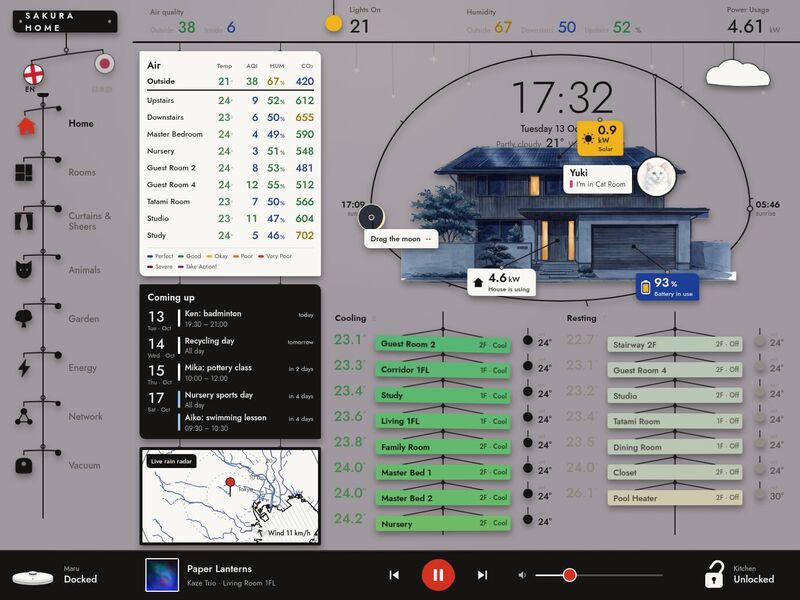
You are setting up Mobile, a wall-tablet dashboard for Home Assistant, in someone else's home. Everything you need is in this package: the full app source, the made-up demo home it ships with, a go-live kit, picture tools and this guide. Work through it in order; you should not need to ask the dashboard's authors anything. The person who gave you this package is not necessarily a developer — explain what you do in plain words and ask them only about their home (which entities, which rooms, which pictures).
What you're building
The demo home at dusk
A full-screen, touch-first dashboard drawn like a Calder mobile: the house hangs inside a wire hoop, the sun (by night the moon) is a bead you can drag round the hoop to scrub through the day, and every card, tag and cat portrait hangs on a wire and sways — gently on a calm day, wildly in a storm. Eight views: Home (house + sky, clock and weather, air quality per area, the A/C list, "coming up" calendar, rain radar, energy tags, a cat that drops in to say which room it is in), Rooms (one card per room: light + dimmer, A/C, curtains, lock, temperature), Curtains & Sheers (a 3-D curtain in front of a painting of that room's window view, day/night/weather), Animals (where each pet has been today / this week, litter boxes, latest camera spottings), Garden (a painting of the garden with every garden light as a tappable pin), Energy (solar, battery, grid and the house as a balance, power today, totals, savings), Network (servers, switches, access points, cameras) and Vacuum (a floor plan and the robot). A top strip (air quality, lights on, humidity, power) and a media bar (speaker, robot, a door lock) frame every view. English ⇄ 日本語 built in.
- They need: Home Assistant 2024.1 or newer (it uses only the standard REST and WebSocket APIs), a wall tablet or any screen (made for 1376 × 1032 CSS px, an 11-inch tablet in landscape; it scales down to fit smaller screens), and a computer with Node.js 18+ to build it. Nothing else — no HACS card, no cloud.
- Time: about an hour to run the demo and go live with a few rooms; a few hours to map a whole house; pictures of their own home are an extra evening (or keep the made-up pictures to start).
What's in this package
HANDOFF.md            this guide            README.md   3-line summary            LICENSE   MIT
package.json          exact versions we build with (npm install)
index.html            the page shell            tsconfig.json   TypeScript settings
vite.config.ts        dev server + builds (demo / live), BASE = where a build is hosted
.env.example          copy to .env.live for live mode (address, token for dev only, BASE)
panel-loader.js       mode B: the tiny module Home Assistant loads for a sidebar panel
live/README.md        the go-live kit's own guide (modes A, B, C in detail, troubleshooting)
docs/still.jpg        the picture above
tools/                picture tools: fit.py (resize/crop to a slot), cutout.py (house cut-out),
                      nightify.py (no-AI night versions), measure.html (click anchors), prompts.md
static/               files served as-is: local/ (pets, room pictures, spottings, network gear, SVGs, icon),
                      demo/ (demo-only camera stills and music covers), fonts/ (+ OFL licence)
src/
  main.tsx            start-up switch: demo (default) · live · sidebar panel
  main.demo.tsx       the demo entry (made-up home, no network at all)
  main.live.tsx       live entry, modes A and C (WebSocket to Home Assistant)
  main.panel.tsx      live entry, mode B (inside Home Assistant's sidebar)
  App.tsx             language provider + the shell
  app/views.tsx       the list of views (remove one here)
  config/             ★ every entity id, room, light, cat, curtain, plan and picture anchor lives here
  ha/                 HaBackend interface (types.ts), HaProvider hooks, mockBackend (demo),
                      wsBackend / hassBackend / authFetch (live)
  views/              one file per view            components/   cards, popups, shell, charts, 3-D curtains
  kinetic/            the mobile's physics (engine.ts), sky / sun / moon maths (sky.ts), weather (forecast.ts)
  i18n/               t("English") → ja.ts dictionary, Japanese web-font loader
  lib/                formatting, colour bands, history/calendar hooks, network data, music, demo REST mock
  demo/               the made-up home: snapshot of states, synthetic day (solar, battery, cats), calendar,
                      music, the network sandbox, the time/weather bridge — delete when live
  styles/             theme tokens (theme.css), fonts, app-wide CSS
assets/ the made-up home's pictures used by the code (house, garden, rooms, cats, curtains)Run the demo first
npm install
npm run dev            # prints http://localhost:5173/ — open it
The made-up home ("Sakura Home", a family house in Tokyo) runs with no Home Assistant at all: src/demo/ fakes the
states, a whole synthetic day of energy and pet movements, calendars and music, and a sandbox blocks every network
request to Home Assistant. Try the URL parameters: ?t=21:30 (a time of day), ?wx=rainy (sunny, partlycloudy,
cloudy, rainy, pouring, lightning-rainy, fog, snowy, windy), ?lang=ja. Drag the sun round the hoop.
npm run build makes the same demo as static files in dist/. If this works, the toolchain is fine — now connect
their house.
How it works
- Data flow. Every view talks to Home Assistant through one interface,
HaBackend(src/ha/types.ts):getStates,subscribe(ids, cb),callService(domain, service, data, target),callServiceResponse(…)(services that return data, e.g.weather.get_forecasts) andbrowseMedia.src/ha/HaProvider.tsxturns it into hooks —useEntity(id),useEntities(ids),useCallService(),useCallServiceResponse(),useBrowseMedia()— and each view subscribes only to the ids it shows. A few things come over REST with the same login: history (/api/history/period/…, charts and the pet timeline), calendars (/api/calendars/<id>),/api/states(the "lights on" list) and/api/template. - Demo vs live.
src/main.tsxpicks the entry at build time: the demo usesmockBackend(+src/lib/mockApi.tsfor the REST calls); live useswsBackend(Home Assistant's WebSocket API throughhome-assistant-js-websocket, with Home Assistant's own login) orhassBackend(thehassobject a sidebar panel receives). Views never know which. A live build contains no demo code. - Config. All entity ids, names and positions are in
src/config/*.ts(plus a few constants named in Step 2). Every made-up id starts withsk_, sogrep -rn "sk_" src --include=*.ts --include=*.tsx | grep -v src/demolists every place to map. - The mobile.
src/kinetic/engine.tsis a small spring simulation: each hanging thing is aBody(spring, damping, wind share);useSwingattaches one to an element. Wind comes from the weather entity'swind_speed/wind_bearing(Ambient.tsx); storms add gusts; taps kick.prefers-reduced-motionturns sway and big transitions off. - The sky.
src/kinetic/sky.tscomputes sun and moon (position, phase, sunrise/sunset) for the home's latitude and longitude from the tablet's clock;Ambient.tsxturns the sun's height into the wall colour (day → golden → dusk → night), shadow direction and a sun patch. Dragging the bead scrubs the sky (and the forecast) and glides back to now. - Weather. The weather entity's condition drives the hanging weather glyph, rain/snow/fog/lightning over the house,
the curtain scenes and the sway; the hourly forecast (
weather.get_forecasts) is shown while scrubbing ahead. - Pictures, layered and anchored. The house is three registered transparent plates (
house-day,house-night,house-lit): the night plate fades in as the sun sets, andhouse-litshows only inside the window boxes of rooms whose light is on (WINDOWSinsrc/config/house.ts, boxes as fractions of the painting).ENERGY_ATpins the solar / battery / house tags andCAT_PERCHwhere a cat hangs for each room. The garden is a day and a night painting with each light's position insrc/config/garden.ts; the app paints the glows itself. Curtains are a three.js scene (src/components/curtains3d/engine.ts) in front of a day or night painting of the window view (src/config/curtainPlates.ts), with rain, lightning and haze done in shaders. Room cards use one ink sketch per room. - i18n.
useT()returnst("English text");src/i18n/ja.tsis a plain{ "English": "日本語" }object; the language toggle setsdata-langon<html>. Japanese web fonts load only when Japanese is on (src/i18n/ja-fonts.ts). - Theme. CSS custom properties in
src/styles/theme.css(--wall,--ink,--wire,--red,--yellow,--blue…, a night set under[data-phase="night"]); the primary colours of the hanging shapes arePAINTinsrc/kinetic/shapes.tsx. - The demo bridge.
src/demo/bridge.tslets a page that embeds the demo (an<iframe>) set the time and weather withpostMessage— that is how dashboards.casa shows "what happens at night / in a storm". Demo only.
Step 1 — Inventory their Home Assistant
- Ask the person for their Home Assistant address and, for this step only, a long-lived access token (their profile → Security → Long-lived access tokens). Keep it out of every file you commit or build.
- List the entities:sh(or Developer Tools → States in the Home Assistant UI). Also note their areas (Settings → Areas).
curl -s -H "Authorization: Bearer $TOKEN" http://homeassistant.local:8123/api/states \ | jq -r '.[] | [.entity_id, .state, (.attributes.friendly_name // "")] | @tsv' | sort > states.tsv - Domains this dashboard uses:
light,switch,climate,sensor,weather,sun,calendar,media_player,vacuum,select,lock,script,button,input_number,input_select,input_boolean,input_text,input_datetime,camera(network view only). - Match by meaning, not by name: for every row in the Step 2 tables find their entity (same domain, same unit), or decide to drop that card. Ask the person when two candidates fit. Write the result down as a two-column list (made-up id → their id) before you edit anything.
Step 2 — Map entities
Edit the files named in each table; replace each made-up id with theirs. Keep the structure (arrays, keys); delete
rows for things they don't have; null is allowed where a table says so. Names shown on cards come from the config
(name) or the entity's friendly_name. After mapping, run npm run dev:live (Step 3, mode C) and check every view.
A. Shell, top strip, weather, sun — src/config/entities.ts, src/components/vacuum/vacuumModel.ts
| Config key | Made-up id | What it is | Read (state / attributes) | Calls | If you don't have it |
|---|---|---|---|---|---|
SHELL.media | media_player.sk_living_speaker | main speaker (media bar + Music) | state, media_title, media_artist, entity_picture, media_duration, media_position(_updated_at), volume_level | media_player.media_play_pause / media_next_track / media_previous_track / volume_set | point it at any media_player; no speaker → remove <MediaBar>'s music block in src/components/shell/MediaBar.tsx |
SHELL.vacuum / VAC | vacuum.sk_maru | robot vacuum | state, battery_level, supported_features, friendly_name | vacuum.start / pause / stop / return_to_base / locate | remove the vacuum entry from src/app/views.tsx and the robot chip in MediaBar.tsx |
SHELL.vacuumState / OP_STATE | sensor.sk_maru_state | vacuum's detailed status (optional) | state | — | leave it: the vacuum's own state is used instead |
MODE | select.sk_maru_clean_mode | cleaning mode select (optional) | state, options | select.select_option | without it the chips show a default list that does nothing: delete the mode row in src/views/VacuumView.tsx |
OP_ERROR | sensor.sk_maru_error | vacuum error text (optional) | state (no_error = fine) | — | leave it |
IDENTIFY | button.sk_maru_identify | "find me" button (optional) | — | button.press (only if the vacuum lacks locate) | leave it |
SHELL.lock | lock.sk_kitchen_door | door lock shown in the media bar | state locked/unlocked | lock.lock / lock.unlock | delete the lock block in MediaBar.tsx |
TOPSTRIP.aqiOutside | sensor.sk_outside_aqi | Outside AQI | state | — | any sensor of the same kind; a missing one shows "—" |
TOPSTRIP.aqiInside | sensor.sk_downstairs_aqi | Downstairs AQI | state | — | any sensor of the same kind; a missing one shows "—" |
TOPSTRIP.lightsOn | sensor.sk_lights_on | Lights On | not read (the count comes from all light.* states, see M) | — | any sensor of the same kind; a missing one shows "—" |
TOPSTRIP.humOutside | sensor.sk_outside_humidity | Outside Humidity | state | — | any sensor of the same kind; a missing one shows "—" |
TOPSTRIP.humDownstairs | sensor.sk_downstairs_humidity | Downstairs Humidity | state | — | any sensor of the same kind; a missing one shows "—" |
TOPSTRIP.humUpstairs | sensor.sk_upstairs_humidity | Upstairs Humidity | state | — | any sensor of the same kind; a missing one shows "—" |
TOPSTRIP.power | sensor.sk_house_power | House Power | state (kW) | — | any sensor of the same kind; a missing one shows "—" |
WEATHER | weather.sk_tokyo | weather (Home clock line, sky, sway, radar wind, curtain scenes) | state = condition, temperature, humidity, wind_speed, wind_bearing, cloud_coverage | weather.get_forecasts {type: hourly} (response) | any weather entity (Met.no is built in) |
| — | sun.sun | the sun | state above_horizon/below_horizon, elevation, azimuth | — | built into Home Assistant |
POOL_PROBE (in ClimateList.tsx) | sensor.sk_pool_temperature | water temperature shown on the pool-heater row | state (°C) | — | change the constant or delete the pool-heater row |
B. Home — A/C list CLIMATE (src/config/entities.ts)
Read: state (off, cool, heat, dry, fan_only, auto), current_temperature, temperature (target). Calls: climate.set_hvac_mode {hvac_mode: off|cool} (tap), climate.set_temperature {temperature} (the setpoint sheet). pin: "top"|"bottom" keeps a unit at the top/bottom of its list. Not there → delete the row.
| # | Name on the card | Made-up id | Floor |
|---|---|---|---|
| 1 | Dining Room | climate.sk_ac_dining | 1F |
| 2 | Corridor 1FL | climate.sk_ac_corridor | 1F |
| 3 | Study | climate.sk_ac_study | 1F |
| 4 | Living 1FL | climate.sk_ac_living | 1F |
| 5 | Tatami Room | climate.sk_ac_tatami | 1F |
| 6 | Stairway 2F | climate.sk_ac_stairway | 2F · pinned top |
| 7 | Guest Room 2 | climate.sk_ac_guest2 | 2F |
| 8 | Nursery | climate.sk_ac_nursery | 2F |
| 9 | Guest Room 4 | climate.sk_ac_guest4 | 2F |
| 10 | Studio | climate.sk_ac_studio | 2F |
| 11 | Family Room | climate.sk_ac_family | 2F |
| 12 | Master Bed 1 | climate.sk_ac_master1 | 2F |
| 13 | Master Bed 2 | climate.sk_ac_master2 | 2F |
| 14 | Closet | climate.sk_ac_closet | 2F |
| 15 | Pool Heater | climate.sk_pool_heater | 2F · pinned bottom |
C. Home — Air panel AREAS (src/config/entities.ts)
Read: each sensor's state (°C, %, AQI number, ppm). co2 is optional (leave the key out). Not there → delete the row.
| Area | Temperature | Humidity | AQI | CO₂ |
|---|---|---|---|---|
| Outside | sensor.sk_outside_temperature | sensor.sk_outside_humidity | sensor.sk_outside_aqi | — |
| Upstairs | sensor.sk_upstairs_temperature | sensor.sk_upstairs_humidity | sensor.sk_upstairs_aqi | sensor.sk_upstairs_co2 |
| Downstairs | sensor.sk_downstairs_temperature | sensor.sk_downstairs_humidity | sensor.sk_downstairs_aqi | sensor.sk_downstairs_co2 |
| Master Bedroom | sensor.sk_master_temperature | sensor.sk_master_humidity | sensor.sk_master_aqi | sensor.sk_master_co2 |
| Nursery | sensor.sk_nursery_temperature | sensor.sk_nursery_humidity | sensor.sk_nursery_aqi | sensor.sk_nursery_co2 |
| Guest Room 2 | sensor.sk_guest2_temperature | sensor.sk_guest2_humidity | sensor.sk_guest2_aqi | sensor.sk_guest2_co2 |
| Guest Room 4 | sensor.sk_guest4_temperature | sensor.sk_guest4_humidity | sensor.sk_guest4_aqi | sensor.sk_guest4_co2 |
| Tatami Room | sensor.sk_tatami_temperature | sensor.sk_tatami_humidity | sensor.sk_tatami_aqi | sensor.sk_tatami_co2 |
| Studio | sensor.sk_studio_temperature | sensor.sk_studio_humidity | sensor.sk_studio_aqi | sensor.sk_studio_co2 |
| Study | sensor.sk_study_temperature | sensor.sk_study_humidity | sensor.sk_study_aqi | sensor.sk_study_co2 |
D. Home — "Coming up" CALENDARS (src/config/entities.ts)
Read over REST: GET /api/calendars/<id>?start=…&end=… (summary, start, end, location). Colour = the dot colour. Use any calendar entities (Local Calendar, Google, CalDAV …); keep 1–6.
| Made-up id | Name | Colour |
|---|---|---|
calendar.sk_family | Family | #ffffff |
calendar.sk_japan_holidays | Holidays in Japan | #ffb4a8 |
calendar.sk_birthdays | Birthdays | #dcae65 |
calendar.sk_school | School | #9ac1e8 |
calendar.sk_cats | Cats | #a9d6a0 |
E. Home — the house on the hoop (src/config/house.ts, HouseStage.tsx)
WINDOWS[].light: when that light is on and the sun is down, its window boxes on the house plate glow (state only). ENERGY_AT pins the three energy tags (sensors in F). Cats come from G. Not there → delete the window row.
| Window group | Light (made-up id) | Boxes on the plate |
|---|---|---|
| TATAMI ROOM | light.sk_1f_tatami | 1 |
| GENKAN | light.sk_1f_corridor | 2 |
| GUEST ROOM 2 | light.sk_2f_guest2 | 1 |
| HALL 2F | light.sk_1f_stairs | 1 |
| GUEST ROOM 4 | light.sk_2f_guest4 | 1 |
| CAT ROOM | light.sk_2f_catroom | 1 |
| PINK ROOM | light.sk_2f_pinkroom | 1 |
F. Energy (src/views/EnergyView.tsx E, HouseStage.tsx E)
Read: states only. Power sensors in kW (grid positive = importing, negative = exporting; battery power positive = discharging), battery level in %, energy totals in kWh, savings in your currency. History for the "Power today" chart comes from GET /api/history/period/… (the recorder). Missing totals → make them with Utility Meter helpers (YAML in Step 2 notes); no solar/battery at all → remove energy from src/app/views.tsx and the three tags in HouseStage.tsx.
| Key | Made-up id | What it is |
|---|---|---|
gridPower | sensor.sk_grid_power | Grid Power |
solarPower | sensor.sk_solar_power | Solar Power |
batt | sensor.sk_battery_level | Home Battery |
loadPower | sensor.sk_house_power | House Power |
gridKwh.today | sensor.sk_grid_import_daily | Grid Import Today |
gridKwh.week | sensor.sk_grid_import_weekly | Grid Import This Week |
gridKwh.month | sensor.sk_grid_import_monthly | Grid Import This Month |
solarKwh.today | sensor.sk_solar_energy_daily | Solar Today |
solarKwh.week | sensor.sk_solar_energy_weekly | Solar This Week |
solarKwh.month | sensor.sk_solar_energy_monthly | Solar This Month |
battKwh.today | sensor.sk_battery_export_daily | Battery Out Today |
battKwh.week | sensor.sk_battery_export_weekly | Battery Out This Week |
battKwh.month | sensor.sk_battery_export_monthly | Battery Out This Month |
savings.today | sensor.sk_savings_today | Energy Savings Today (JPY) |
savings.yesterday | sensor.sk_savings_yesterday | Energy Savings Yesterday (JPY) |
savings.week | sensor.sk_savings_last_week | Energy Savings Last Week (JPY) |
savings.month | sensor.sk_savings_last_month | Energy Savings Last Month (JPY) |
savings.ytd | sensor.sk_savings_ytd | Energy Savings YTD (JPY) |
G. Animals (src/config/animals.ts)
Cats: one room-tracking sensor per pet, sensor.<id>_room (state = a room key from ROOM_RATIO, e.g. kitchen_1; away = outside), plus optional share-of-time sensors sensor.<id>_room_ratio_<7d|today>_<room key> (state = percent) for the donut. History of sensor.<id>_room feeds the timeline. Any presence source works (BLE tags + room presence, a microchip cat flap, cameras with object detection); the ratio sensors can be History Stats helpers (YAML in the notes below).
Cat id (CATS) | Name | Room sensor | Portrait |
|---|---|---|---|
mochi | Mochi | sensor.mochi_room | /local/pets/mochi.webp |
yuki | Yuki | sensor.yuki_room | /local/pets/yuki.webp |
sora | Sora | sensor.sora_room | /local/pets/sora.webp |
kuro | Kuro | sensor.kuro_room | /local/pets/kuro.webp |
hana | Hana | sensor.hana_room | /local/pets/hana.webp |
ren | Ren | sensor.ren_room | /local/pets/ren.webp |
Room key (ROOM_RATIO) | Label | Room key | Label | |
|---|---|---|---|---|
kitchen_1 | Kitchen | 1fl_living_room | Pantry | |
living_west | Living Room 1FL | dining_2 | Dining Room | |
dining_room | Salon | genkan | Genkan | |
office_1 | Study | tatami_1 | Tatami | |
master_bedroom | Master | cat_room | Cat Room | |
2fl_living_room | Family Room | stairway_2 | Stairway 2F | |
hall_east_2 | Hall East 2F |
| Config key | Made-up id | What it is | Read | If you don't have it |
|---|---|---|---|---|
SPOTTINGS[0] | input_text.sk_spotting_1_camera, input_datetime.sk_spotting_1_time | latest cat spotting #1: camera name + time; picture /local/snapshots/animals/spotting-1.jpg | state | delete the entry (the card hides) |
SPOTTINGS[1] | input_text.sk_spotting_2_camera, input_datetime.sk_spotting_2_time | latest cat spotting #2: camera name + time; picture /local/snapshots/animals/spotting-2.jpg | state | delete the entry (the card hides) |
LITTER_BOXES Cat Room | sensor.sk_litter_cat_room_state, sensor.sk_litter_cat_room_occupied | litter box status / occupied | state | delete the entry |
LITTER_BOXES Downstairs | sensor.sk_litter_downstairs_state, sensor.sk_litter_downstairs_occupied | litter box status / occupied | state | delete the entry |
LITTER_BOXES Tatami | sensor.sk_litter_tatami_state, sensor.sk_litter_tatami_occupied | litter box status / occupied | state | delete the entry |
LITTER_BOXES Master | sensor.sk_litter_master_state, sensor.sk_litter_master_occupied | litter box status / occupied | state | delete the entry |
H. Rooms (src/config/rooms.ts ROOMS, ROOM_AC)
Per room card. light = a light group (tap = light.toggle, the dimmer = light.turn_on {brightness_pct}), climate (shows current_temperature), sheer / blackout = on/off entities that say whether the sheers / curtains are open (text only), temp / humidity sensors, lock (icon), featureLight = a second light with its own on/off drawing (light.turn_on/turn_off). Any field may be null. ROOM_AC[name] = the A/C chip: script toggles the unit (script.turn_on), helper is an input_number setpoint (input_number.increment / decrement). Picture: photo.
| Card | Floor | Light | Climate | Sheers / curtains state | Temp / humidity | Lock / feature light | A/C chip (script · setpoint) |
|---|---|---|---|---|---|---|---|
| TATAMI ROOM | 1st | light.sk_1f_tatami | climate.sk_ac_tatami | switch.sk_tatami_sheers_open_led / switch.sk_tatami_curtains_open_led | — / — | — / — | script.sk_tatami_ac_toggle · input_number.sk_tatami_ac_target |
| LIVING ROOM | 1st | light.sk_1f_living | climate.sk_ac_living | switch.sk_living_sheers_open_led / switch.sk_living_curtains_open_led | sensor.sk_living_temperature / sensor.sk_living_humidity | — / — | script.sk_living_ac_toggle · input_number.sk_living_ac_target |
| KITCHEN | 1st | light.sk_1f_kitchen | — | — / — | — / — | lock.sk_kitchen_door / — | — |
| DINING ROOM | 1st | light.sk_1f_dining | climate.sk_ac_dining | switch.sk_dining_sheers_open_led / switch.sk_dining_curtains_open_led | — / sensor.sk_hall_1f_humidity | — / light.sk_1f_dining_halo | script.sk_salon_ac_toggle · input_number.sk_salon_ac_target |
| ATRIUM | 1st | light.sk_1f_atrium | — | switch.sk_atrium_sheers_open_led / switch.sk_atrium_curtains_open_led | sensor.sk_atrium_temperature / sensor.sk_atrium_humidity | — / — | — |
| CORRIDOR | 1st | light.sk_1f_corridor | — | — / — | — / sensor.sk_hall_1f_humidity | — / — | — |
| SALON | 1st | light.sk_1f_salon | climate.sk_ac_dining | switch.sk_salon_sheers_open_led / switch.sk_salon_curtains_open_led | — / sensor.sk_hall_1f_humidity | — / light.sk_1f_salon_halo | script.sk_salon_ac_toggle · input_number.sk_salon_ac_target |
| STUDY | 1st | light.sk_1f_study | climate.sk_ac_study | — / — | sensor.sk_study_temperature / sensor.sk_study_humidity_2 | lock.sk_study_door / — | script.sk_study_ac_toggle · input_number.sk_study_ac_target |
| STAIRS | 1st | light.sk_1f_stairs | climate.sk_ac_stairway | — / — | — / sensor.sk_hall_2f_humidity | — / light.sk_1f_stairs_halo | script.sk_stairs_ac_toggle · input_number.sk_stairs_ac_target |
| MASTER BEDROOM | 2nd | light.sk_2f_master | climate.sk_ac_master1 | — / — | sensor.sk_master_temperature / sensor.sk_bedroom_hall_humidity | lock.sk_master_door / — | script.sk_master_ac1_toggle · input_number.sk_master_ac1_target<br>script.sk_master_ac2_toggle · input_number.sk_master_ac2_target |
| MASTER BATHROOM | 2nd | light.sk_2f_bath | — | — / — | — / — | — / — | — |
| WALK-IN CLOSET | 2nd | light.sk_2f_closet | climate.sk_ac_closet | — / — | — / sensor.sk_bedroom_hall_humidity | — / — | script.sk_closet_ac_toggle · input_number.sk_closet_ac_target |
| FAMILY ROOM | 2nd | light.sk_2f_family | climate.sk_ac_family | — / — | sensor.sk_family_temperature / sensor.sk_hall_2f_humidity | — / — | script.sk_family_ac_toggle · input_number.sk_family_ac_target |
| CAT ROOM | 2nd | light.sk_2f_catroom | — | — / — | sensor.sk_cat_room_temperature / sensor.sk_cat_room_humidity | — / — | — |
| PINK ROOM | 2nd | light.sk_2f_pinkroom | climate.sk_ac_studio | switch.sk_pinkroom_sheers_open_led / switch.sk_pinkroom_curtains_open_led | sensor.sk_studio_temperature / — | lock.sk_pinkroom_door / — | script.sk_pinkroom_ac_toggle · input_number.sk_pinkroom_ac_target |
| NURSERY | 2nd | light.sk_2f_nursery | climate.sk_ac_nursery | switch.sk_nursery_sheers_open_led / switch.sk_nursery_curtains_open_led | sensor.sk_nursery_temperature / — | — / — | script.sk_nursery_ac_toggle · input_number.sk_nursery_ac_target |
| GUEST ROOM 2 | 2nd | light.sk_2f_guest2 | climate.sk_ac_guest2 | switch.sk_guest2_sheers_open_led / switch.sk_guest2_curtains_open_led | — / — | — / — | script.sk_guest2_ac_toggle · input_number.sk_guest2_ac_target |
| GUEST ROOM 4 | 2nd | light.sk_2f_guest4 | climate.sk_ac_guest4 | switch.sk_guest4_sheers_open_led / switch.sk_guest4_curtains_open_led | sensor.sk_guest4_temperature / — | — / — | script.sk_guest4_ac_toggle · input_number.sk_guest4_ac_target |
I. Curtains & Sheers (src/config/curtains3d.ts ROOMS3D)
Each room has one or two covers. scripted: open = an on/off entity that is on while that cover is open, dir = an input_select the script sets to opening / closing / idle while it runs (optional), script = the script that toggles it (script.turn_on). buttons: openBtn / closeBtn = button entities (button.press), openLed / closeLed = on/off entities that show the last direction. With plain cover entities, the simplest route is a toggle script per cover (YAML in the notes) — or edit pressCover in CurtainsSheersView.tsx to call cover.toggle. outdoor: true rooms also follow the weather. Picture: src/config/curtainPlates.ts by key.
Room (key) | Floor | Cover | Kind | Entities |
|---|---|---|---|---|
Dining (dining) | 1F | Curtains | scripted | open switch.sk_dining_curtains_open_led<br>dir input_select.sk_dining_curtains_direction<br>script script.sk_dining_curtains_toggle |
Dining (dining) | 1F | Sheers | scripted | open switch.sk_dining_sheers_open_led<br>dir input_select.sk_dining_sheers_direction<br>script script.sk_dining_sheers_toggle |
Salon (salon) | 1F | Curtains | scripted | open switch.sk_salon_curtains_open_led<br>dir input_select.sk_salon_curtains_direction<br>script script.sk_salon_curtains_toggle |
Salon (salon) | 1F | Sheers | scripted | open switch.sk_salon_sheers_open_led<br>dir input_select.sk_salon_sheers_direction<br>script script.sk_salon_sheers_toggle |
Living Room (living) | 1F | Curtains | scripted | open switch.sk_living_curtains_open_led<br>dir input_select.sk_living_curtains_direction<br>script script.sk_living_curtains_toggle |
Living Room (living) | 1F | Sheers | scripted | open switch.sk_living_sheers_open_led<br>dir input_select.sk_living_sheers_direction<br>script script.sk_living_sheers_toggle |
Atrium (atrium) | 1F | Curtains | scripted | open input_boolean.sk_atrium_curtains_open<br>dir input_select.sk_atrium_curtains_direction<br>script script.sk_atrium_curtains_toggle |
Atrium (atrium) | 1F | Sheers | scripted | open input_boolean.sk_atrium_sheers_open<br>dir input_select.sk_atrium_sheers_direction<br>script script.sk_atrium_sheers_toggle |
Atrium Back (atriumback) | 1F | Curtains | buttons | buttons button.sk_atriumback_curtains_open / button.sk_atriumback_curtains_close<br>leds switch.sk_atriumback_curtains_open_led / switch.sk_atriumback_curtains_close_led |
Atrium Back (atriumback) | 1F | Sheers | buttons | buttons button.sk_atriumback_sheers_open / button.sk_atriumback_sheers_close<br>leds switch.sk_atriumback_sheers_open_led / switch.sk_atriumback_sheers_close_led |
Study (study) | 1F | Blinds | scripted | open switch.sk_study_blinds_open_led<br>dir input_select.sk_study_blinds_direction<br>script script.sk_study_blinds_toggle |
Tatami (tatami) | 1F | Curtains | scripted | open input_boolean.sk_tatami_curtains_open<br>dir input_select.sk_tatami_curtains_direction<br>script script.sk_tatami_curtains_toggle |
Tatami (tatami) | 1F | Sheers | scripted | open input_boolean.sk_tatami_sheers_open<br>dir input_select.sk_tatami_sheers_direction<br>script script.sk_tatami_sheers_toggle |
Family Room (family) | 2F | Curtains | scripted | open input_boolean.sk_family_curtains_open<br>dir input_select.sk_family_curtains_direction<br>script script.sk_family_curtains_toggle |
Family Room (family) | 2F | Sheers | scripted | open input_boolean.sk_family_sheers_open<br>dir input_select.sk_family_sheers_direction<br>script script.sk_family_sheers_toggle |
Master (Ken) (masterken) | 2F | Curtains | scripted | open input_boolean.sk_masterken_curtains_open<br>dir input_select.sk_masterken_curtains_direction<br>script script.sk_masterken_curtains_toggle |
Master (Ken) (masterken) | 2F | Sheers | scripted | open input_boolean.sk_masterken_sheers_open<br>dir input_select.sk_masterken_sheers_direction<br>script script.sk_masterken_sheers_toggle |
Master Bath (masterbath) | 2F | Blinds | scripted | open switch.sk_masterbath_blinds_open_led<br>dir input_select.sk_masterbath_blinds_direction<br>script script.sk_masterbath_blinds_toggle |
Cat Room (catroom) | 2F | Blinds | scripted | open input_boolean.sk_catroom_blinds_open<br>dir input_select.sk_catroom_blinds_direction<br>script script.sk_catroom_blinds_toggle |
Nursery (nursery) | 2F | Curtains | scripted | open input_boolean.sk_nursery_curtains_open<br>dir input_select.sk_nursery_curtains_direction<br>script script.sk_nursery_curtains_toggle |
Nursery (nursery) | 2F | Sheers | scripted | open input_boolean.sk_nursery_sheers_open<br>dir input_select.sk_nursery_sheers_direction<br>script script.sk_nursery_sheers_toggle |
Guest Room 2 (guest2) | 2F | Curtains | scripted | open input_boolean.sk_guest2_curtains_open<br>dir input_select.sk_guest2_curtains_direction<br>script script.sk_guest2_curtains_toggle |
Guest Room 2 (guest2) | 2F | Sheers | scripted | open input_boolean.sk_guest2_sheers_open<br>dir input_select.sk_guest2_sheers_direction<br>script script.sk_guest2_sheers_toggle |
Guest Room 4 (guest4) | 2F | Curtains | scripted | open input_boolean.sk_guest4_curtains_open<br>dir input_select.sk_guest4_curtains_direction<br>script script.sk_guest4_curtains_toggle |
Guest Room 4 (guest4) | 2F | Sheers | scripted | open input_boolean.sk_guest4_sheers_open<br>dir input_select.sk_guest4_sheers_direction<br>script script.sk_guest4_sheers_toggle |
Pink Room (pinkroom) | 2F | Curtains | scripted | open input_boolean.sk_pinkroom_curtains_open<br>dir input_select.sk_pinkroom_curtains_direction<br>script script.sk_pinkroom_curtains_toggle |
Pink Room (pinkroom) | 2F | Sheers | scripted | open input_boolean.sk_pinkroom_sheers_open<br>dir input_select.sk_pinkroom_sheers_direction<br>script script.sk_pinkroom_sheers_toggle |
Family Room TV (familytv) | 2F | Curtains | scripted | open input_boolean.sk_familytv_curtains_open<br>dir input_select.sk_familytv_curtains_direction<br>script script.sk_familytv_curtains_toggle |
Family Room TV (familytv) | 2F | Sheers | scripted | open input_boolean.sk_familytv_sheers_open<br>dir input_select.sk_familytv_sheers_direction<br>script script.sk_familytv_sheers_toggle |
Master (Mika) (mastermika) | 2F | Curtains | scripted | open switch.sk_mastermika_curtains_open_led<br>dir input_select.sk_mastermika_curtains_direction<br>script script.sk_mastermika_curtains_toggle |
Master (Mika) (mastermika) | 2F | Sheers | scripted | open switch.sk_mastermika_sheers_open_led<br>dir input_select.sk_mastermika_sheers_direction<br>script script.sk_mastermika_sheers_toggle |
J. Garden (src/config/garden.ts GARDEN_LIGHTS, FRINGES)
Each light: id (a light or switch; tap = light|switch.turn_on/turn_off, "All on/off" = homeassistant.turn_on/turn_off), pic (which painting), at = position on that painting (fractions), kind = glow shape. FRINGES = the four hanging groups of discs at the top (same ids). Fewer lights → delete rows here and in FRINGES.
| Name | Made-up id | Painting | at |
|---|---|---|---|
| Pavilion Lantern | switch.sk_garden_pavilion | garden | [0.835, 0.337] |
| Olive Tree | switch.sk_garden_olive | garden | [0.692, 0.625] |
| Pool Wall | switch.sk_garden_pool_wall | garden | [0.395, 0.542] |
| Pool Steps | switch.sk_garden_pool_steps | garden | [0.269, 0.725] |
| Table Lantern | switch.sk_garden_table | garden | [0.338, 0.25] |
| Patio | light.sk_garden_patio | garden | [0.115, 0.567] |
| Red Maple | switch.sk_garden_red_maple | garden | [0.9, 0.708] |
| Front Pine | switch.sk_garden_front_pine | front | [0.345, 0.716] |
| Stepping Stones | switch.sk_garden_stepping_stones | garden | [0.69, 0.8] |
| Green Maple | switch.sk_garden_green_maple | garden | [0.095, 0.46] |
| Water Spouts | switch.sk_garden_spouts | garden | [0.555, 0.39] |
| House Sconce | light.sk_garden_house_sconce | front | [0.537, 0.672] |
| Fence Wash | switch.sk_garden_fence | front | [0.215, 0.744] |
| Veranda Downlights | light.sk_garden_veranda | front | [0.64, 0.582] |
| Sunbeds | switch.sk_garden_sunbeds | garden | [0.545, 0.59] |
| Pavilion Steps | switch.sk_garden_pavilion_steps | garden | [0.8, 0.575] |
| Side Gate | switch.sk_garden_side_gate | front | [0.835, 0.725] |
| Side Path | switch.sk_garden_side_path | front | [0.155, 0.81] |
| Back Pine | switch.sk_garden_back_pine | garden | [0.473, 0.236] |
| Fern Bed | switch.sk_garden_ferns | garden | [0.818, 0.86] |
K. Music (src/components/music/useMusicData.ts, src/lib/music.ts)
Speakers (SPEAKERS): media_player per room — state + the media attributes in A; calls media_player.play_media / media_play_pause / media_next_track / media_previous_track / volume_set / shuffle_set / join / unjoin. Radio = media_player/browse_media of the main speaker (Home Assistant's built-in Radio Browser source). The library (favourites, recent, search) needs a music-service integration that answers services with a response: the demo names it musicplus with get_track_favorites, get_player_recent_tracks, get_playlist_favorites, search_tracks, search_artists, search_albums, search_playlists (response) and save_track_favorites, remove_track_favorites, and its account player media_player.sk_music_account. Map these names to your integration's services in src/lib/music.ts; without one, the library tabs stay empty and the speakers, radio and media bar still work.
| Room | Made-up id |
|---|---|
| Living Room | media_player.sk_living_speaker |
| Family Room | media_player.sk_family_speaker |
| Master Bedroom | media_player.sk_master_speaker |
| Study | media_player.sk_study_speaker |
| Pink Room | media_player.sk_pinkroom_speaker |
L. Network (src/lib/networkData.ts)
A static description of the network (devices, names, models, pictures) plus one sensor per live number: per device ent: { cpu, mem, temp, power, clients } (%, %, °C, W, count), WAN latency (ms), recorder/NAS storage, AP state, and camera entities (state only: recording / idle / unavailable). Any monitoring integration that gives these numbers works (router/switch integrations, SNMP, System Monitor, Glances …); missing keys show the stored value. No interest → remove network from src/app/views.tsx.
| Made-up ids (63) |
|---|
camera.sk_cat_room, camera.sk_doorbell, camera.sk_driveway, camera.sk_front_door, camera.sk_garage, camera.sk_garden |
camera.sk_nursery, camera.sk_pool, sensor.sk_net_ap1_clients, sensor.sk_net_ap1_cpu, sensor.sk_net_ap1_memory, sensor.sk_net_ap1_state |
sensor.sk_net_ap2_clients, sensor.sk_net_ap2_cpu, sensor.sk_net_ap2_memory, sensor.sk_net_ap2_state, sensor.sk_net_ap3_clients, sensor.sk_net_ap3_cpu |
sensor.sk_net_ap3_memory, sensor.sk_net_ap3_state, sensor.sk_net_ap4_clients, sensor.sk_net_ap4_cpu, sensor.sk_net_ap4_memory, sensor.sk_net_ap4_state |
sensor.sk_net_core24_clients, sensor.sk_net_core24_cpu, sensor.sk_net_core24_memory, sensor.sk_net_core24_temperature, sensor.sk_net_gate16_clients, sensor.sk_net_gate16_cpu |
sensor.sk_net_gate16_memory, sensor.sk_net_gate16_temperature, sensor.sk_net_gateway_cpu, sensor.sk_net_gateway_memory, sensor.sk_net_gateway_temperature, sensor.sk_net_gateway_uptime |
sensor.sk_net_ha_disk, sensor.sk_net_hall16_cpu, sensor.sk_net_hall16_memory, sensor.sk_net_hall16_temperature, sensor.sk_net_lan_clients, sensor.sk_net_minipc_cpu |
sensor.sk_net_minipc_disk, sensor.sk_net_minipc_memory, sensor.sk_net_nas_cpu, sensor.sk_net_nas_disk_temperature, sensor.sk_net_nas_memory, sensor.sk_net_nas_volume_used |
sensor.sk_net_nvr_recording, sensor.sk_net_nvr_storage, sensor.sk_net_out_core24_power, sensor.sk_net_out_gateway_power, sensor.sk_net_out_minipc_power, sensor.sk_net_out_modem1_power |
sensor.sk_net_out_nas_power, sensor.sk_net_out_nvr_power, sensor.sk_net_pdu_budget, sensor.sk_net_pdu_cpu, sensor.sk_net_pdu_memory, sensor.sk_net_pdu_power |
sensor.sk_net_wan1_latency, sensor.sk_utility_temperature, sensor.sk_utility_temperature_2 |
M. Lights On (top strip) and the dynamic ids
- Lights On counts every
light.*that isonfromGET /api/states(refreshed every 30 s), skipping light groups (they have anentity_idlist), keypads, LEDs and night lights, plusswitch.*entities of the integration named inDIMMERS_INTEGRATION(src/lib/useRealLights.ts; found with the templateintegration_entities('dimmers')through/api/template). Use that for switch-type dimmers or lamps on smart plugs: put your integration's name there, or leave it (switches are then ignored). The popup turns a light off withlight|switch.turn_off. - Pets:
sensor.<pet id>_roomandsensor.<pet id>_room_ratio_<7d|today>_<room key>are built from the pet ids inCATS(see G).
Helpers they may need (create them in the UI first)
Prefer Home Assistant's built-in helpers (Settings → Devices & Services → Helpers → Create helper): they are
validated, editable and need no restart. Use entity ids, never device ids. The YAML below is for reference or for
pasting into the script/automation editor's "Edit in YAML" — adjust the ids. It uses the current syntax (triggers: /
trigger: state / actions:, Home Assistant 2024.10+); older versions write trigger: / platform: state / action:.
- Energy totals (
gridKwh/solarKwh/battKwhdaily, weekly, monthly). If they have kWh counters (state_class: total_increasing), add a Utility Meter helper per counter and cycle (daily, weekly, monthly). If they only have power sensors, first add an Integral (Riemann sum) helper per power sensor (method Left, metric prefix k, time unit hours), then the Utility Meters on top. - House power now (
loadPower,TOPSTRIP.power): if there is no whole-house power sensor, add a Combine the state of several sensors (min/max) helper of type sum over grid + solar + battery power (same unit; grid positive = importing, battery positive = discharging). - Savings (
savings.*): a Template sensor helper per period, for example (today): `{{ ((states('sensor.solar_energy_today')|float(0) - states('sensor.grid_export_today')|float(0)) * 31- states('sensor.grid_export_today')|float(0) * 16) | round(0) }}
— 31 = their price per kWh, 16 = their feed-in rate; or delete the savings block insrc/views/EnergyView.tsx`.
- states('sensor.grid_export_today')|float(0) * 16) | round(0) }}
- Pet room shares (
sensor.<pet>_room_ratio_today_<room>/_7d_): History stats helpers onsensor.<pet>_room, type ratio, state = the room key; today = start{{ today_at() }}, end{{ now() }}; 7 days = start{{ now() - timedelta(days=7) }}, end{{ now() }}. That is two per pet and room, so trimROOM_RATIOto the rooms their pets really use. For many at once, a YAML package is quicker:yamlThe room sensor itself must report the dashboard's room keys; if their tracker reports area names, map them with a Template sensor helper (sensor: - platform: history_stats name: mochi_room_ratio_today_kitchen_1 entity_id: sensor.mochi_room state: "kitchen_1" type: ratio start: "{{ today_at() }}" end: "{{ now() }}"{{ {'Kitchen': 'kitchen_1', 'Study': 'office_1'}.get(states('sensor.mochi_area'), 'away') }}) or rename the keys inROOM_RATIOandCAT_PERCHto theirs. - A/C chip on room cards (
ROOM_AC): a Number helper for the setpoint (min 16, max 30, step 0.5), a script that toggles the unit (Settings → Automations & scenes → Scripts → + → ⋮ → Edit in YAML):yamland an automation that applies the setpoint to the unit:alias: Tatami A/C toggle mode: single sequence: - action: climate.toggle target: { entity_id: climate.tatami_ac }yamlNo such helpers wanted → set the room'salias: Tatami A/C setpoint mode: restart triggers: - trigger: state entity_id: input_number.tatami_ac_target actions: - action: climate.set_temperature target: { entity_id: climate.tatami_ac } data: { temperature: "{{ trigger.to_state.state | float }}" }ROOM_ACentry to[]; the A/C list on Home still controls every unit. - Curtains: with ordinary
cover.*entities, use the third cover kind this package supports —{ kind: "cover", label: "Curtains", cover: "cover.living_curtains" }inROOMS3D(tap =cover.toggle, the state shows opening/closing/open/closed) — and put the samecover.*id in the room card'ssheer/blackoutfield (opencounts as open). Thescripted/buttonskinds are for curtain motors driven by scripts or keypad buttons. - Cat spottings (
SPOTTINGS): an automation per slot (one camera per slot is simplest) that saves a snapshot when the camera sees a pet, and stores where and when. The code asks for/local/snapshots/animals/spotting-1.jpg; a mode-A build (BASE=/local/dashboard/, Step 3) serves that from<config>/www/dashboard/local/snapshots/animals/, so the snapshot goes there. Home Assistant only writes files into allowed folders: add/config/wwwtoallowlist_external_dirsin thehomeassistant:block ofconfiguration.yaml(there is no UI field for it). The two helpers are a Text helper and a Date and/or time helper (date and time).yamlalias: Pet spotting 1 (garden camera) mode: single max_exceeded: silent triggers: - trigger: state entity_id: binary_sensor.garden_camera_animal # their camera's animal / pet detection to: "on" actions: - action: camera.snapshot target: { entity_id: camera.garden } data: { filename: /config/www/dashboard/local/snapshots/animals/spotting-1.jpg } - action: input_text.set_value target: { entity_id: input_text.spotting_1_camera } data: { value: Garden } - action: input_datetime.set_datetime target: { entity_id: input_datetime.spotting_1_time } data: { datetime: "{{ now().strftime('%Y-%m-%d %H:%M:%S') }}" } - delay: "00:05:00" - Litter boxes (
LITTER_BOXES): any sensor whose state mentionsclean/run/work/activeshows "cleaning";occupiedis on whenon/true. Most smart litter-box integrations have both.
Step 3 — Go live
The go-live kit is already wired into this package (its own guide: live/README.md). Pick a mode with the person:
| Mode | What | How |
|---|---|---|
| A — inside Home Assistant (recommended) | static files in Home Assistant's www/ folder, Home Assistant's own login | cp .env.example .env.live (keep VITE_HA_MODE=live, BASE=/local/dashboard/) → npm run build:live → copy everything in dist/ to <config>/www/dashboard/ (Samba share, File editor or Studio Code Server app, or scp) → open http(s)://<their-home-assistant>:8123/local/dashboard/index.html on the tablet and log in once |
| B — sidebar panel | the same build as a page in Home Assistant's sidebar | mode A, plus copy panel-loader.js into <config>/www/dashboard/ and add the panel_custom: block from the top of panel-loader.js to configuration.yaml, restart |
| C — development | live data while you change the code | in .env.live set VITE_HA_TARGET (their address) and VITE_HA_TOKEN (a long-lived token) → npm run dev:live; keep it on their own network |
- Files in
www/are served without a login — never put a token or anything private in a build (the config refuses to bakeVITE_HA_TOKENinto one). The app's own pictures inwww/dashboard/are public to anyone who can reach Home Assistant; that is normal forwww/. /local/…paths in the code are rewritten to the build'sBASE(vite.config.ts→publicPaths): withBASE=/local/dashboard/, the app's/local/pets/…becomes/local/dashboard/local/pets/…, i.e.<config>/www/dashboard/local/pets/…— that is why the spotting snapshots go there.- Once live, delete the demo:
src/demo/(sandbox, snapshot, synthetic day, calendar, music, the time/weather bridge),src/ha/mockBackend.ts,src/lib/mockApi.ts,src/main.demo.tsx,static/demo/, and theelse { import("./main.demo") }branch insrc/main.tsx. Keepsrc/lib/clockEpoch.ts(the app uses it). A live build already leaves all of it out, so this is tidying, not a requirement.
Step 4 — Pictures
Every picture the app uses. keep = generic (UI, icons, textures, gear, fonts): fine in any home. replace = it
shows the made-up home, its rooms, garden or pets: keep them while you test, then redraw them for the person's home.
Sizes are what the app displays; python3 tools/fit.py --slots prints them.
| Path | Size | Role | |
|---|---|---|---|
src/assets/house/house-day.webp, house-night.webp, house-lit.webp | 1190×482, transparent, in register | the house in the hoop: day, night (fades in at dusk), lit windows (shown only inside WINDOWS boxes of lit rooms) | replace |
src/assets/pages/garden.webp, garden-night.webp | 1300×552, in register | Garden view painting, day / night (lamps dark — the app paints glows) | replace |
src/assets/pages/front-day.webp, front-night.webp | 721×348 | Garden view: the small "house from the street" painting with front lights | replace |
src/assets/rooms/<key>.webp (18) | 480×720 | ink sketch on each room card (SKETCH in src/components/rooms/sketches.ts) | replace |
static/local/rooms/<key>.webp (18) | 480×720 | not shown by this design (the photo field in ROOMS); skip | — |
src/assets/cats/<id>.webp (6) | 192×192 | pet medallion that drops into the Home stage | replace |
static/local/pets/<id>.webp (6) | 512×512 | pet portraits in Animals + the pet popup (CATS[].photo) | replace |
src/assets/curtains/<key>-day.webp, -night.webp (17 + 17) | 1200×896 · 896×1200 · 1264×848 | the window view behind each 3-D curtain (src/config/curtainPlates.ts) | replace |
src/assets/curtains/t-<key>.webp (17) | 188×128 | room tags in Curtains & Sheers | replace |
static/local/snapshots/animals/spotting-1.jpg, -2.jpg | 1273×720 | latest pet spottings (live: written by the Step-2 automation) | replace (automatic) |
static/demo/camera/*.jpg, static/demo/music/cover-*.jpg | 1273×720 · 320×320 | demo-only stand-ins for camera images and album covers | delete when live |
static/local/network/assets/gear/*.png (11) | ≤332 px wide, transparent | Network view: gateway, switches, recorder, PDU, APs, mini PC, NAS | keep (or draw their own gear) |
static/local/diningon.svg, diningoff.svg, lights-on2.svg, lights-off2.svg | vector | on/off drawings of the "feature light" on room cards | keep |
static/local/litter-*.svg, static/local/icon.png | vector · 512×512 | litter-box states, app icon | keep |
src/assets/fonts/jost-latin.woff2, static/fonts/manrope.woff2 | — | Jost (all text), Manrope (numbers in some cards) — OFL, licences next to them | keep |
| the robot, the sky, sun, moon, stars, clouds, rain, snow, fog, curtains, plan | code | drawn in SVG / canvas / three.js | keep |
How the pictures are made. All "replace" pictures are one hand: black ink outlines + transparent watercolour washes
on white paper (tools/prompts.md has the exact style line and a prompt per group). Rules that keep it working:
- House — straight-on from the street, a little above, the whole house with white paper around it, no sky painted.
Make the day picture, then the night as an edit of the day, then lit as an edit of the night, so all three line
up; cut them out together with
tools/cutout.py(it applies the day mask to all three), size 1190×482 or any size you then set insrc/config/house.ts(PAINT_W/PAINT_H= the plate,CROP = { x: 0, y: 0, w: PAINT_W, h: PAINT_H }). Re-measure withtools/measure.html(box mode) every lit window →WINDOWS[].boxes, (point mode) the solar panels, battery and front door →ENERGY_AT, and a perch per pet room →CAT_PERCH. - Garden — day + night as a registered pair; measure every light (point mode) into
GARDEN_LIGHTS[].at. For the small front painting, crop the house pictures withtools/fit.pyand setFRONT_CROPto[0, 0, 1, 1]. - Window views — photograph the view from each curtained window, repaint it (edit/img2img: "keep exactly the same view, window frames and mullions"), then the night as an edit of the painting; fit to the room's slot.
- Rooms — one finished room as the style reference for the other 17; vertical page, white paper ground.
- Pets — their own pet photos as the reference ("repaint this photo as a watercolour portrait"): it's their home.
- No AI at all?
tools/nightify.pymakes a usable night and lit-window version from any day picture; the day pictures can be their own photos through a watercolour filter.
Generators (free first). This look comes out best from image editing of their own photos with a style reference, rather than from text alone.
| Route | Good for | Notes |
|---|---|---|
| Google Gemini (free tier, image editing) | everything; best at "repaint this photo, keep the composition" and at night-as-edit | upload the photo + the style line; then "the very same picture at night" on the result |
| ChatGPT free image tier | house, rooms, pets | strong at following the "ink + watercolour on white paper" style; ask for one picture at a time |
| Local: FLUX.1 [schnell] or SDXL in ComfyUI / Forge (free, needs a GPU) | big batches, exact repeatability | img2img from their photos at denoise ≈ 0.55; a watercolour/ink LoRA; fixed seed + the same style reference keep a series consistent |
| Draw Things (Mac / iPad, free, local) | the same as above without a PC GPU | img2img with SDXL or FLUX models |
| Adobe Firefly (free credits), Microsoft Designer / Bing Image Creator, Ideogram, Leonardo, Krea | rooms and garden from text | Firefly and Krea accept a style reference picture; text-only generators drift — pick one and stay with it |
| No AI | photos + a watercolour/ink filter (GIMP + G'MIC, Photoshop, Procreate), a Sweet Home 3D or Blender model of the house rendered straight-on, or an illustrator | then tools/nightify.py for night versions |
Keep a series consistent: same generator and model for the whole set, the same style line, one finished picture as
the style reference for the rest, fixed seeds where available, and always make night versions as edits of the day.
Process every result with tools/fit.py (it also strips camera metadata such as GPS — do that before anything goes
into a build).
Step 5 — Build & run
npm run build:live→dist/(live) ·npm run build→dist/(demo). Checknpm run typecheck(0 errors).- Host: mode A or B (Step 3). Any static web server works for the demo build.
- Screen: designed at 1376 × 1032 CSS px (11-inch tablet, landscape). Smaller screens get the whole layout scaled
down to fit (
src/components/shell/AppShell.tsx,DESIGN_W/DESIGN_H); it never scales up. A 10.9–11-inch iPad or Android tablet in landscape shows it 1:1; on bigger screens the grid stretches to fill them (the stage and cards keep their sizes) — check the layout there before mounting the tablet. - Wall tablet: Android — Fully Kiosk Browser (start URL = the dashboard, keep screen on, motion/schedule dimming). iPad — open the dashboard in Safari, Share → Add to Home Screen (runs full-screen), then Settings → Accessibility → Guided Access to lock it to the app; Display → Auto-Lock "Never" while on the charger.
- Keep the tablet's time zone = the home's time zone (the sky uses the tablet's clock; see Gotchas).
Step 6 — Verify
-
npm run typecheck→ 0 errors;npm run build:live→ no warnings about missing files. - Every view opens (Home, Rooms, Curtains & Sheers, Animals, Garden, Energy, Network, Vacuum) without blank cards or "—" where the person expects a value.
- Browser console: no errors, no failed requests (except RainViewer hiccups); no request to anything but their
Home Assistant, Google Fonts (Japanese only) and
api.rainviewer.com/tilecache.rainviewer.com. - Tap tests: a room light toggles and dims; an A/C turns on/off and its setpoint moves; a curtain opens and the card shows opening → open; a garden light lights its pin; media bar play/pause/volume; the lock (ask first!); vacuum start → dock (ask first).
- Home: clock = the tablet's time; sunrise/sunset times are right for their place; at night the lit windows match the rooms whose lights are on; the weather glyph and temperature match their weather entity.
- Energy: the "Power today" chart has today's curve; kWh totals and savings look sane.
- Animals: each pet's room and today's timeline; litter boxes; spotting pictures appear after a detection.
- 日本語 toggle works (or their language, if you added one).
- On the real tablet: smooth swaying (≈60 fps), the Curtains view loads within a few seconds, memory stays flat after an hour (Safari: Develop → the tablet → Timelines).
Make it theirs
- Names & rooms:
namefields insrc/config/*.ts; room cards areROOMS(floor: "1st" | "2nd"); the house's lit windowsWINDOWS; curtain roomsROOMS3D(+curtainPlates.ts); the vacuum plansrc/config/plan.ts. - Their own floor plan (Vacuum view):
GROUNDis a list of rooms as polygons in metres — x to the right, y up, withy = 0at the back of the house and negative values toward the street (so the street is at the bottom),label= where the name goes,vac: falsefor areas the robot can't reach (shown hatched), andBOUNDS= the drawing's frame. Draw it from a floor-plan image: open it intools/measure.html, type the real width in metres, click each room's corners in polygon mode and paste the "metres" line; or measure the rooms with a tape and write the rectangles by hand.areamust match the names their vacuum integration uses for its rooms if they want them to agree. - Location & time zone:
LAT,LONandTYO(the home's UTC offset in ms) insrc/kinetic/sky.ts; the same offset insrc/kinetic/forecast.ts(wallOf) andsrc/components/home/HouseStage.tsx(9 * 3600000);LAT,LON,AIRPORT,CITYinsrc/components/home/RadarMap.tsx; the radar's rivers and coast insrc/lib/tokyoGeo.ts(setSEA,COAST,RIVERSto""to show rain over plain paper, or redraw them for their city). - Colours: tokens in
src/styles/theme.css(day +[data-phase="night"]), the mobile's primariesPAINTinsrc/kinetic/shapes.tsx, the wall colour through the day insrc/kinetic/sun.ts(wallColors). - Fonts:
src/styles/fonts.css(+--font/--numintheme.css); ship the font's licence with it. - Language: English ⇄ Japanese. To add one, copy
src/i18n/ja.tsto e.g.fr.ts({ "English": "Français" }), extendLangandt()insrc/i18n/i18n.tsx, and add it tosrc/components/shell/LangToggle.tsx. Every visible string goes throught("…"); untranslated strings fall back to English. - Views: remove a view from
src/app/views.tsx; reorder there too. - Demo data for their own demo (optional):
src/demo/snapshot.ts(states),src/demo/synth.ts(the synthetic day).
Gotchas
- The clock is the home's clock. Sun, moon and sky read the tablet's wall-clock time as the home's local time and
convert it with a fixed UTC offset (
TYO, +9 h in the made-up home). Use the home's offset; homes with daylight saving time need the offset to follow it (replace the constant with one computed byIntl.DateTimeFormatfor their time zone) or the sky is an hour off for half the year. - iPad / WebKit: CSS masks need the
-webkit-prefix (already there); keepprefers-reduced-motionsupport; three.js in the Curtains view uses WebGL — older iPads may reload the page if many large textures pile up, so keep window paintings at the slot sizes (≤ 1264 px) and let the engine dispose them (it does when you leave the view). - Big Home Assistant installs: views subscribe only to the entities they show — keep it that way when you add cards
(
useEntities([...ids]), never "all states"). The one exception is Lights On, which reads/api/statesevery 30 s: raisepollMsinuseRealLightsif their instance has thousands of entities. - Units: power sensors in kW (convert W with a helper or divide in
EnergyView.tsx), temperatures in °C as shown (Fahrenheit works but the colour bands insrc/lib/bands.tsassume °C). - Missing entities don't crash anything: values show "—" and cards hide; that also means a typo in an id fails silently — check every view against Step 6.
- History: charts and the pet timeline need the recorder (on by default) to keep at least 8 days
(
purge_keep_days), and History stats helpers count only what the recorder still has. - Radar: rain tiles come from RainViewer's free public API (no key); it is the only third-party request besides Japanese fonts.
www/is public inside their network (and outside, if Home Assistant is exposed): no tokens or private documents inwww/dashboard/.- Demo vs live: never ship a live build with
src/demo/sandbox.tsimported — it disables WebSockets.main.tsxalready keeps them apart; don't import anything fromsrc/demo/in app code.
Licences
- Code: MIT —
LICENSE("Copyright (c) 2026 dashboards.casa"). - Fonts: SIL Open Font License 1.1 — Jost (
src/assets/fonts/OFL.txt) and Manrope (static/fonts/OFL.txt). Japanese fonts are loaded from Google Fonts at runtime (OFL), not shipped. - The made-up home's pictures and data (Sakura Home, its rooms, garden, pets and people): made for this demo, free to use as examples and placeholders.
- npm packages keep their own licences (React, three.js — MIT;
@mdi/js— Apache 2.0;home-assistant-js-websocket— Apache 2.0; Vite, TypeScript — MIT / Apache 2.0). RainViewer's API has its own terms (free, attribution appreciated).