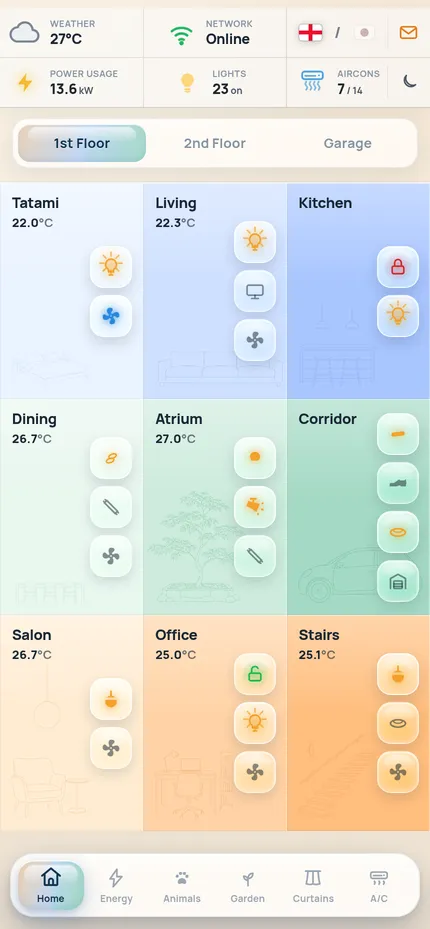
You are setting up Candy v2.1, a phone dashboard for Home Assistant, for a person who wants it on their own home. Everything in this package runs as a demo first (a made-up home called "Sakura Home" in Tokyo, with six cats and made-up data), then you connect it to their Home Assistant and swap the made-up parts for theirs. Work through the steps in order; each one says how to check it worked. You should not need to ask the authors anything.
What you're building
Candy v2.1 home screen
A single-page, framework-free phone app (plain HTML + CSS + JavaScript, no build step) that shows a whole house on one screen: colour-coded room cards per floor with line sketches, lights / A/C / locks / fans as one-tap toggles, and six tabs — Home (floors, rooms, a garage page with camera and doorbell), Energy (solar, battery, grid, a day chart, usage and savings), Animals (which room each pet is in, timelines, litter boxes), Garden (camera feed, landscape lights, pool heater and water quality), Curtains (a live 3D view of each room's curtains, sheers or blinds with weather on the glass) and A/C (units, fans, purifiers, air quality per area, a 30-day air history). A top strip shows weather, network, language (English ⇄ 日本語), power, lights on, A/C running and notifications.
What the person needs: Home Assistant 2024.1 or newer (2023.9+ works; the weather pop-up uses
weather.get_forecasts), a phone (any modern iPhone or Android; the design is made for portrait phones 360–440 px
wide), and either a computer that stays on at home (to run the small proxy, mode A) or nothing else at all (mode B,
the app lives inside Home Assistant). Time: 5 minutes for the demo; 2–6 hours to map a typical house (depends on
how many tabs they keep); 1–3 hours for their own pictures.
What's in this package
HANDOFF.md            this guide
README.md             three lines: what this is / read HANDOFF.md / npm run dev
LICENSE               MIT
package.json          npm scripts only — there are no dependencies to install
.env.example          settings for the live proxy (copy to .env.live)
.gitignore
app/                  THE APP — static files, served as they are
  index.html          the whole app: styles, markup and ~40 small modules (one per view / pop-up)
  ha-live.js          the Home Assistant client: window.HA (demo = inert; live = WebSocket + REST)
  demo-bridge.js      demo only: lets a page around the app set the time and weather (delete when live)
  sw.js               service worker (offline start, instant reopen); manifest.json + icon*.png = installable app
  assets/sketches/    14 room line drawings (transparent PNG masks, tinted by CSS per room)
  animals/assets/pets/  6 cat portraits (512 px PNG)
  garden/assets/cams/   2 demo camera stills (shown only in the demo)
  curtains3d/         the 3D curtain engine (engine.js), the room registry (rooms.js) and the window views
    assets/           <room>{day,storm,night,stormnight}_hf.jpg (1264×848) + archivo.woff2 (+ its licence)
  airgraphs/graphs-data.js   30 days of made-up air-quality history for the Air History pop-up
  vendor/three/       three.js r169 (the 3D engine's only library)
tools/
  serve.mjs           demo server (no dependencies):          npm run dev
  live-proxy.mjs      live mode A: serves the app + forwards /api to Home Assistant with the token: npm run dev:live
  entities.mjs        lists every entity id the app uses; rewrites them from a JSON map (Step 2)
  pictures.py         picture helpers (Python 3 + Pillow): sketches, night window views, pets (Step 4)
docs/still.jpg the screenshot aboveRun the demo first
- You need Node.js 18 or newer (
node -v). There is nothing to install:npm installfinishes at once. npm run dev→ open http://localhost:8080/ (the terminal prints the address). On the person's phone, usehttp://<this computer's address>:8080/on the same Wi-Fi. No Node?python3 -m http.server 8080 -d appworks too.- Check: the home screen shows "Tatami, Living, Kitchen…" cards; every tab opens; tapping a toggle animates it; the Curtains tab shows a 3D room with rain on the window. Nothing talks to Home Assistant in the demo.
- Optional: try the demo clock and weather —
http://localhost:8080/?t=21:30&wx=rainy(24 h time; weather is one ofsunny partlycloudy cloudy rainy lightning-rainy fog snowy). The weather chip, forecast, energy day and the 3D curtains follow.
This proves the files and the phone are fine before you touch their house.
How it works
One page, many small modules. app/index.html holds the CSS, the markup and a series of
(function(){ … })(); modules, one per view or pop-up. Each module owns a plain data object (rooms, devices,
entity ids, demo values) and a render function. There is no framework and no bundler: edit the file, reload.
The Home Assistant layer is window.HA (app/ha-live.js):
| Call | Demo | Live |
|---|---|---|
HA.live | false | true once connected |
HA.get(id) | null | {state, attributes, last_changed, last_updated} |
HA.on(id, cb) / HA.off(id, cb) | stored, never fired | fired on every state_changed of that entity |
HA.call(domain, service, data) | resolves null | call_service over the WebSocket (queued while reconnecting) |
HA.callR(…) | resolves null | the same with return_response (used for weather.get_forecasts) |
HA.ws(msg) | rejects | any WebSocket command (used for statistics / history) |
HA.camUrl(id, n) | /api/camera_proxy/<id>?n=n | the same through the proxy; with a camera token in mode B |
HA.ready | resolves false | resolves true after the first get_states |
Mock first, live on top. Every module first renders its demo data, then — only when window.HA.live — reads the
real states, subscribes with HA.on and calls services on taps. So the app always paints instantly, and anything you
do not map keeps showing demo values (Step 2 says how to hide those parts). Live mode switches on when
window.CANDY_LIVE is set (the proxy injects it, mode A) or when the app is opened from Home Assistant's
/local/… folder (mode B). The demo also seeds a few things from the clock (doorbell rings "today", timelines).
Where the configuration lives (all inside app/index.html, find them by name):
| Object | What it configures |
|---|---|
const ROOMS = [ / const ROOMS2F = [ | the room cards of each floor: name, temperature entity, toggles (kind, entity) |
const SKETCH = { / const SKETCH2F = { | which sketch and tint each card uses (f = file in assets/sketches/, c = colour, optional scale) |
var HAP= | the top strip: home power sensor and the list of A/C units counted as "running" |
window.GARDEN = { | garden lights, pool heater, water-quality sensors, camera names |
window.ENERGY = { | solar / grid / battery power and energy sensors, savings sensors |
var CATS = [, var LITTER = [ | the pets (id, name, colour, photo, home room) and litter boxes |
var FANS = [, var PURIFIERS = [, var ACS = [, var AREAS = [ | the A/C tab: fans, purifiers (+ the automation that runs each in auto), A/C units, air areas |
var ROOMS = { (room pop-ups) | the device list each room card opens: lights (dimmable or not, icons), A/C, locks, scenes |
var PURIF_UNITS = [, var LOCKS = [, var NETDEVS = [, var NODES = [ | what the notification bell watches: purifier filters/faults, lock batteries, network devices, presence receivers |
var ZONES = [ (Air History) | which temperature / humidity / AQI / CO₂ / VOC sensors make each ridgeline |
curtains3d/rooms.js | the 3D curtain rooms: plate name, glass/pool/deck rectangles, curtain kind, motor timings, entities |
Language. The UI is written in English; a second language comes from the dictionary window.__TH = { "English text": "translation", … } near the end of index.html and a small DOM walker that swaps visible text when the
flag in the top strip is tapped. To use their language instead of Japanese, replace the dictionary values (keep the
English keys), replace the second flag's SVG (flagTH in the top strip module) and the toast text next to it.
Theme. Colours are CSS variables on :root, with dark-mode overrides under html.dark. The moon/sun button in
the top strip toggles dark mode and remembers it in localStorage (theme).
Pictures. Room sketches are masks: the PNG's alpha is the line, CSS paints it in the room's colour
(mask-image + background-color), so one drawing works for any colour and both themes. Pet portraits are plain
images. The 3D curtains render each room's window view (a photo-like plate) behind cloth simulated in three.js; rain
streaks are clipped to the room's glass rectangle from rooms.js (fractions of the plate, v measured from the
bottom), splashes to pool / deck rectangles.
Demo bridge. demo-bridge.js (demo only) listens for postMessage({dc:"demo", v:1, type:"set", time, weather})
from a parent page and for ?t= / ?wx=; it shifts the app's clock, re-draws the energy day, the weather chip and
forecast, and the curtain scene. Live builds don't need it.
Step 1 — Inventory their Home Assistant
Get a list of their entities with states and attributes, either:
- Home Assistant → Developer tools → States (filter by domain, copy what you need), or
- REST with a long-lived token (profile → Security → Long-lived access tokens):
curl -s -H "Authorization: Bearer $HA_TOKEN" http://homeassistant.local:8123/api/states > states.json(keepstates.jsonand the token out of anything you publish).
Domains this dashboard can use: light switch climate fan lock cover camera sensor binary_sensor weather sun input_boolean input_select script automation media_player group. For each tab, decide with the person whether they
have the matching equipment:
| Tab / part | Needs | If they don't have it |
|---|---|---|
| Home cards, room pop-ups | lights/switches, climate.* (A/C or thermostats), lock.*, temperature sensors per room | keep the tab; remove toggles they lack (Step 2) |
| Garage page | a garage light/switch, a camera.*, a doorbell binary_sensor.* | delete the Garage chip (Make it theirs) |
| Energy | solar inverter / battery / grid meter power sensors (kW) and daily energy (kWh) — any inverter or battery integration, or a clamp meter | hide the tab |
| Animals | per pet a sensor whose state is the pet's room (BLE collar tags + room receivers, e.g. ESPHome Bluetooth proxies with a room-presence integration such as Bermuda); optional smart litter boxes | hide the tab |
| Garden | landscape lights, a camera.*, optional pool heater (climate.*) and water probes (pH, ORP, temperature) | remove the pool cards / hide the tab |
| Curtains | covers or curtain scripts per room | hide the tab |
| A/C | climate.*, fan.*, purifiers (fan.* + filter sensors), air-quality sensors | remove the groups they lack |
| Weather chip + pop-up | any weather.* entity (the built-in Met.no integration is fine) | — (strongly recommended) |
Step 2 — Map entities
Every id in the app is a made-up placeholder (light.l_23, sensor.s_139, climate.ac_7 …). Map each to one of
theirs, or remove what they don't have.
node tools/entities.mjs > my-entities.mdlists every id with the view it belongs to and its label (the tables below are that output for this package).- Write
map.json—{ "light.l_23": "light.bedroom_ceiling", "climate.ac_1": "climate.tatami_ac", … }— using theirstates.jsonfrom Step 1. Match by meaning (room + device), not by number. node tools/entities.mjs --unmapped map.jsonshows what is still missing; thennode tools/entities.mjs --apply map.jsonrewrites the ids inapp/index.htmlandapp/curtains3d/rooms.js.- For things they don't have: delete the toggle object (
{kind:'light', on:false, entity:'light.l_13'}) from the card inROOMS/ROOMS2F, the device object from the room's pop-up list invar ROOMS = {, or the row from the tab's list (FANS,ACS,AREAS,LITTER, gardenlights…). To hide a whole tab, see Make it theirs. - Rename the visible names in the same objects (
name:'Tatami'→ their room). If they keep Japanese (or add their language), add the new names to thewindow.__THdictionary.
Ids that are built from a pattern (not listed in the tables; create them with these names or edit the pattern in the code):
- Animals:
sensor.<pet id>_room(state = the pet's current room key, e.g.kitchen_1) and, for the time-share rings,sensor.<pet id>_room_ratio_<period>_<room key>with<period>=todayor7d(any scale — the app normalises them). The History stats helper makes these (Settings → Devices & services → Helpers → History stats, type "ratio", entity = the pet's room sensor, state = the room key, a 24 h or 7 d window) — or skip them: the rings then stay on demo values, so hide the ring rows. - Purifier notifications (
PURIF_UNITS,base= the purifier's id stem):binary_sensor.<base>_fault_<fault>,binary_sensor.<base>_filter_replacement,sensor.<base>_hepa_filter_life,sensor.<base>_carbon_filter_life,sensor.<base>_hepa_filter_type. Purifier integrations differ; remove the checks they don't expose. - Presence receivers (
NODES):binary_sensor.presence_<room>_connectivity.
Helpers they may need:
# configuration.yaml (or Settings → Helpers → Template → Sensor in the UI)
template:
  - sensor:
      - name: "Home power now"            # the top strip and Energy "Current use" expect kW
        unit_of_measurement: "kW"
        device_class: power
        state: "{{ (states('sensor.house_power_w') | float(0) / 1000) | round(2) }}"
      - name: "Lights on"                 # optional: a count for automations; the app counts lights itself
        state: "{{ states.light | selectattr('state','eq','on') | list | count }}"
Curtains (curtains3d/rooms.js, one object per room): open = an input_boolean.* (or a binary sensor) that is on
while the curtain is open, dir = an input_select.* the script reads for the direction, script = the
script.* that moves it. If their curtains are plain cover.* entities, make two tiny scripts or change the call
in the Curtains module (HA.call('cover', open ? 'open_cover' : 'close_cover', {entity_id})).
Every entity the demo uses
| Domain | State / attributes read | Services called |
|---|---|---|
automation | on/off | automation.turn_on / turn_off |
binary_sensor | on/off | — |
button | — | button.press |
camera | snapshot image (/api/camera_proxy) | — |
climate | hvac_mode, current_temperature, temperature | climate.set_hvac_mode / set_temperature |
fan | on/off, percentage, preset_mode | fan.turn_on / turn_off / set_percentage / set_preset_mode |
group | on/off | — |
input_boolean | on/off (curtain open flag / UI toggle) | input_boolean.turn_on / turn_off |
input_select | option (curtain direction) | input_select.select_option |
light | on/off, brightness | light.turn_on / turn_off (brightness_pct) |
lock | locked/unlocked | lock.lock / unlock |
media_player | state, media title, volume | media_player.media_play_pause / volume_set |
script | — | script.turn_on |
sensor | numeric state (+ unit) | — |
sun | above/below_horizon | — |
switch | on/off | switch.turn_on / turn_off |
weather | condition + temperature, humidity; forecasts | weather.get_forecasts |
Home · 1st-floor room cards (25)
| Demo id | What (label · kind) | Key in the code | Also used in |
|---|---|---|---|
climate.ac_1 | Tatami / Tatami Bedroom · ac | tempEnt, entity | Top strip; A/C; Room pop-ups |
climate.ac_2 | Living / Living Room 1FL · ac | tempEntBak, entity, temp | Top strip; A/C; Air History |
climate.ac_3 | Dining / Salon · ac | tempEnt, entity, acs | Top strip; A/C; Room pop-ups |
climate.ac_4 | Office / Study · ac | tempEntBak, entity, temp | Top strip; A/C; Air History; Room pop-ups |
climate.ac_5 | Stairs / Stairway 2F · ac | tempEnt, entity | Top strip; A/C; Room pop-ups |
group.grp_1 | light | entity | |
light.l_1 | light | entity | |
light.l_2 | light | entity | |
light.l_3 | Under Cupboard Lights · light | entity | Room pop-ups |
light.l_4 | Halo Ring Lights · light | entity | Room pop-ups |
light.l_5 | Cove Lights · light | entity | Room pop-ups |
light.l_6 | light | entity | |
light.l_7 | light | entity | |
light.l_8 | Cove Lights · light | entity | Room pop-ups |
light.l_9 | Shoe Room · shoe / light | entity | Room pop-ups |
light.l_10 | Corridor / Long Corridor · light | entity | Room pop-ups |
light.l_11 | Halo Pendants · light | entity | Room pop-ups |
light.l_12 | Stairs Halo · light | entity | Room pop-ups |
lock.lock_1 | Kitchen Lock / Doorlock · lock | entity, lock | Notifications; Room pop-ups |
lock.lock_2 | Study Lock / Doorlock · lock | entity, lock | Notifications; Room pop-ups |
media_player.mp_1 | tv | entity | |
sensor.s_43 | Office | tempEnt, temp | A/C; Air History |
sensor.s_143 | Living | tempEnt | |
sensor.s_151 | Atrium | tempEnt | |
switch.sw_1 | light | entity, entity_id | Home · Garage |
Home · 2nd-floor room cards (32)
| Demo id | What (label · kind) | Key in the code | Also used in |
|---|---|---|---|
climate.ac_6 | Master / Master Bed 2 · ac | tempEntBak, entity | Top strip; A/C; Air History; Room pop-ups |
climate.ac_7 | Master Bed 1 · acpink / ac | entity, temp | Top strip; A/C; Air History; Room pop-ups |
climate.ac_8 | Closet / Walk-in Closet · ac | tempEnt, entity | Top strip; A/C |
climate.ac_9 | Living / Living Room 2FL · ac | tempEntBak, entity, temp | Top strip; A/C; Air History |
climate.ac_10 | Pink Room / Studio · ac | tempEntBak, entity, temp | Top strip; A/C; Air History |
climate.ac_11 | Nursery · ac | tempEntBak, entity, temp | Top strip; A/C; Air History |
climate.ac_12 | Guest 2 / Bedroom 2 · ac | tempEnt, entity, temp | Top strip; A/C; Air History |
climate.ac_13 | Guest 4 / Bedroom 4 · ac | tempEntBak, entity, temp | Top strip; A/C; Air History |
input_boolean.ib_1 | light | entity | |
input_boolean.ib_2 | light | entity | |
light.l_13 | light | entity | |
light.l_14 | light | entity | |
light.l_15 | light | entity | |
light.l_16 | light | entity | |
light.l_17 | light | entity | |
light.l_18 | light | entity | |
light.l_19 | light | entity | |
light.l_20 | light | entity | |
light.l_21 | light | entity | |
light.l_22 | light | entity | |
light.l_64 | — | — | |
lock.lock_3 | Master Bed Lock / Doorlock · lock | entity, lock | Notifications; Room pop-ups |
lock.lock_4 | Pink Room Lock / Doorlock · lock | entity, lock | Notifications; Room pop-ups |
media_player.mp_2 | tv | entity | |
media_player.mp_3 | tv | entity | |
sensor.s_35 | Nursery | tempEnt, temp | A/C; Air History |
sensor.s_39 | Master | tempEnt, temp | A/C; Air History |
sensor.s_47 | Guest 4 | tempEnt, temp | A/C; Air History |
sensor.s_51 | Pink Room | tempEnt, temp | A/C; Air History |
sensor.s_141 | Cat Room | tempEnt | |
sensor.s_175 | Living | tempEnt | |
switch.sw_2 | light | entity |
Home · Garage (gate light, cameras, doorbell) (2)
| Demo id | What (label · kind) | Key in the code | Also used in |
|---|---|---|---|
binary_sensor.doorbell_1 | — | — | |
camera.cam_1 | Garage · Camera | ent | Notifications |
Top strip (weather, power, lights, A/C counters) (2)
| Demo id | What (label · kind) | Key in the code | Also used in |
|---|---|---|---|
climate.ac_14 | Corridor 1FL | entity | A/C |
sensor.s_1 | — | power, loadPower | Energy |
Lights pop-up (3)
| Demo id | What (label · kind) | Key in the code | Also used in |
|---|---|---|---|
weather.wx_1 | — | — | Weather pop-up; Other |
weather.wx_2 | — | — | Weather pop-up |
weather.wx_3 | — | — | Weather pop-up |
Weather pop-up (1)
| Demo id | What (label · kind) | Key in the code | Also used in |
|---|---|---|---|
button.active | — | — |
Energy (19)
| Demo id | What (label · kind) | Key in the code | Also used in |
|---|---|---|---|
binary_sensor.bs_1 | — | charging | |
sensor.s_2 | — | gridPower | |
sensor.s_3 | — | solarPower | |
sensor.s_4 | — | batt | |
sensor.s_5 | — | battPower | |
sensor.s_6 | — | today | |
sensor.s_7 | — | week | |
sensor.s_8 | — | month | |
sensor.s_9 | — | today | |
sensor.s_10 | — | week | |
sensor.s_11 | — | month | |
sensor.s_12 | — | today | |
sensor.s_13 | — | week | |
sensor.s_14 | — | month | |
sensor.s_15 | — | today | |
sensor.s_16 | — | yesterday | |
sensor.s_17 | — | week | |
sensor.s_18 | — | month | |
sensor.s_19 | — | ytd |
Animals (pets, litter boxes) (1)
| Demo id | What (label · kind) | Key in the code | Also used in |
|---|---|---|---|
sensor.s_20 | — | — |
Garden (lights, pool, cameras) (13)
| Demo id | What (label · kind) | Key in the code | Also used in |
|---|---|---|---|
camera.cam_2 | Pool | entity | |
camera.cam_3 | Garden · Camera | entity, ent | Notifications |
climate.ac_15 | Pool Heater | entity | A/C |
sensor.s_21 | ORP | entity | |
sensor.s_22 | pH | entity | |
sensor.s_23 | Salt | entity | |
sensor.s_197 | — | tempEntity | |
switch.sw_3 | Olive Tree · tree | entity | |
switch.sw_4 | Pavillion · awning | entity | |
switch.sw_5 | Pool Wall · pool | entity | |
switch.sw_6 | Pool Step · ledstrip | entity | |
switch.sw_7 | Table & Sunbed · tablechair | entity | |
switch.sw_8 | Patio · recessed | entity |
Other (1)
| Demo id | What (label · kind) | Key in the code | Also used in |
|---|---|---|---|
sun.sun | — | — |
A/C (A/C units, fans, purifiers, air areas) (44)
| Demo id | What (label · kind) | Key in the code | Also used in |
|---|---|---|---|
automation.auto_1 | Salon / Living Room 1FL | autoEntity | |
automation.auto_2 | Study | autoEntity | |
automation.auto_3 | Living Room 2FL | autoEntity | |
automation.auto_4 | Studio | autoEntity | |
automation.auto_5 | Corridor 1FL | autoEntity | |
fan.fan_1 | Master Bedroom Fan | entity, fan | Notifications |
fan.fan_2 | — | entity, fan | Notifications |
fan.fan_3 | Tatami Fan | entity, fan | Notifications |
fan.fan_4 | Living Room 1FL / Living 1FL Purifier | entity, fan | Notifications |
fan.fan_5 | Study / Office Purifier | entity, fan | Notifications |
fan.fan_6 | Living Room 2FL / Living 2FL Purifier | entity, fan | Notifications |
fan.fan_7 | Salon / Salon Purifier | entity, fan | Notifications |
fan.fan_8 | Studio / Studio Purifier | entity, fan | Notifications |
fan.fan_9 | Corridor 1FL / Corridor Purifier | entity, fan | Notifications |
sensor.s_24 | — | temp | Air History |
sensor.s_25 | — | hum | Air History |
sensor.s_26 | — | aqi | Air History |
sensor.s_36 | — | hum | Air History |
sensor.s_37 | — | aqi | Air History |
sensor.s_38 | — | co2 | Air History |
sensor.s_40 | — | hum | Air History |
sensor.s_41 | — | aqi | Air History |
sensor.s_42 | — | co2 | Air History |
sensor.s_44 | — | hum | Air History |
sensor.s_45 | — | aqi | Air History |
sensor.s_46 | — | co2 | Air History |
sensor.s_48 | — | hum | Air History |
sensor.s_49 | — | aqi | Air History |
sensor.s_50 | — | co2 | Air History |
sensor.s_52 | — | hum | Air History |
sensor.s_53 | — | aqi | Air History |
sensor.s_54 | — | co2 | Air History |
sensor.s_152 | — | aqi | Air History |
sensor.s_154 | — | hum | Air History |
sensor.s_155 | — | temp | Air History |
sensor.s_156 | — | co2 | Air History |
sensor.s_169 | — | aqi | Air History |
sensor.s_170 | — | co2 | Air History |
sensor.s_171 | — | hum | Air History |
sensor.s_172 | — | temp | Air History |
sensor.s_173 | — | aqi | Air History |
sensor.s_179 | — | co2 | Air History |
sensor.s_180 | — | hum | Air History |
sensor.s_181 | — | temp | Air History |
Notifications (26)
| Demo id | What (label · kind) | Key in the code | Also used in |
|---|---|---|---|
binary_sensor.presence_cat_1_connectivity | — | — | |
binary_sensor.presence_dining_2_connectivity | — | — | |
binary_sensor.presence_genkan_connectivity | — | — | |
binary_sensor.presence_hall_east_2_connectivity | — | — | |
binary_sensor.presence_kitchen_1_connectivity | — | — | |
binary_sensor.presence_living_2_connectivity | — | — | |
binary_sensor.presence_living_west_connectivity | — | — | |
binary_sensor.presence_master_1_connectivity | — | — | |
binary_sensor.presence_office_1_connectivity | — | — | |
binary_sensor.presence_pantry_connectivity | — | — | |
binary_sensor.presence_salon_connectivity | — | — | |
binary_sensor.presence_stairway_2_connectivity | — | — | |
binary_sensor.presence_tatami_1_connectivity | — | — | |
camera.cam_door | Front Door · Camera | ent | |
sensor.s_138 | Kitchen Lock / Doorlock · lock | batt, batteryEntity | Room pop-ups |
sensor.s_139 | Study Lock / Doorlock · lock | batt, batteryEntity | Room pop-ups |
sensor.s_140 | Home Server · Server | ent | |
sensor.s_161 | Internet · Internet line | ent | |
sensor.s_162 | Gateway · Gateway | ent | |
sensor.s_191 | Pink Room Lock / Doorlock · lock | batt, batteryEntity | Room pop-ups |
sensor.s_192 | Master Bed Lock / Doorlock · lock | batt, batteryEntity | Room pop-ups |
sensor.s_198 | Wi-Fi · 1st Floor · Access point | ent | |
sensor.s_199 | Wi-Fi · 2nd Floor · Access point | ent | |
sensor.s_209 | Video Recorder · NVR | ent | |
sensor.s_214 | Core Switch · Switch | ent | |
sensor.s_217 | Wi-Fi · Garden · Access point | ent |
Air History (33)
| Demo id | What (label · kind) | Key in the code | Also used in |
|---|---|---|---|
sensor.s_142 | — | dew | |
sensor.s_144 | — | pb03 | |
sensor.s_145 | — | nox | |
sensor.s_146 | — | tvoc | |
sensor.s_147 | — | dew | |
sensor.s_148 | — | pb03 | |
sensor.s_149 | — | nox | |
sensor.s_150 | — | tvoc | |
sensor.s_153 | — | dew | |
sensor.s_157 | — | pb03 | |
sensor.s_158 | — | nox | |
sensor.s_159 | — | tvoc | |
sensor.s_165 | — | dew | |
sensor.s_166 | — | pb03 | |
sensor.s_167 | — | nox | |
sensor.s_168 | — | tvoc | |
sensor.s_174 | — | dew | |
sensor.s_176 | — | pb03 | |
sensor.s_177 | — | nox | |
sensor.s_178 | — | tvoc | |
sensor.s_182 | — | dew | |
sensor.s_183 | — | pb03 | |
sensor.s_184 | — | nox | |
sensor.s_185 | — | tvoc | |
sensor.s_186 | — | dew | |
sensor.s_187 | — | pb03 | |
sensor.s_188 | — | nox | |
sensor.s_189 | — | tvoc | |
sensor.s_190 | — | dew | |
sensor.s_201 | — | dew | |
sensor.s_202 | — | pb03 | |
sensor.s_203 | — | nox | |
sensor.s_204 | — | tvoc |
Room pop-ups (56)
| Demo id | What (label · kind) | Key in the code | Also used in |
|---|---|---|---|
light.l_23 | Cove Lights · light | entity | |
light.l_24 | Bed Spotlights · light | entity | |
light.l_25 | Closet Spotlights · light | entity | |
light.l_26 | Shelf Striplights · light | entity | |
light.l_27 | TV Spotlights · light | entity | |
light.l_28 | Cove Lights · light | entity | |
light.l_29 | Shelf Striplight · light | entity | |
light.l_30 | Spotlights · light | entity | |
light.l_33 | Main LEDs · light | entity | |
light.l_34 | LED Striplights · light | entity | |
light.l_35 | Cove Lighting · light | entity | |
light.l_36 | Recessed Lights · light | entity | |
light.l_37 | Headboard · light | entity | |
light.l_38 | Side Spotlights · light | entity | |
light.l_39 | TV Spotlights · light | entity | |
light.l_40 | Shelf Striplights · light | entity | |
light.l_41 | Hallway · light | entity | |
light.l_42 | Cove Lights · light | entity | |
light.l_43 | TV Spotlights · light | entity | |
light.l_44 | Shelf Striplights · light | entity | |
light.l_45 | Stairs Landing · light | entity | |
light.l_46 | Spotlights · light | entity | |
light.l_47 | Long Corridor · light | entity | |
light.l_48 | Archway LEDs · light | entity | |
light.l_49 | Flower Lights · light | entity | |
light.l_50 | Cove Lights · light | entity | |
light.l_51 | Clouds · light | entity | |
light.l_52 | Arch Striplight · light | entity | |
light.l_53 | LED Lights · light | entity | |
light.l_54 | Closet Lights · light | entity | |
light.l_55 | Back Recessed · light | entity | |
light.l_56 | Front Recessed · light | entity | |
light.l_57 | Closet Lights · light | entity | |
light.l_58 | Back Recessed · light | entity | |
light.l_59 | Front Recessed · light | entity | |
light.l_60 | Corridor Lights · light | entity | |
light.l_61 | Wall Lights · light | entity | |
light.l_62 | Cove · cove | entity | |
light.l_63 | Downlights · recessed | entity | |
light.l_65 | — | kelvinEnt | |
light.l_66 | Halo Arc Lamp · light | entity | |
light.l_67 | — | warm | |
light.l_68 | — | cool | |
script.scr_30 | Halo Pendants · light | introScript | |
switch.sw_14 | Headboard · light | entity | |
switch.sw_15 | Living Room Lamp · light | entity | |
switch.sw_16 | Spotlights · light | entity | |
switch.sw_17 | Hanging Lights · light | entity | |
switch.sw_19 | Step Lighting · light | entity | |
switch.sw_20 | Balcony Lights · light | entity | |
switch.sw_21 | Cove Lights · light | entity | |
switch.sw_23 | Cove Lights · light | entity | |
switch.sw_24 | Terrace Light · light | entity | |
switch.sw_25 | Cove Lights · light | entity | |
switch.sw_26 | Terrace Light · light | entity | |
switch.sw_29 | Halo Wall Lights · light | entity |
Curtains (3D) (48)
| Demo id | What (label · kind) | Key in the code | Also used in |
|---|---|---|---|
input_boolean.ib_c10 | Curtains · scripted | open | |
input_boolean.ib_c13 | Sheers · scripted | open | |
input_boolean.ib_c16 | Curtains · scripted | open | |
input_boolean.ib_c19 | Sheers · scripted | open | |
input_boolean.ib_c22 | Curtains · scripted | open | |
input_boolean.ib_c25 | Sheers · scripted | open | |
input_boolean.ib_c28 | Curtains · scripted | open | |
input_boolean.ib_c31 | Sheers · scripted | open | |
input_boolean.ib_c34 | Curtains · scripted | open | |
input_boolean.ib_c37 | Sheers · scripted | open | |
input_boolean.ib_c40 | Curtains · scripted | open | |
input_boolean.ib_c43 | Sheers · scripted | open | |
input_boolean.ib_c46 | Blinds · scripted | open | |
input_select.sel_c2 | Curtains · scripted | dir | |
input_select.sel_c5 | Sheers · scripted | dir | |
input_select.sel_c8 | Blinds · scripted | dir | |
input_select.sel_c11 | Curtains · scripted | dir | |
input_select.sel_c14 | Sheers · scripted | dir | |
input_select.sel_c17 | Curtains · scripted | dir | |
input_select.sel_c20 | Sheers · scripted | dir | |
input_select.sel_c23 | Curtains · scripted | dir | |
input_select.sel_c26 | Sheers · scripted | dir | |
input_select.sel_c29 | Curtains · scripted | dir | |
input_select.sel_c32 | Sheers · scripted | dir | |
input_select.sel_c35 | Curtains · scripted | dir | |
input_select.sel_c38 | Sheers · scripted | dir | |
input_select.sel_c41 | Curtains · scripted | dir | |
input_select.sel_c44 | Sheers · scripted | dir | |
input_select.sel_c47 | Blinds · scripted | dir | |
script.scr_c3 | Curtains · scripted | script | |
script.scr_c6 | Sheers · scripted | script | |
script.scr_c9 | Blinds · scripted | script | |
script.scr_c12 | Curtains · scripted | script | |
script.scr_c15 | Sheers · scripted | script | |
script.scr_c18 | Curtains · scripted | script | |
script.scr_c21 | Sheers · scripted | script | |
script.scr_c24 | Curtains · scripted | script | |
script.scr_c27 | Sheers · scripted | script | |
script.scr_c30 | Curtains · scripted | script | |
script.scr_c33 | Sheers · scripted | script | |
script.scr_c36 | Curtains · scripted | script | |
script.scr_c39 | Sheers · scripted | script | |
script.scr_c42 | Curtains · scripted | script | |
script.scr_c45 | Sheers · scripted | script | |
script.scr_c48 | Blinds · scripted | script | |
switch.sw_c1 | Curtains · scripted | open | |
switch.sw_c4 | Sheers · scripted | open | |
switch.sw_c7 | Blinds · scripted | open |
Step 3 — Go live
The same app/ folder runs live in two ways. In both, first remove the demo bridge: delete
app/demo-bridge.js and the line <script src="demo-bridge.js"></script> at the top of app/index.html.
Mode A — a small proxy on their network (recommended; works with any Home Assistant).
cp .env.example .env.liveand fill inHA_URL(e.g.http://homeassistant.local:8123) andHA_TOKEN(a long-lived token). Optional:PORT,TLS_KEY+TLS_CERTfor HTTPS,SNAP_DIRfor doorbell snapshots,ALLOWED_HOSTS(only if the phone opens the proxy by a name that is not an IP address,localhostor a.local/.lanname).npm run dev:live(Node 22 or newer — Node 20.10+ works withnode --experimental-websocket tools/live-proxy.mjs) (=node tools/live-proxy.mjs). It servesapp/, addswindow.CANDY_LIVE='proxy'to the page, and forwards/api/…(REST and the WebSocket) to Home Assistant, adding the token on the server side — the token never reaches the phone.- Open
http(s)://<that computer>:8080/on the phone. Keep this port inside their home network: anyone who can reach it can control the house. - Keep it running: a service (
systemd,pm2, Task Scheduler) or Docker:docker run -d --restart unless-stopped --name candy -v "$PWD":/app -w /app --env-file .env.live -p 8080:8080 node:22-alpine node tools/live-proxy.mjs(node:22or newer: the proxy uses Node's built-in WebSocket client). - HTTPS: the phone needs it to install the app to the home screen and for the service worker. Make a certificate
(
openssl req -x509 -newkey rsa:2048 -nodes -keyout key.pem -out cert.pem -days 3650 -subj "/CN=candy"), setTLS_KEY/TLS_CERT, and trust it on the phone once — or put the proxy behind their existing reverse proxy.
Mode B — inside Home Assistant (nothing else to run).
- Copy everything in
app/to<config>/www/candy/on the Home Assistant machine (Samba, File editor or Studio Code Server add-on, orscp). Files inwww/are served at/local/without login, so never put a token or anything private in these files. - On the phone open
https://<their Home Assistant address>/local/candy/index.html(orhttp://…:8123/…on the home network). The app sees the/local/path, sends the person to Home Assistant's own login page once, and keeps the session inlocalStorage(candy-ha-auth). Cameras use each camera's own access token (HA.camUrl). - If Home Assistant is reached through several addresses, always open the app at the address you log in at.
What else to delete once live (optional): the demo seeds stay as the first paint and as values for anything you
didn't map — that is why Step 2 removes what they don't have. app/airgraphs/graphs-data.js is only the demo's
history: live, the Air History pop-up asks Home Assistant's statistics instead. garden/assets/cams/*.jpg are only
shown in the demo.
Step 4 — Pictures
Every picture the app uses:
Path (in app/) | Size | Role | Keep / replace |
|---|---|---|---|
assets/sketches/{bedroom,living,kitchen,dining,atrium,corridor,formal,office,stairs,bathroom,closet,cat,pinkroom,baby}.png | ≤ 800 px, transparent | line drawing on each Home card (bottom-left, faint) and room pop-up header, tinted by CSS | replace to match their rooms (optional: they are generic furniture) |
animals/assets/pets/{mochi,yuki,sora,kuro,hana,ren}.png | 512×512 | pet portraits (cards, sheets) | replace (their pets) |
curtains3d/assets/<room>day_hf.jpg, <room>storm_hf.jpg, <room>night_hf.jpg, <room>stormnight_hf.jpg (9 rooms) | 1264×848 | window view behind the 3D curtains, per room and scene | replace (their windows) |
garden/assets/cams/{garden,pool}.jpg | 1376×768 | demo camera stills | keep (live shows their cameras) |
icon.png, apple-touch-icon*.png (180), icon-192.png, icon-512.png | square | home-screen icon | replace (optional, their own icon) |
curtains3d/assets/archivo.woff2 | — | font for the 3D labels | keep |
everything in vendor/ | — | three.js | keep |
Room sketches — one subject per room, minimal black line art on white, then python3 tools/pictures.py sketch drawing.png app/assets/sketches/<name>.png. The tool keeps the line darkness as transparency, trims and sizes it.
Prompt used for this demo (one call per room, square or wide):
Minimal black line drawing on a pure white background. Thin, even-weight black ink line with clean continuous contour strokes, like an architect's quick furniture sketch. No shading, no hatching, no fills, no colour, no grey, no text, no lettering, no logos, no shadows, no border. The object is centred and completely inside the frame with a generous white margin. Subject: a low wooden platform bed with two pillows and a small bedside lamp on each side.
Subjects used: bed + lamps · long low sofa · kitchen island + stools + pendants · dining table + chairs · a small
Japanese maple in a stone planter · a compact hatchback (garage corridor) · armchair under a globe pendant · desk +
laptop + bookshelf · floating timber stairs · wooden soaking tub + stool · wardrobe rail · cat tree with a cat ·
easel + canvas · crib with a star mobile. Pick one recognisable object for each of their rooms. Wide subjects suit
cards with a scale above 1 in SKETCH.
Non-AI route that works very well: any single-colour line icon (e.g. an openly licensed icon set) exported as a PNG
— the app only uses its shape.
Pet portraits — square, head and shoulders, centred for a circular crop, plain light background. Their own
photos are the best start (it's their home): crop with python3 tools/pictures.py pet photo.jpg out.png and, if they
want the cartoon look, restyle the photo image-to-image ("cute kawaii cel-shaded cartoon portrait of this cat, big
eyes, clean thick outlines, flat pastel background, no text"). Keep the file names or update photo: in CATS.
Window views (3D curtains) — the view through each room's window, shot or generated straight on, the window frame exactly at the image edges, 3:2 (1264×848 is plenty). Four scenes per room must line up pixel for pixel:
day— the view on a bright day (their own photo through the window is ideal);storm— the same view, darker sky, wet ground: an image-to-image edit of the day plate ("same view, keep every line where it is, a dark thunderstorm sky, rain-darkened ground");nightandstormnight—python3 tools/pictures.py night day.jpg night.jpgand… --storm storm.jpg stormnight.jpg(a registered darkening, no AI needed). Then measure each room's glazing and updateglass: [u0, v0, u1, v1]incurtains3d/rooms.js(fractions of the plate,vfrom the bottom); addpool/deckrectangles only where rain should splash on water or paving. Edits can silently move window mullions: overlay day and storm at 50 % and check the frame lines stay put.
Free alternatives to the paid image service this demo used:
- Local, free: FLUX.1 [schnell] or SDXL in ComfyUI or Forge (a GPU with 8 GB+); Draw Things on a Mac / iPad.
- Free tiers: Google Gemini (image generation and edits), Microsoft Designer / Bing Image Creator, Ideogram, Leonardo, Adobe Firefly, Krea, ChatGPT's free image tier.
- No AI: their own photos (window views, pets), a free 3D model of the house (Sweet Home 3D or Blender) for window views, line icons for the sketches, or an illustrator.
- Best route per picture here: sketches → any model or icons; pets → their photos (+ image-to-image for the
cartoon look); window views → their own photos (day) +
pictures.py night, and one image-to-image edit for storm. - Consistency: generate one picture first, then pass it as the style reference for the others (or reuse the same seed and prompt prefix); keep one prompt prefix for the whole series.
Step 5 — Build & run
There is no build: app/ is the finished app. Host it with the live proxy (mode A) or in Home Assistant's www/
(mode B). For a public demo (no Home Assistant), any static host works — keep demo-bridge.js there.
- After every change to a file in
app/, edit the first line ofapp/sw.js(const CACHE = '…') to a new value, or phones keep showing the cached old files. - Phone as a wall/desk panel: open the app, "Add to Home Screen" (iPhone: Share → Add to Home Screen; Android: menu → Install app). It opens full screen. Lock it to the app with Guided Access (iPhone) or screen pinning (Android), or use a kiosk browser (Fully Kiosk Browser on Android). Keep the screen awake: Auto-Lock "Never" plus a charger, or the kiosk browser's keep-screen-on setting.
- Size: designed for portrait phones 360–440 px wide (tested at 430×929 CSS px); it reflows to the width. On a tablet or computer it still works, as a narrow column.
Step 6 — Verify
- Demo:
npm run dev, every tab and pop-up opens, no errors in the browser console. -
node tools/entities.mjs --unmapped map.jsonlists only ids you deliberately removed. - Live: the top strip shows their weather and power; the lights count matches Home Assistant.
- Every room card: the temperature is theirs; each toggle switches the right device (watch Home Assistant's logbook) and follows when the device is changed elsewhere.
- Room pop-ups: dimmers set brightness; A/C mode and set-point calls reach the right
climate.*. - Energy (if kept): current use, solar, battery and grid match their energy dashboard within a few %.
- Animals (if kept): each pet's room follows its sensor.
- Garden/garage cameras show live images; the doorbell card counts today's rings.
- Curtains (if kept): open/close run their scripts or covers; the 3D view follows the weather and night.
- Weather pop-up: hourly and daily forecasts come from their weather entity.
- Notifications bell: no false alarms for entities they don't have (remove those watch-list rows).
- On the target phone: smooth scrolling, the Curtains tab opens in under ~2 s, no reloads after an hour.
- Nothing private ended up in
app/(tokens, their address) if the folder is ever shared.
Make it theirs
- Names: room names in
ROOMS/ROOMS2F, the room pop-ups (var ROOMS = {),curtains3d/rooms.jsand the A/C lists; pet names inCATS; the app name inmanifest.jsonand<title>. - Colours: room card colours are classes on each card (
cls) and the tints inSKETCH/SKETCH2F; the rest are CSS variables at the top ofindex.html(light) and underhtml.dark(dark). - Fonts: Manrope from Google Fonts (
<link>near the top). Swap the family there and in the CSS, or self-host. - Language: see How it works → Language. English works on its own; the flag toggle can be removed from the top
strip's markup in its
render(). - Remove a tab: hide its button — e.g. Animals is the 3rd: add
#nav button:nth-of-type(3){display:none}to the CSS. Keep the buttons in the DOM: the tab handlers use their position. Also remove the top-strip shortcuts into that tab (the power tile opens Energy, the A/C tile opens A/C) in the strip's click handler. - Remove the Garage page: delete the third floor chip (
<button role="tab">Garage</button>) and the{key:'garage', …}entry inconst FLOORS. - Different floors:
const FLOORSlists the pages of the Home tab; each points at a rooms array and a sketch map.
Gotchas
- iOS cannot play a camera's MJPEG stream in an
<img>. The app polls/api/camera_proxy/snapshots in a double-buffered loop (about 7 fps, paused when off screen). Keep that pattern. - Doorbell snapshots: in live mode the garage page shows a thumbnail per ring from
/dbsnap/<unix time>.thumb.jpg(full size/dbsnap/<unix time>.jpg). Mode A serves them fromSNAP_DIR: an automation on the doorbell can savecamera.snapshotto<SNAP_DIR>/{{ as_timestamp(now()) | int }}.jpgand a copy as.thumb.jpg(a smaller copy is nicer on the phone; the folder must be listed inallowlist_external_dirs). Without them the rows show no picture. - Service-worker caching (see Step 5): without a new
CACHEvalue, edits seem to "not work" on the phone. - HTTPS and mixed content: a page served over
https://cannot openws://to Home Assistant — both modes keep everything on one origin, keep it that way. Add to Home Screen, the service worker and haptics need HTTPS. - Big installations: live mode loads all states once and listens to every
state_changed; a few thousand entities are fine on a recent phone, tens of thousands are not — then filter inha-live.js(subscribe only to the ids the app uses). - Lights helper:
window.casCallre-sends a light command once after ~1 s — some lighting meshes drop the first command. Remove the second call if their lights are reliable. - Time and night: the app shows the phone's local time; the Curtains tab switches to night plates when
sun.sunis below the horizon. Sun-dependent things follow Home Assistant's own location. - Motion: heavy animations respect
prefers-reduced-motion; the 3D curtains use WebGL — very old phones may render them slowly; remove the tab if so. - Storage keys:
theme,notifs.v1(notification history),lbri.v1(last brightness per light),candy-ha-auth(mode B login). Clear them when testing from scratch. - Haptics: iOS only buzzes for a real tap on a native
<input type="checkbox" switch>, which is why toggles are<label>s wrapping hidden switches. Don't replace them with plain buttons.
Licences
- Code (everything in
app/exceptvendor/, plustools/): MIT — seeLICENSE("Copyright (c) 2026 dashboards.casa"). - three.js (
app/vendor/three/): MIT, © three.js authors (its licence header is kept in the file). - Archivo font (
app/curtains3d/assets/archivo.woff2): SIL Open Font License 1.1, text inapp/curtains3d/assets/OFL-archivo.txt. Manrope (and Sora + Plus Jakarta Sans in the notifications pop-up) load from Google Fonts (Open Font License). - The made-up home's pictures (sketches, pets, window views, demo camera stills, icon) were made for this demo and are free to use as examples.