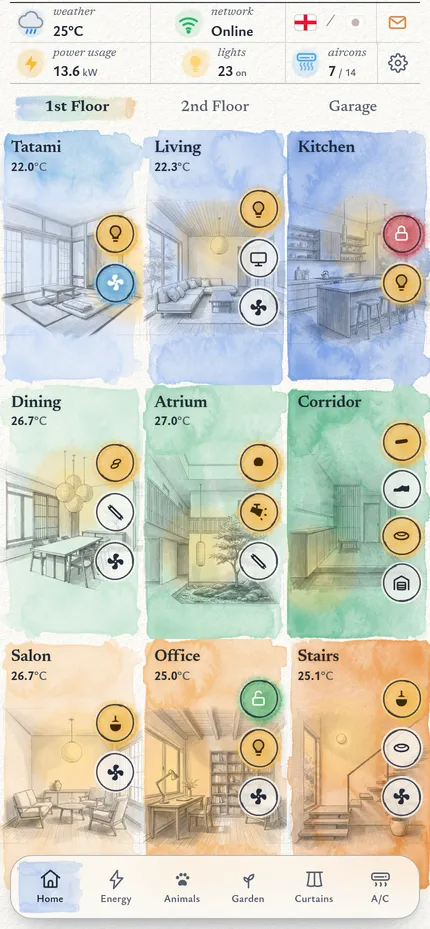
You are setting up Candy v3.1, a watercolour-styled phone dashboard for Home Assistant, for a person who wants it on their own home. Everything in this package runs as a demo first (a made-up home called "Sakura Home" in Tokyo, with six cats and made-up data), then you connect it to their Home Assistant and swap the made-up parts — including the paintings — for theirs. Work through the steps in order; each one says how to check it worked. You should not need to ask the authors anything.
What you're building
Candy v3.1 home screen
A single-page, framework-free phone app (plain HTML + CSS + JavaScript, no build step) drawn like an architect's ink-and-watercolour sketchbook: every room is a grey painting washed in its zone colour, a lamp bloom glows on the painting where a light is on, and the house itself is painted on the Energy tab with a sun by day and the real moon phase by night, its windows lighting up when the lights are on. Six tabs — Home (floors of painted room tiles, a garage page with camera and doorbell), Energy (the house with live annotations, a day chart, usage, savings), Animals (pets washed in the colour of the room they are in, timelines, litter boxes), Garden (a day/night painting with each landscape light glowing where it is, cameras, pool), Curtains (live 3D curtains with weather on the glass) and A/C (units, fans, purifier "specimen" pages, air quality, a 30-day air history). A top strip shows weather, network, language (English ⇄ 日本語), power, lights and A/C; a cog opens Settings (Light / Dark / System).
What the person needs: Home Assistant 2024.1 or newer (2023.9+ works; the weather pop-up uses
weather.get_forecasts), a phone (any modern iPhone or Android; the design is made for portrait phones 360–440 px
wide), and either a computer that stays on at home (to run the small proxy, mode A) or nothing else at all (mode B,
the app lives inside Home Assistant). Time: 5 minutes for the demo; 2–6 hours to map a typical house; 2–4 hours for
their own paintings (the house and garden pictures take the most care).
What's in this package
HANDOFF.md            this guide
README.md             three lines: what this is / read HANDOFF.md / npm run dev
LICENSE               MIT
package.json          npm scripts only — there are no dependencies to install
.env.example          settings for the live proxy (copy to .env.live)
.gitignore
app/                  THE APP — static files, served as they are
  index.html          the whole app: styles, markup and ~40 small modules (one per view / pop-up)
  ha-live.js          the Home Assistant client: window.HA (demo = inert; live = WebSocket + REST)
  demo-bridge.js      demo only: lets a page around the app set the time and weather (delete when live)
  sw.js               service worker; manifest.json + icon*.png = installable app
  assets/
    tex/              watercolour masks: washes, blooms, brush strokes, granulation, paper (+ ring.svg)
    rooms/            18 room paintings, neutral grey, 480×720 (room pop-ups)
    rooms-mid/        the same 18, softened for the Home tiles
    pages/            energy.webp, energy-night.webp, energy-night-lit.webp (1300×726, registered),
                      garden.webp, garden-night.webp (1300×552, registered), garage.webp (1050×704)
    pets/             6 watercolour cat portraits (512×512)
    purif/            purifier drawings: <model>-ink.webp (drawing) + <model>-cut.webp (silhouette mask), plume.webp
    nb/               ruled-line masks for the notebook lists; dogtag.png (the cat sheet's tag)
  garden/assets/cams/ 2 demo camera stills (shown only in the demo)
  curtains3d/         the 3D curtain engine (engine.js), room registry (rooms.js), window views (assets/)
  airgraphs/graphs-data.js   30 days of made-up air-quality history for the Air History pop-up
  vendor/three/       three.js r169
tools/
  serve.mjs           demo server (no dependencies):          npm run dev
  live-proxy.mjs      live mode A: serves the app + forwards /api to Home Assistant with the token: npm run dev:live
  entities.mjs        lists every entity id the app uses; rewrites them from a JSON map (Step 2)
  pictures.py         picture helpers (Python 3 + Pillow): grey plates, Home-tile versions, night/lit joins,
                      paper-to-transparency, pets, window views, measuring anchors (Step 4)
docs/still.jpg the screenshot aboveRun the demo first
- You need Node.js 18 or newer (
node -v). There is nothing to install:npm installfinishes at once. npm run dev→ open http://localhost:8080/. On the person's phone, usehttp://<this computer's address>:8080/on the same Wi-Fi. No Node?python3 -m http.server 8080 -d appworks too.- Check: painted room tiles on the Home tab; every tab opens; the Energy tab shows the painted house; Garden shows the painted garden; Curtains shows a 3D room. Nothing talks to Home Assistant in the demo.
- Try the clock and the weather:
http://localhost:8080/?t=21:30&wx=rainy(24 h time; weather one ofsunny partlycloudy cloudy rainy lightning-rainy fog snowy) — the house and garden turn to night with the moon and lit windows, the weather chip, forecast, energy day and curtains follow. Other preview switches:?night=1/?night=0,?lights=1/?lights=0(lit windows),?moon=2026-10-26T21:00(the moon at a given local time).
How it works
One page, many small modules. app/index.html holds the CSS, the markup and a series of (function(){ … })();
modules, one per view or pop-up. Each module owns a plain data object (rooms, devices, entity ids, demo values) and a
render function. There is no framework and no bundler: edit the file, reload.
The Home Assistant layer is window.HA (app/ha-live.js):
| Call | Demo | Live |
|---|---|---|
HA.live | false | true once connected |
HA.get(id) | null | {state, attributes, last_changed, last_updated} |
HA.on(id, cb) / HA.off(id, cb) | stored, never fired | fired on every state_changed of that entity |
HA.call(domain, service, data) | resolves null | call_service over the WebSocket (queued while reconnecting) |
HA.callR(…) | resolves null | the same with return_response (used for weather.get_forecasts) |
HA.ws(msg) | rejects | any WebSocket command (statistics / history) |
HA.camUrl(id, n) | /api/camera_proxy/<id>?n=n | the same through the proxy; with a camera token in mode B |
HA.ready | resolves false | resolves true after the first get_states |
Mock first, live on top. Every module renders its demo data first, then — only when window.HA.live — reads
the real states, subscribes and calls services on taps. Anything you do not map keeps showing demo values (Step 2
says how to remove those parts). Live mode switches on when window.CANDY_LIVE is set (the proxy injects it, mode A)
or when the app is opened from Home Assistant's /local/… folder (mode B).
Where the configuration lives (inside app/index.html, find them by name):
| Object | What it configures |
|---|---|
const ROOMS = [ / const ROOMS2F = [ | the room tiles per floor: name, temperature entity, toggles (kind, icon, entity) |
const SKETCH = { / const SKETCH2F = { | each tile's painting (p = file in assets/rooms-mid/ and assets/rooms/) and lamp position (lx, ly = % of the painting) |
const FLOORS = [ | the pages of the Home tab (1st floor, 2nd floor, garage) |
var HAP= | the top strip: home power sensor, A/C units counted as running |
window.ENERGY = { | solar / grid / battery power and energy sensors, savings sensors |
var EN_AIM = { / EN_SUN | where the Energy annotations point on the house painting (fractions of 1300×726) and where the sun/moon sits |
window.GARDEN = { + const LIGHT_XY | garden lights (entities, names) and where each glows on the garden painting (fractions of 1300×552) |
var CATS = [, CAT_TAGS, var LITTER = [ | pets (id, name, colour, portrait, home room), the info on each cat's tag, litter boxes |
var FANS = [, var PURIFIERS = [, var ACS = [, var AREAS = [ | the A/C tab lists |
PFP_UNITS | the purifier "specimen" pages: which drawing, sensors and automation each machine uses |
var ROOMS = { (room pop-ups) | the device list each room tile opens |
var PURIF_UNITS = [, var LOCKS = [, var NETDEVS = [, var NODES = [ | what the notification bell watches |
var ZONES = [ (Air History) | which sensors make each ridgeline |
curtains3d/rooms.js | the 3D curtain rooms: plate name, glass/pool/deck rectangles, curtain kind, motor timings, entities |
The watercolour system. Colours are CSS variables (--paper, --ink, zone pigments --b1…--o3, dark versions
under html.dark). Every painted texture in assets/tex/ is an alpha mask: an element is a flat colour
(background: var(--zone)) shown through a wash or bloom mask, so zone colours, state colours and dark mode never
need new images. Room and garage paintings are neutral grey (R = G = B) and sit on the zone wash with
mix-blend-mode: multiply; dark mode inverts them (invert(1) hue-rotate(180deg)) and uses screen. That is why
new room paintings must be grey too (Step 4).
Drawing space. Paintings are shown with object-fit: cover, so the visible crop changes with the phone. Anything
placed on a painting — energy dots and leader lines, the sun/moon, garden lamp glows, a room's lamp bloom — is stored
as a fraction of the image and converted to pixels for the current box on every resize. Re-measure these
fractions for new paintings (python3 tools/pictures.py frac painting.webp X Y).
Day and night. Night = the sun below the horizon for the home's location; in the demo it is computed from the
clock for latitude 35.6762, longitude 139.6503 (Tokyo — search 35.6762 and 139.6503 in index.html and put
their coordinates there; in live mode sun.sun decides). At night the Energy house and the garden switch to their
night paintings; the house's lit version fades in while more than DARK_AT_MOST lights are on; the moon is drawn at
its real phase and tilt for that latitude.
Language. A second language comes from window.__TH = { "English text": "translation", … } near the end of
index.html and a small DOM walker that swaps visible text when the flag in the top strip is tapped. Replace the
values (keep the English keys), the second flag's SVG (flagTH) and the toast text next to it for their language.
Japanese text uses the phone's own fonts.
Demo bridge. demo-bridge.js (demo only) listens for postMessage({dc:"demo", v:1, type:"set", time, weather})
from a parent page and for ?t= / ?wx=; it shifts the app's clock and re-draws the energy day, night/lit paintings,
weather chip and forecast and the curtain scene. Live builds don't need it.
Step 1 — Inventory their Home Assistant
Get their entities with states and attributes, either from Developer tools → States, or with a long-lived token
(profile → Security → Long-lived access tokens):
curl -s -H "Authorization: Bearer $HA_TOKEN" http://homeassistant.local:8123/api/states > states.json
(keep states.json and the token out of anything you publish).
Domains this dashboard can use: light switch climate fan lock cover camera sensor binary_sensor weather sun select input_boolean input_select script automation media_player device_tracker group. Decide per tab with the person:
| Tab / part | Needs | If they don't have it |
|---|---|---|
| Home tiles, room pop-ups | lights/switches, climate.*, lock.*, a temperature sensor per room | keep; remove toggles they lack |
| Garage page | a garage light/switch, a camera.*, a doorbell binary_sensor.* | delete the Garage chip |
| Energy | solar / battery / grid power sensors (kW) and daily energy (kWh) — any inverter or battery integration, or a clamp meter | hide the tab |
| Animals | per pet a sensor whose state is its room (BLE collar tags + room receivers, e.g. ESPHome Bluetooth proxies with a room-presence integration such as Bermuda); optional smart litter boxes | hide the tab |
| Garden | landscape lights, a camera.*, optional pool heater (climate.*) and water probes | remove the pool cards / hide the tab |
| Curtains | covers or curtain scripts per room | hide the tab |
| A/C + purifiers | climate.*, fan.*, purifiers (fan.* + filter / fault sensors), air-quality sensors | remove the groups they lack |
| Weather chip + pop-up | any weather.* (the built-in Met.no integration is fine) | — (strongly recommended) |
Step 2 — Map entities
Every id in the app is a made-up placeholder (light.l_23, sensor.s_139, climate.ac_7 …). Map each to one of
theirs, or remove what they don't have.
node tools/entities.mjs > my-entities.mdlists every id with its view and label (the tables below are that output).- Write
map.json—{ "light.l_23": "light.bedroom_ceiling", … }— from theirstates.json; match by meaning. node tools/entities.mjs --unmapped map.json, thennode tools/entities.mjs --apply map.json(rewritesapp/index.htmlandapp/curtains3d/rooms.js).- Delete what they don't have: the toggle object in
ROOMS/ROOMS2F, the device in the room pop-up list (var ROOMS = {), the row inFANS/ACS/AREAS/LITTER/ gardenlights, the machine inPFP_UNITS. - Rename the visible names in the same objects; add new names to
window.__THif they keep a second language.
Ids built from a pattern (not in the tables; create them with these names or change the pattern in the code):
- Animals:
sensor.<pet id>_room(state = the pet's room key) andsensor.<pet id>_room_ratio_<period>_<room key>(<period>=todayor7d, any scale — the app normalises; the History stats helper, type "ratio", makes these; or hide the rings). - Purifier notifications (
PURIF_UNITS,base= the purifier's id stem):binary_sensor.<base>_fault_<fault>,binary_sensor.<base>_filter_replacement,sensor.<base>_hepa_filter_life,sensor.<base>_carbon_filter_life,sensor.<base>_hepa_filter_type. Integrations differ; remove the checks they don't expose. - Presence receivers (
NODES):binary_sensor.presence_<room>_connectivity.
Helpers they may need:
# configuration.yaml (or Settings → Helpers → Template → Sensor in the UI)
template:
  - sensor:
      - name: "Home power now"            # the top strip and Energy "current use" expect kW
        unit_of_measurement: "kW"
        device_class: power
        state: "{{ (states('sensor.house_power_w') | float(0) / 1000) | round(2) }}"
Curtains (curtains3d/rooms.js): open = an input_boolean.* that is on while open, dir = an input_select.* the
script reads, script = the script.* that moves it. Plain cover.* entities: make two tiny scripts, or change the
call in the Curtains module to cover.open_cover / close_cover.
Every entity the demo uses
| Domain | State / attributes read | Services called |
|---|---|---|
automation | on/off | automation.turn_on / turn_off |
binary_sensor | on/off | — |
button | — | button.press |
camera | snapshot image (/api/camera_proxy) | — |
climate | hvac_mode, current_temperature, temperature | climate.set_hvac_mode / set_temperature |
device_tracker | home/away | — |
fan | on/off, percentage, preset_mode | fan.turn_on / turn_off / set_percentage / set_preset_mode |
group | on/off | — |
input_boolean | on/off (curtain open flag / UI toggle) | input_boolean.turn_on / turn_off |
input_select | option (curtain direction) | input_select.select_option |
light | on/off, brightness | light.turn_on / turn_off (brightness_pct) |
lock | locked/unlocked | lock.lock / unlock |
media_player | state, media title, volume | media_player.media_play_pause / volume_set |
script | — | script.turn_on |
select | option | select.select_option |
sensor | numeric state (+ unit) | — |
sun | above/below_horizon | — |
switch | on/off | switch.turn_on / turn_off |
weather | condition + temperature, humidity; forecasts | weather.get_forecasts |
Home · 1st-floor room cards (25)
| Demo id | What (label · kind) | Key in the code | Also used in |
|---|---|---|---|
climate.ac_1 | Tatami / Tatami Bedroom · ac | tempEnt, entity, temp | Top strip; A/C; Air History; Room pop-ups |
climate.ac_2 | Living / Living Room 1FL · ac | tempEntBak, entity, temp | Top strip; A/C; Air History |
climate.ac_3 | Dining / Salon · ac | tempEnt, entity, acs | Top strip; A/C; Room pop-ups |
climate.ac_4 | Office / Study · ac | tempEntBak, entity, temp | Top strip; A/C; Air History; Room pop-ups |
climate.ac_5 | Stairs / Stairway 2F · ac | tempEnt, entity | Top strip; A/C; Room pop-ups |
group.grp_1 | light | entity | |
light.l_1 | light | entity | |
light.l_2 | light | entity | |
light.l_3 | Under Cupboard Lights · light | entity | Room pop-ups |
light.l_4 | Halo Ring Lights · light | entity | Room pop-ups |
light.l_5 | Cove Lights · light | entity | Room pop-ups |
light.l_6 | light | entity | |
light.l_7 | light | entity | |
light.l_8 | Cove Lights · light | entity | Room pop-ups |
light.l_9 | Shoe Room · shoe / light | entity | Room pop-ups |
light.l_10 | Corridor / Long Corridor · light | entity | Room pop-ups |
light.l_11 | Halo Pendants · light | entity | Room pop-ups |
light.l_12 | Stairs Halo · light | entity | Room pop-ups |
lock.lock_1 | Kitchen Lock / Doorlock · lock | entity, lock | Notifications; Room pop-ups |
lock.lock_2 | Study Lock / Doorlock · lock | entity, lock | Notifications; Room pop-ups |
media_player.mp_1 | tv | entity | |
sensor.s_43 | Office | tempEnt, temp | A/C; Air History |
sensor.s_143 | Living | tempEnt | |
sensor.s_151 | Atrium | tempEnt | |
switch.sw_1 | light | entity, entity_id | Home · Garage |
Home · 2nd-floor room cards (32)
| Demo id | What (label · kind) | Key in the code | Also used in |
|---|---|---|---|
climate.ac_6 | Master / Master Bed 2 · ac | tempEntBak, entity | Top strip; A/C; Air History; Room pop-ups |
climate.ac_7 | Master Bed 1 · acpink / ac | entity, temp | Top strip; A/C; Air History; Room pop-ups |
climate.ac_8 | Closet / Walk-in Closet · ac | tempEnt, entity | Top strip; A/C |
climate.ac_9 | Living / Living Room 2FL · ac | tempEntBak, entity, temp | Top strip; A/C; Air History |
climate.ac_10 | Pink Room / Studio · ac | tempEntBak, entity, temp | Top strip; A/C; Air History |
climate.ac_11 | Nursery · ac | tempEntBak, entity, temp | Top strip; A/C; Air History |
climate.ac_12 | Guest 2 / Bedroom 2 · ac | tempEnt, entity, temp | Top strip; A/C; Air History |
climate.ac_13 | Guest 4 / Bedroom 4 · ac | tempEntBak, entity, temp | Top strip; A/C; Air History |
input_boolean.ib_1 | light | entity | |
input_boolean.ib_2 | light | entity | |
light.l_13 | light | entity | |
light.l_14 | light | entity | |
light.l_15 | light | entity | |
light.l_16 | light | entity | |
light.l_17 | light | entity | |
light.l_18 | light | entity | |
light.l_19 | light | entity | |
light.l_20 | light | entity | |
light.l_21 | light | entity | |
light.l_22 | light | entity | |
light.l_64 | — | — | |
lock.lock_3 | Master Bed Lock / Doorlock · lock | entity, lock | Notifications; Room pop-ups |
lock.lock_4 | Pink Room Lock / Doorlock · lock | entity, lock | Notifications; Room pop-ups |
media_player.mp_2 | tv | entity | |
media_player.mp_3 | tv | entity | |
sensor.s_35 | Nursery | tempEnt, temp | A/C; Air History |
sensor.s_39 | Master | tempEnt, temp | A/C; Air History |
sensor.s_47 | Guest 4 | tempEnt, temp | A/C; Air History |
sensor.s_51 | Pink Room | tempEnt, temp | A/C; Air History |
sensor.s_141 | Cat Room | tempEnt | |
sensor.s_175 | Living | tempEnt | |
switch.sw_2 | light | entity |
Home · Garage (gate light, cameras, doorbell) (2)
| Demo id | What (label · kind) | Key in the code | Also used in |
|---|---|---|---|
binary_sensor.doorbell_1 | — | — | |
camera.cam_1 | Garage · Camera | ent | Notifications |
Top strip (weather, power, lights, A/C counters) (2)
| Demo id | What (label · kind) | Key in the code | Also used in |
|---|---|---|---|
climate.ac_14 | Corridor 1FL | entity | A/C |
sensor.s_1 | — | power, loadPower | Energy |
Lights pop-up (3)
| Demo id | What (label · kind) | Key in the code | Also used in |
|---|---|---|---|
weather.wx_1 | — | — | Weather pop-up; Other |
weather.wx_2 | — | — | Weather pop-up |
weather.wx_3 | — | — | Weather pop-up |
Weather pop-up (1)
| Demo id | What (label · kind) | Key in the code | Also used in |
|---|---|---|---|
button.active | — | — |
Energy (19)
| Demo id | What (label · kind) | Key in the code | Also used in |
|---|---|---|---|
binary_sensor.bs_1 | — | charging | |
sensor.s_2 | — | gridPower | |
sensor.s_3 | — | solarPower | |
sensor.s_4 | — | batt | |
sensor.s_5 | — | battPower | |
sensor.s_6 | — | today | |
sensor.s_7 | — | week | |
sensor.s_8 | — | month | |
sensor.s_9 | — | today | |
sensor.s_10 | — | week | |
sensor.s_11 | — | month | |
sensor.s_12 | — | today | |
sensor.s_13 | — | week | |
sensor.s_14 | — | month | |
sensor.s_15 | — | today | |
sensor.s_16 | — | yesterday | |
sensor.s_17 | — | week | |
sensor.s_18 | — | month | |
sensor.s_19 | — | ytd |
Animals (pets, litter boxes) (1)
| Demo id | What (label · kind) | Key in the code | Also used in |
|---|---|---|---|
sensor.s_20 | — | — |
Garden (lights, pool, cameras) (14)
| Demo id | What (label · kind) | Key in the code | Also used in |
|---|---|---|---|
camera.cam_2 | Pool | entity | |
camera.cam_3 | Garden · Camera | entity, ent | Notifications |
climate.ac_15 | Pool Heater | entity | A/C |
sensor.s_21 | ORP | entity | |
sensor.s_22 | pH | entity | |
sensor.s_23 | Salt | entity | |
sensor.s_197 | — | tempEntity | A/C |
sun.sun | — | — | Other |
switch.sw_3 | Olive Tree · tree | entity | |
switch.sw_4 | Pavillion · awning | entity | |
switch.sw_5 | Pool Wall · pool | entity | |
switch.sw_6 | Pool Step · ledstrip | entity | |
switch.sw_7 | Table & Sunbed · tablechair | entity | |
switch.sw_8 | Patio · recessed | entity |
A/C (A/C units, fans, purifiers, air areas) (52)
| Demo id | What (label · kind) | Key in the code | Also used in |
|---|---|---|---|
automation.auto_8 | Corridor 1FL | autoEntity | Purifier pages |
automation.auto_10 | Studio | autoEntity | Purifier pages |
automation.auto_11 | Salon / Living Room 1FL | autoEntity | Purifier pages |
automation.auto_12 | Living Room 2FL | autoEntity | Purifier pages |
automation.auto_13 | Master Bedroom | autoEntity | Purifier pages |
automation.auto_14 | Study | autoEntity | Purifier pages |
automation.auto_15 | Nursery | autoEntity | Purifier pages |
fan.fan_1 | Master Bedroom Fan | entity, fan | Notifications; Purifier pages |
fan.fan_2 | — | entity, fan | Notifications; Purifier pages |
fan.fan_3 | Tatami Fan | entity, fan | Notifications; Purifier pages |
fan.fan_4 | Living Room 1FL / Living 1FL Purifier | entity, fan | Notifications; Purifier pages |
fan.fan_5 | Study / Office Purifier | entity, fan | Notifications; Purifier pages |
fan.fan_6 | Master Bedroom / Master Bed Purifier | entity, fan | Notifications; Purifier pages |
fan.fan_7 | Nursery / Nursery Purifier | entity, fan | Notifications; Purifier pages |
fan.fan_8 | Studio / Studio Purifier | entity, fan | Notifications; Purifier pages |
fan.fan_9 | Corridor 1FL / Corridor Purifier | entity, fan | Notifications; Purifier pages |
fan.fan_15 | Salon / Salon Purifier | entity, fan | Notifications; Purifier pages |
fan.fan_16 | Living Room 2FL / Living 2FL Purifier | entity, fan | Notifications; Purifier pages |
sensor.s_24 | — | temp | Air History |
sensor.s_25 | — | hum | Air History |
sensor.s_26 | — | aqi | Air History |
sensor.s_36 | — | hum | Air History |
sensor.s_37 | — | aqi | Air History |
sensor.s_38 | Nursery AQ monitor | co2, ent | Notifications; Air History |
sensor.s_40 | — | hum | Air History |
sensor.s_41 | — | aqi | Air History |
sensor.s_42 | Master Bedroom AQ monitor | co2, ent | Notifications; Air History |
sensor.s_44 | — | hum | Air History |
sensor.s_45 | — | aqi | Air History |
sensor.s_46 | Study AQ monitor | co2, ent | Notifications; Air History |
sensor.s_48 | — | hum | Air History |
sensor.s_49 | — | aqi | Air History |
sensor.s_50 | Bedroom 4 AQ monitor | co2, ent | Notifications; Air History |
sensor.s_52 | — | hum | Air History |
sensor.s_53 | — | aqi | Air History |
sensor.s_54 | Studio AQ monitor | co2, ent | Notifications; Air History |
sensor.s_152 | — | aqi | Air History |
sensor.s_154 | — | hum | Air History |
sensor.s_155 | — | temp | Air History |
sensor.s_156 | Bedroom 2 AQ monitor | co2, ent | Notifications; Air History |
sensor.s_169 | — | aqi | Air History |
sensor.s_170 | Downstairs AQ monitor | co2, ent | Notifications; Air History |
sensor.s_171 | — | hum | Air History |
sensor.s_172 | — | temp | Air History |
sensor.s_173 | — | aqi | Air History |
sensor.s_179 | Upstairs AQ monitor | co2, ent | Notifications; Air History |
sensor.s_180 | — | hum | Air History |
sensor.s_181 | — | temp | Air History |
sensor.s_306 | — | aqi | Air History |
sensor.s_308 | — | hum | Air History |
sensor.s_309 | — | temp | Air History |
sensor.s_310 | Tatami Room AQ monitor | co2, ent | Notifications; Air History |
Notifications (31)
| Demo id | What (label · kind) | Key in the code | Also used in |
|---|---|---|---|
binary_sensor.presence_cat_1_connectivity | — | — | |
binary_sensor.presence_dining_2_connectivity | — | — | |
binary_sensor.presence_genkan_connectivity | — | — | |
binary_sensor.presence_hall_east_2_connectivity | — | — | |
binary_sensor.presence_kitchen_1_connectivity | — | — | |
binary_sensor.presence_living_2_connectivity | — | — | |
binary_sensor.presence_living_west_connectivity | — | — | |
binary_sensor.presence_master_1_connectivity | — | — | |
binary_sensor.presence_office_1_connectivity | — | — | |
binary_sensor.presence_pantry_connectivity | — | — | |
binary_sensor.presence_salon_connectivity | — | — | |
binary_sensor.presence_stairway_2_connectivity | — | — | |
binary_sensor.presence_tatami_1_connectivity | — | — | |
camera.cam_door | Front Door · Camera | ent | |
fan.fan_10 | Tatami Purifier | fan | Purifier pages |
fan.fan_11 | Living 2FL Hall Purifier | fan | Purifier pages |
fan.fan_12 | Bedroom 4 Purifier | fan | Purifier pages |
fan.fan_13 | Dining Room Purifier | fan | Purifier pages |
fan.fan_14 | Bedroom 2 Purifier | fan | Purifier pages |
sensor.s_138 | Kitchen Lock / Doorlock · lock | batt, batteryEntity | Room pop-ups |
sensor.s_139 | Study Lock / Doorlock · lock | batt, batteryEntity | Room pop-ups |
sensor.s_140 | Home Server · Server | ent | |
sensor.s_161 | Internet · Internet line | ent | |
sensor.s_162 | Gateway · Gateway | ent | |
sensor.s_191 | Pink Room Lock / Doorlock · lock | batt, batteryEntity | Room pop-ups |
sensor.s_192 | Master Bed Lock / Doorlock · lock | batt, batteryEntity | Room pop-ups |
sensor.s_198 | Wi-Fi · 1st Floor · Access point | ent | |
sensor.s_199 | Wi-Fi · 2nd Floor · Access point | ent | |
sensor.s_209 | Video Recorder · NVR | ent | |
sensor.s_214 | Core Switch · Switch | ent | |
sensor.s_217 | Wi-Fi · Garden · Access point | ent |
Air History (37)
| Demo id | What (label · kind) | Key in the code | Also used in |
|---|---|---|---|
sensor.s_142 | — | dew | |
sensor.s_144 | — | pb03 | |
sensor.s_145 | — | nox | |
sensor.s_146 | — | tvoc | |
sensor.s_147 | — | dew | |
sensor.s_148 | — | pb03 | |
sensor.s_149 | — | nox | |
sensor.s_150 | — | tvoc | |
sensor.s_153 | — | dew | |
sensor.s_157 | — | pb03 | |
sensor.s_158 | — | nox | |
sensor.s_159 | — | tvoc | |
sensor.s_165 | — | dew | |
sensor.s_166 | — | pb03 | |
sensor.s_167 | — | nox | |
sensor.s_168 | — | tvoc | |
sensor.s_174 | — | dew | |
sensor.s_176 | — | pb03 | |
sensor.s_177 | — | nox | |
sensor.s_178 | — | tvoc | |
sensor.s_182 | — | dew | |
sensor.s_183 | — | pb03 | |
sensor.s_184 | — | nox | |
sensor.s_185 | — | tvoc | |
sensor.s_186 | — | dew | |
sensor.s_187 | — | pb03 | |
sensor.s_188 | — | nox | |
sensor.s_189 | — | tvoc | |
sensor.s_190 | — | dew | |
sensor.s_201 | — | dew | |
sensor.s_202 | — | pb03 | |
sensor.s_203 | — | nox | |
sensor.s_204 | — | tvoc | |
sensor.s_307 | — | dew | |
sensor.s_311 | — | pb03 | |
sensor.s_312 | — | nox | |
sensor.s_313 | — | tvoc |
Room pop-ups (56)
| Demo id | What (label · kind) | Key in the code | Also used in |
|---|---|---|---|
light.l_23 | Cove Lights · light | entity | |
light.l_24 | Bed Spotlights · light | entity | |
light.l_25 | Closet Spotlights · light | entity | |
light.l_26 | Shelf Striplights · light | entity | |
light.l_27 | TV Spotlights · light | entity | |
light.l_28 | Cove Lights · light | entity | |
light.l_29 | Shelf Striplight · light | entity | |
light.l_30 | Spotlights · light | entity | |
light.l_33 | Main LEDs · light | entity | |
light.l_34 | LED Striplights · light | entity | |
light.l_35 | Cove Lighting · light | entity | |
light.l_36 | Recessed Lights · light | entity | |
light.l_37 | Headboard · light | entity | |
light.l_38 | Side Spotlights · light | entity | |
light.l_39 | TV Spotlights · light | entity | |
light.l_40 | Shelf Striplights · light | entity | |
light.l_41 | Hallway · light | entity | |
light.l_42 | Cove Lights · light | entity | |
light.l_43 | TV Spotlights · light | entity | |
light.l_44 | Shelf Striplights · light | entity | |
light.l_45 | Stairs Landing · light | entity | |
light.l_46 | Spotlights · light | entity | |
light.l_47 | Long Corridor · light | entity | |
light.l_48 | Archway LEDs · light | entity | |
light.l_49 | Flower Lights · light | entity | |
light.l_50 | Cove Lights · light | entity | |
light.l_51 | Clouds · light | entity | |
light.l_52 | Arch Striplight · light | entity | |
light.l_53 | LED Lights · light | entity | |
light.l_54 | Closet Lights · light | entity | |
light.l_55 | Back Recessed · light | entity | |
light.l_56 | Front Recessed · light | entity | |
light.l_57 | Closet Lights · light | entity | |
light.l_58 | Back Recessed · light | entity | |
light.l_59 | Front Recessed · light | entity | |
light.l_60 | Corridor Lights · light | entity | |
light.l_61 | Wall Lights · light | entity | |
light.l_62 | Cove · cove | entity | |
light.l_63 | Downlights · recessed | entity | |
light.l_65 | — | kelvinEnt | |
light.l_66 | Halo Arc Lamp · light | entity | |
light.l_67 | — | warm | |
light.l_68 | — | cool | |
script.scr_30 | Halo Pendants · light | introScript | |
switch.sw_14 | Headboard · light | entity | |
switch.sw_15 | Living Room Lamp · light | entity | |
switch.sw_16 | Spotlights · light | entity | |
switch.sw_17 | Hanging Lights · light | entity | |
switch.sw_19 | Step Lighting · light | entity | |
switch.sw_20 | Balcony Lights · light | entity | |
switch.sw_21 | Cove Lights · light | entity | |
switch.sw_23 | Cove Lights · light | entity | |
switch.sw_24 | Terrace Light · light | entity | |
switch.sw_25 | Cove Lights · light | entity | |
switch.sw_26 | Terrace Light · light | entity | |
switch.sw_29 | Halo Wall Lights · light | entity |
Purifier pages (machines, filters, faults, auto/manual) (199)
| Demo id | What (label · kind) | Key in the code | Also used in |
|---|---|---|---|
automation.auto_6 | — | — | |
automation.auto_7 | — | — | |
automation.auto_9 | — | — | |
automation.auto_16 | — | — | |
binary_sensor.fan_1_fault_air_quality_sensor | — | — | |
binary_sensor.fan_1_fault_filter | — | — | |
binary_sensor.fan_1_fault_hepa_filter | — | — | |
binary_sensor.fan_1_fault_motor | — | — | |
binary_sensor.fan_1_fault_power_supply | — | — | |
binary_sensor.fan_1_fault_system | — | — | |
binary_sensor.fan_1_fault_wifi_connection | — | — | |
binary_sensor.fan_1_filter_replacement | — | — | |
binary_sensor.fan_2_fault_air_quality_sensor | — | — | |
binary_sensor.fan_2_fault_filter | — | — | |
binary_sensor.fan_2_fault_hepa_filter | — | — | |
binary_sensor.fan_2_fault_motor | — | — | |
binary_sensor.fan_2_fault_power_supply | — | — | |
binary_sensor.fan_2_fault_system | — | — | |
binary_sensor.fan_2_fault_wifi_connection | — | — | |
binary_sensor.fan_2_filter_replacement | — | — | |
binary_sensor.fan_3_fault_air_quality_sensor | — | — | |
binary_sensor.fan_3_fault_filter | — | — | |
binary_sensor.fan_3_fault_hepa_filter | — | — | |
binary_sensor.fan_3_fault_motor | — | — | |
binary_sensor.fan_3_fault_power_supply | — | — | |
binary_sensor.fan_3_fault_system | — | — | |
binary_sensor.fan_3_fault_wifi_connection | — | — | |
binary_sensor.fan_3_filter_replacement | — | — | |
binary_sensor.fan_4_fault_air_quality_sensor | — | — | |
binary_sensor.fan_4_fault_filter | — | — | |
binary_sensor.fan_4_fault_hepa_filter | — | — | |
binary_sensor.fan_4_fault_motor | — | — | |
binary_sensor.fan_4_fault_power_supply | — | — | |
binary_sensor.fan_4_fault_system | — | — | |
binary_sensor.fan_4_fault_wifi_connection | — | — | |
binary_sensor.fan_4_filter_replacement | — | — | |
binary_sensor.fan_5_fault_air_quality_sensor | — | — | |
binary_sensor.fan_5_fault_filter | — | — | |
binary_sensor.fan_5_fault_hepa_filter | — | — | |
binary_sensor.fan_5_fault_motor | — | — | |
binary_sensor.fan_5_fault_power_supply | — | — | |
binary_sensor.fan_5_fault_system | — | — | |
binary_sensor.fan_5_fault_wifi_connection | — | — | |
binary_sensor.fan_5_filter_replacement | — | — | |
binary_sensor.fan_6_fault_air_quality_sensor | — | — | |
binary_sensor.fan_6_fault_filter | — | — | |
binary_sensor.fan_6_fault_hepa_filter | — | — | |
binary_sensor.fan_6_fault_motor | — | — | |
binary_sensor.fan_6_fault_power_supply | — | — | |
binary_sensor.fan_6_fault_system | — | — | |
binary_sensor.fan_6_fault_wifi_connection | — | — | |
binary_sensor.fan_6_filter_replacement | — | — | |
binary_sensor.fan_7_fault_air_quality_sensor | — | — | |
binary_sensor.fan_7_fault_filter | — | — | |
binary_sensor.fan_7_fault_hepa_filter | — | — | |
binary_sensor.fan_7_fault_motor | — | — | |
binary_sensor.fan_7_fault_power_supply | — | — | |
binary_sensor.fan_7_fault_system | — | — | |
binary_sensor.fan_7_fault_wifi_connection | — | — | |
binary_sensor.fan_7_filter_replacement | — | — | |
binary_sensor.fan_8_fault_air_quality_sensor | — | — | |
binary_sensor.fan_8_fault_filter | — | — | |
binary_sensor.fan_8_fault_hepa_filter | — | — | |
binary_sensor.fan_8_fault_motor | — | — | |
binary_sensor.fan_8_fault_power_supply | — | — | |
binary_sensor.fan_8_fault_system | — | — | |
binary_sensor.fan_8_fault_wifi_connection | — | — | |
binary_sensor.fan_8_filter_replacement | — | — | |
binary_sensor.fan_9_fault_air_quality_sensor | — | — | |
binary_sensor.fan_9_fault_filter | — | — | |
binary_sensor.fan_9_fault_hepa_filter | — | — | |
binary_sensor.fan_9_fault_motor | — | — | |
binary_sensor.fan_9_fault_power_supply | — | — | |
binary_sensor.fan_9_fault_system | — | — | |
binary_sensor.fan_9_fault_wifi_connection | — | — | |
binary_sensor.fan_9_filter_replacement | — | — | |
binary_sensor.fan_10_fault_air_quality_sensor | — | — | |
binary_sensor.fan_10_fault_filter | — | — | |
binary_sensor.fan_10_fault_hepa_filter | — | — | |
binary_sensor.fan_10_fault_motor | — | — | |
binary_sensor.fan_10_fault_power_supply | — | — | |
binary_sensor.fan_10_fault_system | — | — | |
binary_sensor.fan_10_fault_wifi_connection | — | — | |
binary_sensor.fan_10_filter_replacement | — | — | |
binary_sensor.fan_11_fault_air_quality_sensor | — | — | |
binary_sensor.fan_11_fault_filter | — | — | |
binary_sensor.fan_11_fault_hepa_filter | — | — | |
binary_sensor.fan_11_fault_motor | — | — | |
binary_sensor.fan_11_fault_power_supply | — | — | |
binary_sensor.fan_11_fault_system | — | — | |
binary_sensor.fan_11_fault_wifi_connection | — | — | |
binary_sensor.fan_11_filter_replacement | — | — | |
binary_sensor.fan_12_fault_air_quality_sensor | — | — | |
binary_sensor.fan_12_fault_filter | — | — | |
binary_sensor.fan_12_fault_hepa_filter | — | — | |
binary_sensor.fan_12_fault_motor | — | — | |
binary_sensor.fan_12_fault_power_supply | — | — | |
binary_sensor.fan_12_fault_system | — | — | |
binary_sensor.fan_12_fault_wifi_connection | — | — | |
binary_sensor.fan_12_filter_replacement | — | — | |
binary_sensor.fan_13_fault_air_quality_sensor | — | — | |
binary_sensor.fan_13_fault_filter | — | — | |
binary_sensor.fan_13_fault_hepa_filter | — | — | |
binary_sensor.fan_13_fault_motor | — | — | |
binary_sensor.fan_13_fault_power_supply | — | — | |
binary_sensor.fan_13_fault_system | — | — | |
binary_sensor.fan_13_fault_wifi_connection | — | — | |
binary_sensor.fan_13_filter_replacement | — | — | |
binary_sensor.fan_14_fault_air_quality_sensor | — | — | |
binary_sensor.fan_14_fault_filter | — | — | |
binary_sensor.fan_14_fault_hepa_filter | — | — | |
binary_sensor.fan_14_fault_motor | — | — | |
binary_sensor.fan_14_fault_power_supply | — | — | |
binary_sensor.fan_14_fault_system | — | — | |
binary_sensor.fan_14_fault_wifi_connection | — | — | |
binary_sensor.fan_14_filter_replacement | — | — | |
binary_sensor.fan_15_fault_air_quality_sensor | — | — | |
binary_sensor.fan_15_fault_filter | — | — | |
binary_sensor.fan_15_fault_hepa_filter | — | — | |
binary_sensor.fan_15_fault_motor | — | — | |
binary_sensor.fan_15_fault_power_supply | — | — | |
binary_sensor.fan_15_fault_system | — | — | |
binary_sensor.fan_15_fault_wifi_connection | — | — | |
binary_sensor.fan_15_filter_replacement | — | — | |
binary_sensor.fan_16_fault_air_quality_sensor | — | — | |
binary_sensor.fan_16_fault_filter | — | — | |
binary_sensor.fan_16_fault_hepa_filter | — | — | |
binary_sensor.fan_16_fault_motor | — | — | |
binary_sensor.fan_16_fault_power_supply | — | — | |
binary_sensor.fan_16_fault_system | — | — | |
binary_sensor.fan_16_fault_wifi_connection | — | — | |
binary_sensor.fan_16_filter_replacement | — | — | |
device_tracker.dt_2 | — | — | |
fan.fan_17 | — | — | |
select.fan_1_oscillation | — | — | |
select.fan_2_oscillation | — | — | |
select.fan_3_oscillation | — | — | |
sensor.fan_1_hepa_filter_life | — | — | |
sensor.fan_1_hepa_filter_type | — | — | |
sensor.fan_2_hepa_filter_life | — | — | |
sensor.fan_2_hepa_filter_type | — | — | |
sensor.fan_3_hepa_filter_life | — | — | |
sensor.fan_3_hepa_filter_type | — | — | |
sensor.fan_4_carbon_filter_life | — | — | |
sensor.fan_4_hepa_filter_life | — | — | |
sensor.fan_4_hepa_filter_type | — | — | |
sensor.fan_5_carbon_filter_life | — | — | |
sensor.fan_5_hepa_filter_life | — | — | |
sensor.fan_5_hepa_filter_type | — | — | |
sensor.fan_6_carbon_filter_life | — | — | |
sensor.fan_6_hepa_filter_life | — | — | |
sensor.fan_6_hepa_filter_type | — | — | |
sensor.fan_7_carbon_filter_life | — | — | |
sensor.fan_7_hepa_filter_life | — | — | |
sensor.fan_7_hepa_filter_type | — | — | |
sensor.fan_8_carbon_filter_life | — | — | |
sensor.fan_8_hepa_filter_life | — | — | |
sensor.fan_8_hepa_filter_type | — | — | |
sensor.fan_9_carbon_filter_life | — | — | |
sensor.fan_9_hepa_filter_life | — | — | |
sensor.fan_9_hepa_filter_type | — | — | |
sensor.fan_10_carbon_filter_life | — | — | |
sensor.fan_10_hepa_filter_life | — | — | |
sensor.fan_10_hepa_filter_type | — | — | |
sensor.fan_11_carbon_filter_life | — | — | |
sensor.fan_11_hepa_filter_life | — | — | |
sensor.fan_11_hepa_filter_type | — | — | |
sensor.fan_12_carbon_filter_life | — | — | |
sensor.fan_12_hepa_filter_life | — | — | |
sensor.fan_12_hepa_filter_type | — | — | |
sensor.fan_13_carbon_filter_life | — | — | |
sensor.fan_13_hepa_filter_life | — | — | |
sensor.fan_13_hepa_filter_type | — | — | |
sensor.fan_14_carbon_filter_life | — | — | |
sensor.fan_14_hepa_filter_life | — | — | |
sensor.fan_14_hepa_filter_type | — | — | |
sensor.fan_15_carbon_filter_life | — | — | |
sensor.fan_15_hepa_filter_life | — | — | |
sensor.fan_15_hepa_filter_type | — | — | |
sensor.fan_16_carbon_filter_life | — | — | |
sensor.fan_16_hepa_filter_life | — | — | |
sensor.fan_16_hepa_filter_type | — | — | |
sensor.fan_17_filter_lifetime | — | — | |
switch.fan_1_night_mode | — | — | |
switch.fan_2_night_mode | — | — | |
switch.fan_3_night_mode | — | — | |
switch.fan_4_night_mode | — | — | |
switch.fan_5_night_mode | — | — | |
switch.fan_6_night_mode | — | — | |
switch.fan_7_night_mode | — | — | |
switch.fan_8_night_mode | — | — | |
switch.fan_9_night_mode | — | — | |
switch.fan_10_night_mode | — | — | |
switch.fan_11_night_mode | — | — | |
switch.fan_12_night_mode | — | — | |
switch.fan_13_night_mode | — | — | |
switch.fan_14_night_mode | — | — | |
switch.fan_15_night_mode | — | — | |
switch.fan_16_night_mode | — | — |
Curtains (3D) (48)
| Demo id | What (label · kind) | Key in the code | Also used in |
|---|---|---|---|
input_boolean.ib_c10 | Curtains · scripted | open | |
input_boolean.ib_c13 | Sheers · scripted | open | |
input_boolean.ib_c16 | Curtains · scripted | open | |
input_boolean.ib_c19 | Sheers · scripted | open | |
input_boolean.ib_c22 | Curtains · scripted | open | |
input_boolean.ib_c25 | Sheers · scripted | open | |
input_boolean.ib_c28 | Curtains · scripted | open | |
input_boolean.ib_c31 | Sheers · scripted | open | |
input_boolean.ib_c34 | Curtains · scripted | open | |
input_boolean.ib_c37 | Sheers · scripted | open | |
input_boolean.ib_c40 | Curtains · scripted | open | |
input_boolean.ib_c43 | Sheers · scripted | open | |
input_boolean.ib_c46 | Blinds · scripted | open | |
input_select.sel_c2 | Curtains · scripted | dir | |
input_select.sel_c5 | Sheers · scripted | dir | |
input_select.sel_c8 | Blinds · scripted | dir | |
input_select.sel_c11 | Curtains · scripted | dir | |
input_select.sel_c14 | Sheers · scripted | dir | |
input_select.sel_c17 | Curtains · scripted | dir | |
input_select.sel_c20 | Sheers · scripted | dir | |
input_select.sel_c23 | Curtains · scripted | dir | |
input_select.sel_c26 | Sheers · scripted | dir | |
input_select.sel_c29 | Curtains · scripted | dir | |
input_select.sel_c32 | Sheers · scripted | dir | |
input_select.sel_c35 | Curtains · scripted | dir | |
input_select.sel_c38 | Sheers · scripted | dir | |
input_select.sel_c41 | Curtains · scripted | dir | |
input_select.sel_c44 | Sheers · scripted | dir | |
input_select.sel_c47 | Blinds · scripted | dir | |
script.scr_c3 | Curtains · scripted | script | |
script.scr_c6 | Sheers · scripted | script | |
script.scr_c9 | Blinds · scripted | script | |
script.scr_c12 | Curtains · scripted | script | |
script.scr_c15 | Sheers · scripted | script | |
script.scr_c18 | Curtains · scripted | script | |
script.scr_c21 | Sheers · scripted | script | |
script.scr_c24 | Curtains · scripted | script | |
script.scr_c27 | Sheers · scripted | script | |
script.scr_c30 | Curtains · scripted | script | |
script.scr_c33 | Sheers · scripted | script | |
script.scr_c36 | Curtains · scripted | script | |
script.scr_c39 | Sheers · scripted | script | |
script.scr_c42 | Curtains · scripted | script | |
script.scr_c45 | Sheers · scripted | script | |
script.scr_c48 | Blinds · scripted | script | |
switch.sw_c1 | Curtains · scripted | open | |
switch.sw_c4 | Sheers · scripted | open | |
switch.sw_c7 | Blinds · scripted | open |
Step 3 — Go live
The same app/ folder runs live in two ways. In both, first remove the demo bridge: delete
app/demo-bridge.js and the line <script src="demo-bridge.js"></script> at the top of app/index.html.
Mode A — a small proxy on their network (recommended; works with any Home Assistant).
cp .env.example .env.live; fill inHA_URL(e.g.http://homeassistant.local:8123) andHA_TOKEN(a long-lived token). Optional:PORT,TLS_KEY+TLS_CERT(HTTPS),SNAP_DIR(doorbell snapshots),ALLOWED_HOSTS(only if the phone opens the proxy by a name that is not an IP address,localhostor a.local/.lanname).npm run dev:live(Node 22 or newer — Node 20.10+ works withnode --experimental-websocket tools/live-proxy.mjs). It servesapp/, addswindow.CANDY_LIVE='proxy'to the page and forwards/api/…(REST and the WebSocket) to Home Assistant, adding the token on the server — the token never reaches the phone.- Open
http(s)://<that computer>:8080/on the phone. Keep this port inside their home network. - Keep it running with a service, or Docker:
docker run -d --restart unless-stopped --name candy -v "$PWD":/app -w /app --env-file .env.live -p 8080:8080 node:22-alpine node tools/live-proxy.mjs - HTTPS (needed for Add to Home Screen and the service worker): make a certificate
(
openssl req -x509 -newkey rsa:2048 -nodes -keyout key.pem -out cert.pem -days 3650 -subj "/CN=candy"), setTLS_KEY/TLS_CERT, trust it on the phone once — or put the proxy behind their existing reverse proxy.
Mode B — inside Home Assistant (nothing else to run).
- Copy everything in
app/to<config>/www/candy/(Samba, File editor / Studio Code Server add-on, orscp).www/is served at/local/without login — never put a token or anything private in these files. - Open
https://<their Home Assistant address>/local/candy/index.htmlon the phone. The app sees/local/, sends the person to Home Assistant's own login page once and keeps the session inlocalStorage(candy-ha-auth). - Always open the app at the same address you log in at.
Optional clean-up once live: airgraphs/graphs-data.js is only demo history (live, Air History asks Home
Assistant's statistics); garden/assets/cams/*.jpg only show in the demo. Demo values remain as the first paint and
for anything left unmapped — remove what they don't have (Step 2).
Step 4 — Pictures
Every picture the app uses:
Path (in app/) | Size | Role | Keep / replace |
|---|---|---|---|
assets/tex/* (wash, bloom, stroke, granulation, paper, ring.svg) | various | watercolour masks for every coloured element | keep |
assets/nb/*, assets/dogtag.png, assets/purif/plume.webp | small | ruled lines, the cat tag, the purifier airflow mask | keep |
assets/rooms/<key>.webp (18) | 480×720 grey | room pop-up header painting | replace (their rooms) |
assets/rooms-mid/<key>.webp (18) | 480×720 grey | the same, softened, on the Home tiles | replace (made from rooms/ by a tool) |
assets/pages/energy.webp, energy-night.webp, energy-night-lit.webp | 1300×726, registered | the house on the Energy tab: day / night / night with lights on | replace (their house) |
assets/pages/garden.webp, garden-night.webp | 1300×552, registered | the Garden tab | replace (their garden) |
assets/pages/garage.webp | 1050×704 grey | the Garage page | replace |
assets/pets/<cat>.webp (6) | 512×512 | pet portraits | replace (their pets) |
assets/purif/<model>-ink.webp + -cut.webp | ~600 px | purifier drawing + its silhouette mask | replace if their purifiers look different |
curtains3d/assets/<room>{day,storm,night,stormnight}_hf.jpg | 1264×848 | window views behind the 3D curtains | replace (their windows) |
garden/assets/cams/*.jpg | 1376×768 | demo camera stills | keep (live shows their cameras) |
icon.png, apple-touch-icon*.png, icon-192.png, icon-512.png | square | home-screen icon | replace (optional) |
The style anchor. Paint one room first, from text, then pass that picture as the style reference for everything else ("same artist, same hand"). The prompt used for the anchor:
An architect's hand-drawn interior sketch on white watercolour paper. Technique: fine, slightly loose Payne's-grey ink linework (thin technical pen, a few construction lines overshooting the corners) with soft, transparent watercolour washes in Payne's grey only - a monochrome blue-grey ink-and-wash drawing, no other colours. Lots of untouched white paper; the washes are pale and luminous with soft blooms and gentle granulation, shadows laid in with a few darker glazes. Subject: {their living room: the main furniture, the windows, the light fixture}. Composition: gentle eye-level two-point perspective; the room is drawn as a vignette that dissolves into bare white paper at its edges - the drawing sits in the lower two-thirds of the sheet with a generous empty white margin above and around it. Calm, airy, minimal, elegant. No people, no animals, no text, no lettering, no signature, no logos, no border or frame.
Rooms (2:3, reference = the anchor): "Same artist, same hand and same paper as the reference image: an
architect's interior sketch with fine, slightly loose Payne's-grey ink linework … in Payne's grey only … Use the
reference ONLY for the drawing style; draw a DIFFERENT room with different furniture and a different layout. Subject:
{room}. Gentle eye-level perspective. Calm, airy, minimal. No people, no animals, no text …" — one per tile key. Name
the main light fixture in the subject: its position becomes the lamp bloom (lx, ly in SKETCH).
Then: python3 tools/pictures.py grey raw.png app/assets/rooms/<key>.webp (cover-crop to 480×720, neutral grey,
the demo's ink density, drawing nudged 36 px down) and python3 tools/pictures.py mid app/assets/rooms/<key>.webp app/assets/rooms-mid/<key>.webp. The garage: the same with --size 1050x704 --level 0.15,0.984,0.8 --shift 0.
The house (Energy, 16:9, reference = the anchor): full colour this time — "Same artist and the same fine,
slightly loose Payne's-grey ink linework as the reference image, but this time with soft, transparent FULL-COLOUR
watercolour washes … An architect's presentation sketch. Use the reference ONLY for the drawing style. Subject: the
street front of {their house}, seen straight-on from across the street and a little above. The WHOLE house is in
frame and centred, with white paper margins on both sides … the solar panels clearly visible … the front door and
the garage door clear. The top third of the sheet is open, pale sky with only a few faint cloud washes - no sun, no
moon, no birds. The drawing fades out to white paper at the edges. No people, no cars, no animals, no text …" Their
own photo of the house is a fine image-to-image start (it's their home).
Night (reference = the day picture): "Edit this painting. Keep EXACTLY the same drawing: the same house, the same
ink lines, the same framing, the same position and size of everything, and the same white paper margins. Change only
the time of day to a clear night: the sky becomes a deep indigo watercolour wash scattered with small white-gouache
stars (no moon, no clouds); everything is glazed with deep blue-indigo night washes; every window is dark; no lights
are on anywhere." Lit (reference = the night picture): "… Change only the house's interior lights: they are
switched on, so every window glows with warm golden-amber lamplight … Everything else stays exactly as it is."
Then python3 tools/pictures.py paper night.png app/assets/pages/energy-night.webp (paper margins → transparent) and
python3 tools/pictures.py lit app/assets/pages/energy-night.webp lit.png app/assets/pages/energy-night-lit.webp --box x0,y0,x1,y1 (box = the house, fractions) so only the windows change. Check registration: flick between day and
night at 100 %; nothing but colour may move (regenerate if the model shifted the drawing).
Re-measure EN_AIM (load → the front door, batt → the garage, solar → the panels; the third value is the side
the label sits on: 'l', 'r' or 'b') and EN_SUN (an empty patch of sky) with tools/pictures.py frac.
The garden (21:9, reference = the anchor; night = an edit with every lamp OFF): list every landscape light they
have in the prompt so each is visible; the app paints the glows itself at LIGHT_XY (one [x, y] fraction per light
in GARDEN.lights order). paper the night picture as for the house.
Pets (1:1): "A watercolour portrait of a cat, painted on warm off-white cold-press watercolour paper: fine,
slightly loose Payne's-grey ink linework with soft, transparent watercolour washes … Head and shoulders, facing the
viewer with a slight three-quarter turn, centred in the square with space all around so it fits a circular crop; a
pale wash halo behind the pet fading to paper at the edges. The pet: {their pet's coat, eyes, markings}. Calm, gentle
expression. No text, no border, no collar." Their own pet photos as image-to-image references give the best
likeness. python3 tools/pictures.py pet raw.png app/assets/pets/<id>.webp.
Purifier drawings: an ink drawing of each model on white (<model>-ink.webp) plus a black silhouette of the same
outline on transparent (<model>-cut.webp, the airflow and colour masks). Each model has two CSS rules in the purifier
module — #purifPop .a-<key>{--mink; --mcut} (the two files) and #purifPop .art.m-<key>{--k; --a; --nx; --ny} (scale,
aspect ratio and the airflow outlet as fractions of the drawing) — and artKey() picks the key from the unit's
model text. Keep the shipped generic drawings if their machines look similar.
Window views (3D curtains): as in the classic design — straight-on views with the window frame at the image edges,
3:2; day from their own photo, storm as an image-to-image edit of it, night/stormnight with
python3 tools/pictures.py night … (--storm for the storm plate); then measure glass: [u0, v0, u1, v1] per room
in curtains3d/rooms.js (fractions, v from the bottom).
Free alternatives to the paid image service this demo used:
- Local, free: FLUX.1 [schnell] or SDXL in ComfyUI or Forge (style consistency: an IP-Adapter or a LoRA trained on the anchor); Draw Things on a Mac / iPad.
- Free tiers with image references and edits: Google Gemini, ChatGPT's free image tier, Microsoft Designer / Bing Image Creator, Ideogram, Leonardo, Adobe Firefly, Krea.
- No AI: watercolour filters over their own photos, a free 3D model of the house (Sweet Home 3D, Blender) rendered and painted over, or an illustrator (the brief above is a complete art brief).
- Best route for this look: a model that accepts a reference image (for the "same hand" series) and does edits (for registered night / lit versions). Generate the anchor until it is right, then never change the prefix.
Step 5 — Build & run
There is no build: app/ is the finished app. Host it with the live proxy (mode A) or in Home Assistant's www/
(mode B). For a public demo (no Home Assistant), any static host works — keep demo-bridge.js there.
- After every change to a file in
app/, change the first line ofapp/sw.js(const CACHE = '…'), or phones keep showing the cached old files. - Phone as a panel: "Add to Home Screen" (iPhone: Share → Add to Home Screen; Android: Install app); lock it with Guided Access (iPhone) or screen pinning / Fully Kiosk Browser (Android); keep the screen awake.
- Size: made for portrait phones 360–440 px wide (tested at 430×929 CSS px); paintings are cropped to fit, and every mark on them is re-placed by drawing-space maths on resize.
Step 6 — Verify
- Demo:
npm run dev, every tab and pop-up opens, no browser-console errors,?t=21:30turns house and garden to night. -
node tools/entities.mjs --unmapped map.jsonlists only ids you deliberately removed. - Live: weather chip and power are theirs; the lights count matches Home Assistant.
- Every tile: temperature theirs; each toggle switches the right device and follows outside changes; the lamp bloom sits on the painting's light.
- Room pop-ups: dimmers, A/C mode and set-point reach the right entities.
- Energy: the four annotations point at the door, panels, garage and sky on their painting, at several phone widths.
- Night: after sunset (or
sun.sunbelow horizon) house and garden switch; windows light only when lights are on. - Garden: each light's glow sits on its lamp; cameras show live images.
- Animals: each pet's tile is washed in its current room colour.
- Purifiers: fan speed, auto/manual, filter gauges and faults follow their entities.
- Curtains: open/close run their scripts or covers; the 3D view follows the weather and night.
- Settings: Light / Dark / System; dark mode shows the paintings inverted cleanly (grey plates only).
- On the target phone: smooth scrolling, Curtains opens in under ~2 s, no reloads after an hour.
- Nothing private (tokens, their address) in
app/if the folder is ever shared.
Make it theirs
- Names: rooms in
ROOMS/ROOMS2F, the room pop-ups,curtains3d/rooms.jsand the A/C lists; pets inCATS; the app name inmanifest.jsonand<title>. - Colours: the zone pigments
--b1…--o3(and their dark versions) at the top ofindex.html. - Fonts: Newsreader + Ysabeau Office from Google Fonts (
<link>near the top); swap or self-host. - Location: the demo's coordinates for sun and moon (
35.6762,139.6503) → theirs. - Language: see How it works → Language.
- Remove a tab: hide its button — e.g. Animals is the 3rd:
#nav button:nth-of-type(3){display:none}in the CSS (keep the buttons in the DOM: the handlers use their position) and remove top-strip shortcuts into it. - Remove the Garage page: delete its chip in
.floorand its entry inconst FLOORS.
Gotchas
- Grey plates only: a coloured room painting looks muddy under the zone wash and wrong in dark mode. Run every room
and the garage through
pictures.py grey. - Registration: night and lit versions must line up with the day picture to the pixel; models often shift or rescale an edit by 0.3–0.5 % — compare at 100 % and regenerate (or align) before use.
- Paper margins: night paintings need transparent paper (
pictures.py paper) or a white frame shows in dark mode. - Leader lines: keep annotation leaders on a slant; a horizontal or vertical hairline disappears into fences and panel grids.
- iOS cannot play a camera's MJPEG stream in an
<img>: keep the snapshot-polling loop. - Doorbell snapshots: in live mode the garage page shows a thumbnail per ring from
/dbsnap/<unix time>.thumb.jpg(full size/dbsnap/<unix time>.jpg). Mode A serves them fromSNAP_DIR: an automation on the doorbell can savecamera.snapshotto<SNAP_DIR>/{{ as_timestamp(now()) | int }}.jpgand a copy as.thumb.jpg(a smaller copy is nicer on the phone; the folder must be listed inallowlist_external_dirs). Without them the rows show no picture. - Service-worker caching: without a new
CACHEvalue insw.js, edits seem to "not work" on the phone. - HTTPS: a page on
https://cannot openws://to Home Assistant — both modes keep one origin; Add to Home Screen, the service worker and haptics need HTTPS. - Big installations: live mode loads all states and listens to every change; tens of thousands of entities are too
much for a phone — then filter in
ha-live.js. - Time and night: clocks show the phone's local time; night follows
sun.sunwhen live and the coordinates above in the demo. - Motion: heavy animations respect
prefers-reduced-motion; the 3D curtains need WebGL. - Storage keys:
theme(light / dark / system),notifs.v1,lbri.v1,candy-ha-auth(mode B). - Haptics: iOS buzzes only for a real tap on a native
<input type="checkbox" switch>— toggles are<label>s around hidden switches; keep them.
Licences
- Code (everything in
app/exceptvendor/, plustools/): MIT — seeLICENSE("Copyright (c) 2026 dashboards.casa"). - three.js (
app/vendor/three/): MIT, © three.js authors (licence header kept in the file). - Archivo font (
app/curtains3d/assets/archivo.woff2): SIL Open Font License 1.1 —app/curtains3d/assets/OFL-archivo.txt. Newsreader and Ysabeau Office load from Google Fonts (Open Font License). - The made-up home's pictures (paintings, pets, textures, window views, demo camera stills, icon) were made for this demo and are free to use as examples.